What Is Interactive Video? A Complete Guide for Educators
Interactive video asks viewers to respond, decide, or explore during playback. Learn how it works, what research supports, and which source limits matter.
Interactive video is video playback combined with a purposeful viewer action. Instead of only pressing play, a learner might retrieve an idea, choose an option, submit an explanation, inspect part of a frame, or decide what should happen next.
The interaction is not automatically educational. Its value depends on whether it asks for useful thinking at a fair moment and provides an appropriate next step. This guide explains the format, the evidence behind it, and the source and measurement limits educators should understand.
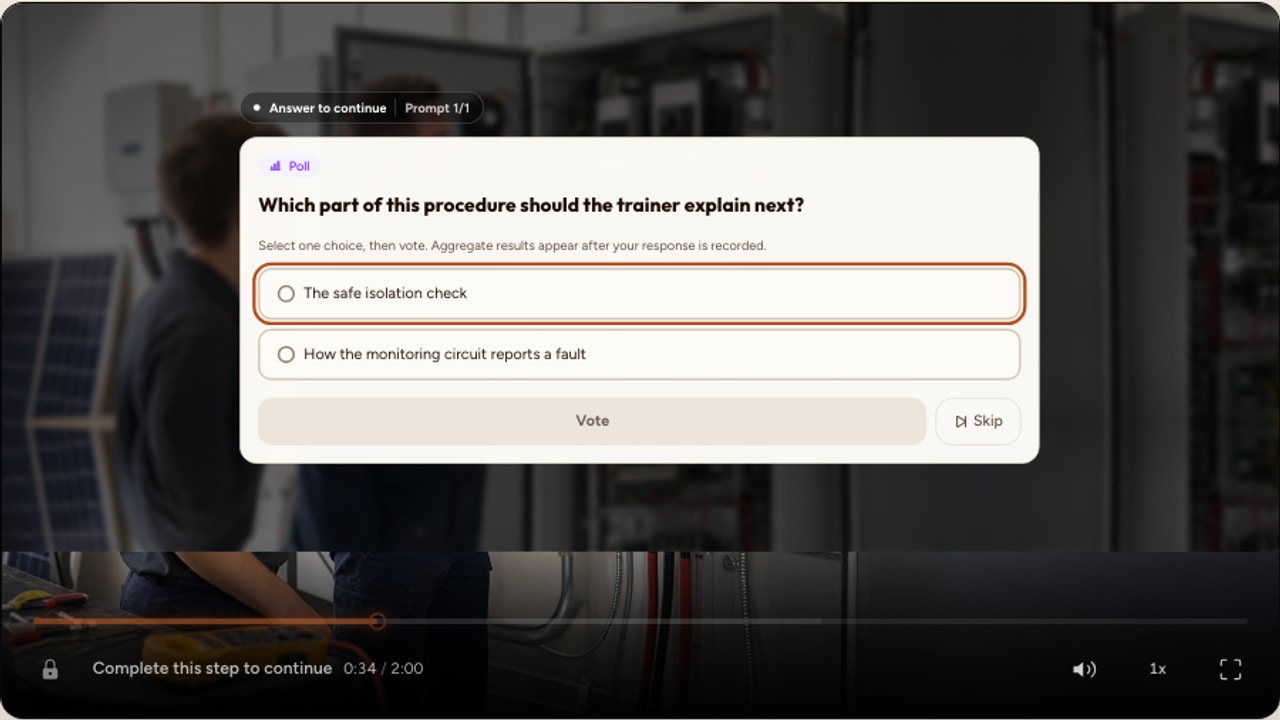
What makes a video interactive
A play button, chapter list, or ordinary video controls let a viewer navigate media. Interactive learning video adds a designed moment that asks the viewer to do something with the content. That action can be graded, ungraded, reflective, navigational, or spatial.
For example, a safety demonstration might pause after a procedure and ask for the correct next step. A history lesson might collect a prediction before revealing a primary source. An uploaded anatomy video might ask a learner to identify a region on the frame. Each example connects the interaction to a learning purpose.
How interactive video works
The source video and the interaction configuration are stored separately. An author chooses a timestamp, selects an interaction type, writes its content and feedback, and saves it to the video timeline. During learner playback, the player presents that interaction at the authored moment.
Some interactions should pause playback because the learner must read, retrieve, decide, or submit before the explanation continues. Other elements, such as a brief information card or chapter marker, may remain non-blocking. The author should preview the arrival and the return to video rather than applying one behavior to every interaction.
Responses are recorded according to the configured interaction. A graded question can compare a response with its answer rule. A poll records a distribution without inventing a correct answer. An open response may need educator review unless the author has configured an appropriate automated rule.
Why educators use interactive video
- Retrieval: learners recall or apply an idea instead of only seeing it again.
- Feedback: a response can lead to an explanation while the source context is still available.
- Prediction: a prompt can ask learners to commit to an expectation before an outcome is shown.
- Reflection: an open response or poll can make a learner articulate a judgment that would otherwise remain invisible.
- Teaching evidence: response patterns can identify a question, explanation, or topic that deserves review.
These are design opportunities, not guaranteed outcomes. A trivial question can add friction without useful practice. An ambiguous answer key can create misleading data. A prompt that appears while important media continues can divide attention.
What the research supports
Ploetzner's meta-analysis of 17 studies reported an average learning advantage for educational videos with enhanced interaction features over videos with only navigational or no interaction features. The review also found that leaving the video running while an enhanced interaction was presented could impede learning. This supports purposeful tasks and controlled pacing, not interaction for its own sake.
In a laboratory study of online lectures, Szpunar, Khan, and Schacter found that interpolated tests reduced reported mind wandering and improved learning for the tested condition. That study provides a useful mechanism and design clue, but it does not establish a universal completion, engagement, or exam-score increase for every platform and audience.
Retrieval-practice research also shows that attempting to recall studied material can support later retention. Feedback research shows that correct-answer feedback can help repair errors and low-confidence correct responses. Those findings do not mean that every in-video multiple-choice item is effective. The prompt, response effort, feedback, timing, prior knowledge, and later assessment still matter.
Interactive video vs. a quiz after the video
During-video questions and post-video assessments answer different design needs. Neither is automatically superior.
Quiz after the video
Useful when learners should integrate the whole video, retrieve after a delay, or complete a separate assessment.
Question during the video
Useful when a response should follow one specific explanation, trigger immediate feedback, or prepare the next section.
A coherent lesson may use both. A brief checkpoint can support the explanation while context is available, followed later by an independent task that tests retention or transfer.
Types of interactions
Knowledge checks
Multiple choice, true or false, fill blank, numeric input, ordering, and matching collect focused, scoreable responses.
Audience input
Polls, rating scales, open responses, audio responses, and comments collect judgments, confidence, or explanation.
Context and navigation
Information cards, chapters, timed calls to action, and choice moments provide context or a next step.
Spatial and practice tools
Hotspots, image labels, annotation, drawing, workspaces, and complete branching use uploaded-media or scenario-specific capabilities.
Choose the lightest interaction that produces the evidence or learner action you need. A poll should not be scored as if opinion were fact. A multiple-choice item should not stand in for an explanation when the reasoning matters. A hotspot is appropriate only when location on the media frame is part of the objective.
YouTube and uploaded-video differences
In Interakly, a supported public or unlisted YouTube video continues to play through YouTube's embedded player. The source must allow embedding and remain available. Compatible non-spatial questions, responses, cards, and participation moments can appear with that source.
Uploaded video gives Interakly an owned media surface. That is required for precise spatial activities such as hotspots, frame labels, annotation, drawing, embedded workspaces, and complete segment-based branching. An uploaded source can also avoid YouTube advertising and availability changes, but the creator remains responsible for rights, privacy, and appropriate access settings.
Common education and training uses
Teachers can use interactive video for pre-class preparation, worked examples, lab readiness, language practice, and formative checks. Trainers can use it for onboarding, product knowledge, procedural rehearsal, and scenario-based decisions. The useful common feature is not the sector. It is a task where a response during playback improves practice, feedback, or the instructor's next decision.
Interactive video can also be inappropriate. A continuous demonstration may need uninterrupted attention. A sensitive reflection may not belong in identifiable analytics. A high-stakes assessment may require stronger security, validation, supervision, and accommodation than an ordinary video layer provides.
What interactive video analytics can show
Interakly can report observable product events such as sessions, completion, submitted responses, scores, per-question response counts, answer distributions, and correctness for graded interactions. Depending on the content and dashboard, creators can also review watch activity, heatmap views, gradebook views, and CSV exports.
Use those records to form a review question. A common wrong option may indicate a misconception, ambiguous wording, or a faulty key. A completion drop may relate to relevance, access, timing, technical friction, or external circumstances. The dashboard locates a pattern. It does not diagnose the cause.
Read Video Question Analytics Without Guessing
Move from response counts and answer patterns to cautious hypotheses and bounded revisions.
Accessibility, privacy, and access
Test the published learner experience with captions, keyboard input, touch, zoom, a phone-sized viewport, and the real embed context. An interaction that is readable in the editor can still fail when the host column is narrow or when controls compete for focus.
Decide whether the experience is open, password protected, sign-in restricted, email gated, allowlisted, invitation only, or limited to approved embed domains. Collect only the identity and response data needed for the stated purpose, explain the use to learners, and apply the institution's retention and access requirements.
Getting started
- Write one outcome. State what the learner should be able to recall, decide, explain, locate, or perform.
- Choose a supported source. Use an embeddable YouTube video for compatible non-spatial interactions or upload a video when the design requires an owned media frame.
- Mark meaningful boundaries. Add a response after a complete explanation, worked step, example, or decision point.
- Write feedback. Explain the relevant principle and what the learner should do next.
- Test the complete route. Preview, publish privately, open the learner view on desktop and phone, and verify every answer path.
- Review evidence cautiously. Use response and watch patterns to identify what should be checked, revised, or studied next.
How to Create an Interactive Video
Follow the complete workflow from source selection through learner testing and analytics review.
Sources and further reading
- Ploetzner, The effectiveness of enhanced interaction features in educational videos: a meta-analysis.
- Zhang and colleagues, Active learning strategies in video learning: A meta-analysis.
- Szpunar, Khan, and Schacter, Interpolated memory tests reduce mind wandering and improve learning of online lectures.
- Roediger and Karpicke, Test-enhanced learning.
- Butler, Karpicke, and Roediger, Correcting a metacognitive error with feedback.
- W3C Web Content Accessibility Guidelines overview.
FAQ
What is interactive video?
Interactive video combines video playback with timed learner actions or contextual elements. A viewer might answer a question, make a choice, submit a response, open an information card, or interact with part of an uploaded video frame.
Do I need to record a new video?
No. You can add a separate interaction layer to an existing supported video. In Interakly, that can be an embeddable public or unlisted YouTube video or a video file you upload. The source is not edited into a new media file.
Does interactive video improve learning?
It can when the learner action is relevant and well timed. Research reviews report average benefits for enhanced interactions such as questions and tasks, but results vary. Poorly timed or distracting interactions can also hinder learning.
Can interactive video work with YouTube?
Yes, when the YouTube video is public or unlisted, permits embedding, and remains available. Interakly supports compatible non-spatial interactions over the embedded player. Spatial activities such as hotspots require uploaded video.
What analytics can an interactive video provide?
Interakly can report sessions, completion, scores, submitted responses, per-question response counts, answer distributions, and correctness for graded interactions. Available dashboards can also include watch activity or heatmap views. These are product observations, not proof of attention or durable learning.
Is interactive video suitable for corporate training?
It can support onboarding, product training, procedural practice, and scenario work. A team should still define the required evidence, access route, privacy rules, accessibility checks, and any separate compliance obligations before launch.
The bottom line
Interactive video is a delivery format, not a learning guarantee. It is most useful when a well-chosen action follows the right source moment, feedback helps the learner continue, and the resulting evidence informs a real teaching decision.
Start with one outcome and one purposeful interaction. Respect the difference between YouTube and uploaded media, test the published learner route, and let evidence guide revision without claiming more than the data can show.
Turn one useful video moment into active practice
Choose a supported source, add a purposeful interaction, and test the complete learner experience before sharing.
Explore video interactions