Where Should You Place Questions in a Video?
Choose better timestamps for video questions with a practical framework for evidence, segment boundaries, predictions, spacing, visual context, and learner testing.
A video question should appear when the viewer has enough information to do one useful piece of thinking. That moment is usually the end of a complete explanation, example, demonstration, or decision sequence.
Placement affects the fairness of the question, the pace of the lesson, the evidence visible on screen, and the meaning of the response data. A strong prompt can produce weak evidence when it opens too early, breaks a sentence, or arrives long after the relevant section.
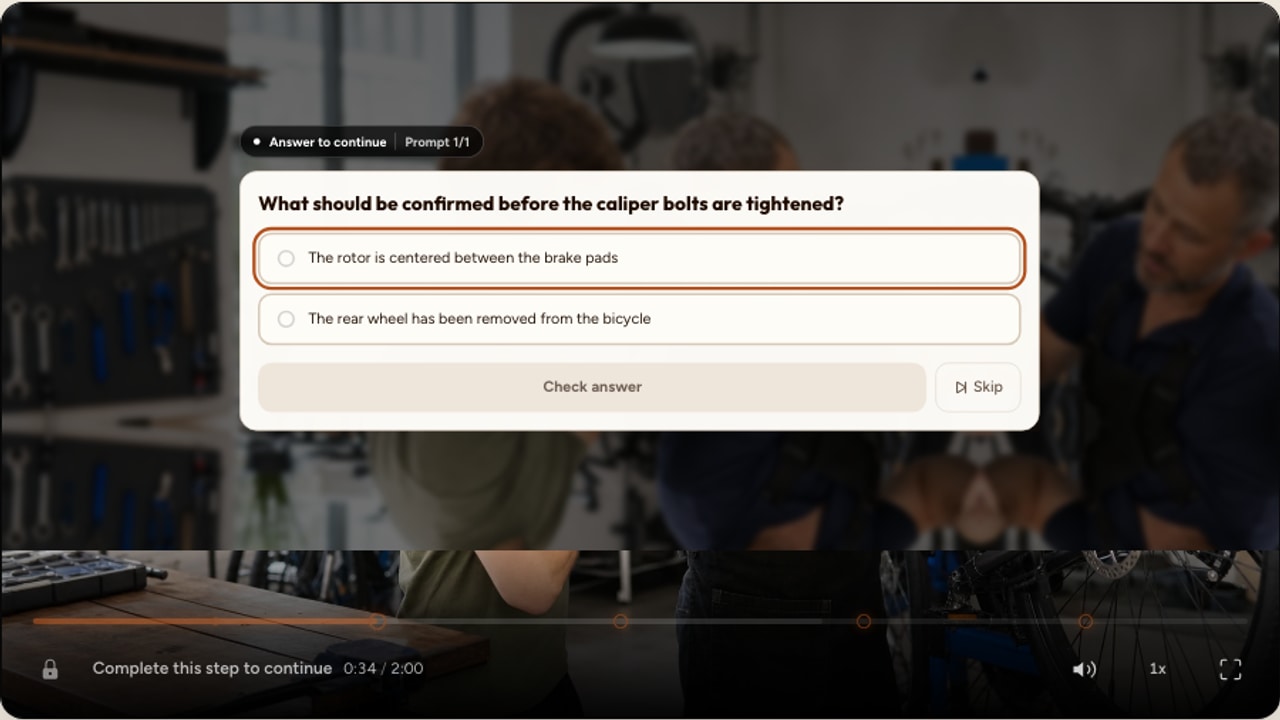
The short answer
Place retrieval questions after the complete content they test. Place predictions before the relevant reveal. Use meaningful topic boundaries for recap and reflection. Use the end for synthesis. Review the exact arrival through normal playback, then move or remove any question that interrupts a coherent sequence without earning that interruption.
Clock-led placement
A question appears every two minutes because an even timeline looks organized.
Evidence-led placement
A question appears at the first natural boundary after the viewer has seen the evidence needed to respond.
Start with the evidence boundary
The evidence boundary is the point at which the viewer has received the complete information needed for a fair response. In a lecture, it may be the end of an explanation. In software training, it may be the moment a complete workflow finishes. In a safety video, it may be the settled frame after a hazard has been shown from several angles.
Find that boundary before choosing the exact second. Watch at normal speed, note where the thought or action finishes, and give the transition enough breathing room to feel deliberate. A clean slide change or scene cut can help, but content completion matters more than editing rhythm.
- Sentence boundary: the claim and its qualification are both complete.
- Example boundary: the worked result and its reasoning are visible.
- Procedure boundary: the relevant sequence reaches a safe stopping point.
- Visual boundary: motion settles and the viewer has seen the detail the question refers to.
- Topic boundary: one idea closes before the next idea begins.
Use five useful placement jobs
The same timestamp can support very different forms of thinking. Name the job before selecting the question type, grading rule, or playback behavior.
After the explanation
Retrieve a completed idea
Which condition must be met before this valve can be opened?
Use when the viewer has received the full answer and should recall it without replaying the wording.
After the demonstration settles
Interpret visible evidence
Which reading shows that the circuit is isolated?
Pause on a frame that preserves the evidence or give the viewer time to inspect it before the question opens.
Before the reveal
Predict what happens next
What do you expect the pressure to do when the outlet closes?
Present this as a prediction. Do not treat an informed guess as failed recall of content that has not appeared yet.
At the topic boundary
Close a meaningful section
Which of these examples follows the policy we just reviewed?
Use the change in topic, scene, speaker, or procedure as a natural point to check the section that just ended.
Near the close
Synthesize the whole lesson
Which response combines all three parts of the process?
Reserve the final question for integration, application, or a next decision rather than repeating a local recall item.
What the research supports
Retrieval practice provides the strongest general reason to ask a question after learning. In two experiments using prose passages, Roediger and Karpicke found that taking recall tests produced stronger delayed retention than repeated study, even though repeated study raised learners' confidence. This study did not use video, so it supports the retrieval principle rather than a particular video timestamp.
Video-specific studies offer a useful design direction. Szpunar, Khan, and Schacter placed memory tests between four segments of a 21-minute online lecture. Their experiments found less mind wandering and better learning in the interpolated-test condition. The questions occupied boundaries between lecture blocks, which is more informative for design than treating every minute as equivalent.
Van der Meij and Böckmann used four open-ended questions after four meaningful sections of a 28-minute recorded lecture. The question group spent more time with the lecture, replayed more, and achieved a higher knowledge score. The authors also reported an important limit: when the repeated test item was removed, the conditions did not differ on the remaining composite score. Questions may strengthen the content they target more reliably than nearby content they never ask about.
Replication has not produced one simple effect size. A later experiment with 195 undergraduates found a small reduction in task-unrelated thought from interpolated testing, without a significant learning benefit. The practical conclusion is modest: embedded questions can help, but placement, question quality, audience, feedback, and the surrounding lesson still matter.
Choose before or after the explanation
Place retrieval questions after the content
A retrieval question asks the viewer to bring back something they have just learned. Place it after the complete idea, then ask for the key distinction, step, cause, or application. This creates a fair attempt and gives the response a clear interpretation.
Avoid copying the exact sentence from the video into the question. A useful check asks the viewer to retrieve or apply the idea, while the feedback can point back to the evidence and address the likely mistake.
Place predictions before the content
A pre-question can direct attention or activate prior knowledge. Make the framing explicit: “What do you predict?” or “Which result do you expect?” The viewer has not yet seen the answer, so grading the response as failed recall would be misleading.
Pretesting research is promising but sensitive to design. Benefits often concentrate on the specific information asked about, and newer studies have reported mixed effects. Use predictions to give the next section a purpose, not as a guaranteed way to improve every part of the lesson.
Use the final question for integration
A closing question is valuable when the viewer must combine evidence from several sections. It is less useful as a storage area for every local check. If a learner misses an end-only question, the relevant explanation may be several minutes away and harder to locate.
Set spacing by content, not the clock
Even spacing looks tidy in an editor, but videos rarely present equally important ideas at equal intervals. Start with the learning objectives, mark the boundaries that matter, and ask the fewest questions that produce useful evidence.
- Preserve an uninterrupted story, demonstration, or explanation when a pause would damage comprehension.
- Use two nearby questions only when they require genuinely different thinking.
- Combine prompts that ask for the same evidence in slightly different words.
- Allow a longer gap when the viewer needs sustained observation or when the section has no assessable objective.
- Remove a low-value question before adding another one to balance the rail.
Question density deserves a separate decision from placement. The complete approach in the practical guide to adding quizzes to video covers question types, scoring, feedback, and assessment design around these timestamps.
Protect the evidence on screen
A video question occupies the player's interaction layer. If the answer depends on a diagram, measurement, hand position, interface control, or facial expression, the viewer needs a fair chance to inspect it. Let the evidence appear clearly before the prompt opens, and preview whether the question surface covers a detail that still needs to be consulted.
Hold playback for a response
A required question should give the viewer enough time to read, respond, and use any permitted review path without missing the next explanation.
Keep passive content lightweight
Non-blocking cards can support context, but they should not demand a response or a long reading task while the lesson continues.
For uploaded video, a spatial activity can ask the viewer to act on a coordinate in the owned media canvas. New YouTube authoring does not provide spatial hotspots. The timing principle remains the same across sources: show the evidence, reach a stable boundary, then present the task. The YouTube interaction placement guide explains the verified YouTube-specific boundary in detail.
Plan the timeline before authoring
A simple four-column plan prevents the timeline from becoming a sequence of guesses. Record the approximate time, the evidence boundary, the thinking job, and a draft prompt. Refine the exact seconds in the editor after the structure makes sense.
Illustrative nine-minute safety lesson
Map questions to boundaries before choosing timestamps
The opening scenario is established
Prediction
Which hazard should the operator address first?
The three hazard categories are complete
Retrieval
Which category includes an obstructed emergency exit?
The shutdown procedure has finished
Sequence
Put the isolation steps in the demonstrated order.
The worked incident reaches its conclusion
Application
What should the supervisor do next, and why?
The example uses uneven spacing because the source sections have different lengths. The opening prediction directs attention, the middle questions check distinct sections, and the final application prompt integrates the incident. It is a planning model, not a recommended four-question quota.
Place questions in Interakly
Watch through the complete section
Play the source at normal speed and identify the first natural boundary after the required evidence.
Add the question at that moment
Choose a question type that collects the evidence your objective requires, then author the prompt and answer configuration.
Set feedback, scoring, and playback behavior
Use grading only when a defensible answer exists. If the viewer needs the frame to hold while responding, turn on Pause on question in Player settings.
Approach the marker through playback
Start before the timestamp instead of scrubbing directly onto it. Check the final sentence, visual frame, prompt entrance, and expected player behavior.
Complete the response path
Submit every supported outcome, read the feedback, and confirm playback resumes at a coherent point.
Review the whole timeline
Look for accidental clusters, repeated jobs, long but justified gaps, and any marker whose purpose cannot be explained clearly.
Interakly keeps each question on the authored media timeline. A timestamp must remain within the known duration of its media source. An exact end-of-media moment is valid, while a moment beyond a known duration is rejected. Recheck the timeline when a source or segment changes.
Test the exact arrival and return
Scrubbing to a marker confirms that the question exists. It does not show how the interruption feels. For each question, begin at least one complete thought before the timestamp and continue until the next section is under way.
- The speaker finishes the relevant sentence and qualification.
- The required visual has been visible for a reasonable period.
- The player pauses before new information begins.
- The question asks for one clear action.
- Feedback refers to the right evidence without simply repeating it.
- Playback resumes without clipping a word or repeating an awkward beat.
- The full composition remains usable on a phone-sized player.
- Keyboard, touch, and text-entry paths all complete successfully.
Placement is one part of release quality. Use the interactive video best-practices checklist to review feedback, accessibility, mobile behavior, source limits, results, and the complete viewer path.
Use results to improve placement
Response data can reveal a placement problem, although it cannot diagnose the cause by itself. A high wrong-answer rate may reflect a difficult concept, weak question wording, a misleading answer key, or a timestamp that arrives before the relevant evidence is complete.
Review the video and question together. Compare answer patterns with retention around the moment, look for a cluster of prompts that may cause fatigue, and ask a few real viewers to describe what they thought the question was testing. Change one variable at a time where possible, then compare the next cohort.
Question placement checklist
Research sources
These studies inform the guidance above. Their tasks, populations, and question formats differ, so the findings should guide design rather than be treated as a fixed recipe.
- Roediger and Karpicke (2006), Test-enhanced learning: two experiments comparing repeated recall tests with repeated study for delayed retention of prose.
- Szpunar, Khan, and Schacter (2013), Interpolated memory tests reduce mind wandering: two experiments placing tests between segments of an online lecture.
- Van der Meij and Böckmann (2021), Effects of embedded questions in recorded lectures: a controlled experiment using open-ended questions at meaningful section boundaries.
- Welhaf and colleagues (2022), Interpolated testing and content pretesting: a larger conceptual replication reporting a small attention effect and no significant learning benefit from interpolated testing.
FAQ
Should video questions appear before or after the answer?
Place a comprehension or retrieval question after the relevant explanation, example, or demonstration is complete. Place a question before the content only when its purpose is prediction, prior-knowledge activation, or directing attention, and label that purpose clearly.
How soon after a concept should I ask a question?
Use the first natural boundary after the complete concept. That might be a few seconds later or several minutes later. The viewer should have all required evidence, and the question should not cut through a sentence, calculation, procedure, or important visual sequence.
Should I place a question every two or three minutes?
No fixed interval works for every video. Use meaningful segments and learning objectives to set the pattern. A dense tutorial may justify several questions, while a continuous demonstration may need a longer uninterrupted stretch.
Should every video question pause playback?
A question that requires an answer should normally hold playback so the viewer can respond without missing the next explanation. Passive information can continue only when it remains understandable without immediate action or sustained reading.
Is it useful to put all questions at the end of a video?
An end question can assess synthesis across the whole video, but saving every question for the end removes the chance to check each meaningful section while it is still easy to review. Use section-level questions for local understanding and a final question only when it serves a distinct purpose.
How do I know whether a question is placed well?
Preview the published experience from before the timestamp. The speaker should finish the relevant thought, every required visual should be available, the prompt should have an obvious purpose, and playback should resume at a coherent point after the response.
How to Add Quizzes to Video
Choose question formats, write useful prompts, configure feedback and scoring, and build the complete assessment path.
Interactive Video Best Practices
Review the full experience across outcomes, source limits, feedback, accessibility, mobile use, analytics, and release testing.
Where to Place Interactions in a YouTube Video
Apply the timing framework to supported YouTube interactions while protecting embedded-player evidence and source boundaries.
Build a video timeline with a reason behind every question
Start with one complete section, place a useful question at its evidence boundary, and preview the full response path before publishing.
Explore video interactions