How to Write Useful Feedback for Video Questions
Write answer feedback that explains the evidence, corrects the reasoning, and gives viewers a useful next step after every video question.
The few seconds after a viewer submits an answer can change the purpose of a video question. A bare verdict closes the interaction. Useful feedback turns the response into another chance to understand, correct, and apply the idea.
This guide focuses on that teaching moment. It shows how to respond to correct answers, mistakes, opinions, and work awaiting review without repeating the question-writing advice covered elsewhere.
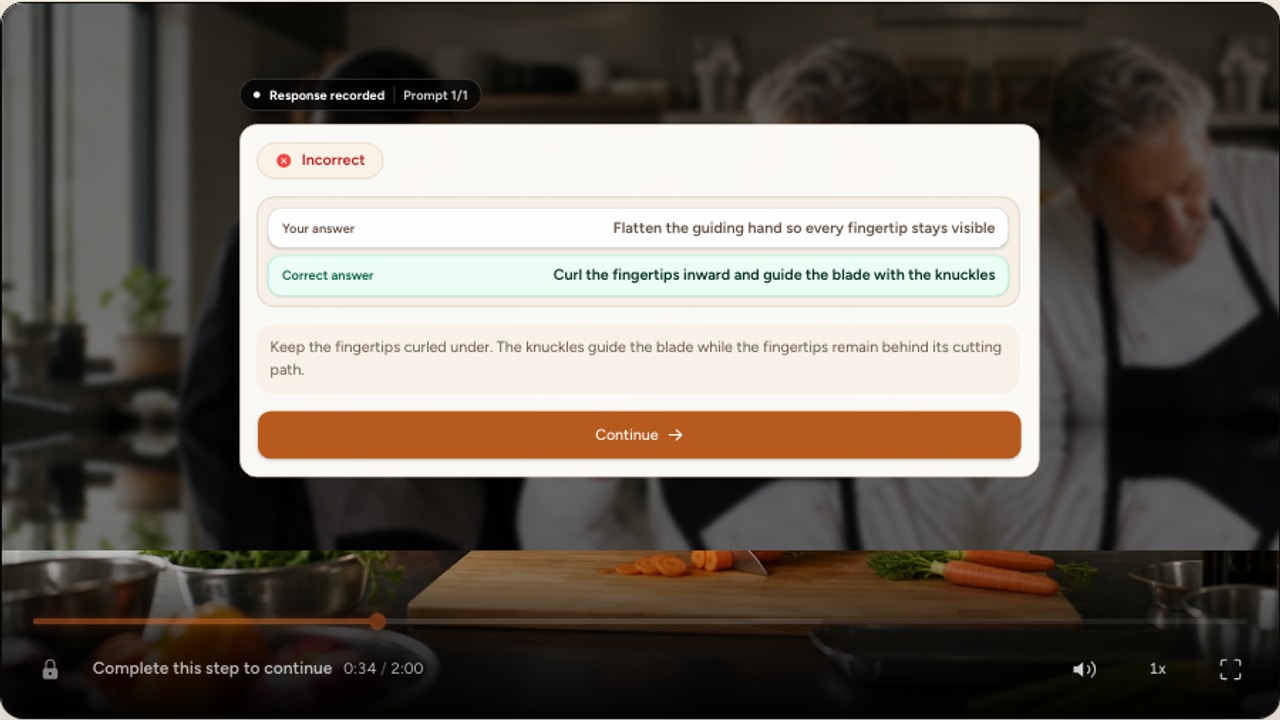
Treat feedback as part of the lesson
Feedback is instructional information about a response. “Correct” and “incorrect” are status labels. They tell the viewer what happened, but they do not explain the concept or improve the next decision.
A large meta-analysis of educational feedback research found a positive average effect on learning, along with substantial variation between forms of feedback. The information in the message matters. This is why adding more praise, more words, or a brighter result state is not a substitute for explaining the task.
Before writing, decide what the viewer should understand after reading the feedback that was not secure before the question. That decision gives the message a clear instructional job.
Use evidence, reasoning, and a next move
A reliable feedback message has three parts. Point to the relevant evidence, explain how it determines the answer, then give the viewer one useful next move. The sequence works for facts, procedures, visual analysis, and decisions because it connects the result to something the viewer can inspect and use.
The feedback recipe
Evidence, reasoning, then the next move
- 01
Evidence
What in the video matters?
The pressure gauge remains above zero.
- 02
Reasoning
How does that evidence change the answer?
Stored energy is still present even though motion has stopped.
- 03
Next move
What should the viewer do with this idea?
Release and verify the stored energy before restarting.
Verdict only
Incorrect. The machine is not ready.
Teaching feedback
The gauge still shows stored pressure, so stopping visible motion is not enough. Release and verify that energy before restarting.
Respond to the mistake behind a wrong answer
Wrong answers become useful when each one represents a recognizable reasoning path. One viewer may confuse “stopped” with “safe.” Another may remember the right action but perform it in the wrong order. Those mistakes need different explanations.
Write feedback against the misconception, not against the person. Name what the selected response overlooks, restore the missing relationship, and state the corrected rule. Avoid “You failed to notice...” or “Read more carefully.” Those phrases assign blame without supplying evidence.
Generic correction
No. The correct answer is isolate the power source.
Misconception-specific correction
The stop control ends motion, but it does not isolate incoming power. Use the disconnect before beginning maintenance.
Multiple-choice feedback can also guard against false learning from the alternatives themselves. In an experimental study, Butler and Roediger found that immediate and delayed feedback improved later recall and reduced intrusions from wrong multiple-choice options compared with no feedback. A practical implication is to correct the attractive wrong idea, not merely reveal a different letter.
Turn misconceptions into credible distractors
Build wrong options from recognizable reasoning errors, then map each response to specific feedback.
Teach after correct answers too
A correct response can come from secure knowledge, elimination, or a guess. Feedback can confirm why the answer works and strengthen the rule the viewer should carry forward. It should not simply say, “Correct, good job.”
In two experiments on confidence and retention, Butler, Karpicke, and Roediger found that feedback helped correct errors and improved retention of correct answers given with low confidence. This matters when a video question is meant to build reliable judgment rather than produce one successful click.
Correctness repeated
Correct. Disconnecting the power is right.
Principle reinforced
Correct. The disconnect controls the energy source itself, which is why it comes before maintenance begins.
Match feedback to the response type
The same feedback pattern does not fit every interaction. A selected option can receive diagnostic correction. A calculation needs a short method. A poll needs context rather than a verdict. An open response may need review before anyone can judge its quality.
Multiple choice
Feedback jobAddress the reasoning represented by the selected option.
Feedback patternEvidence + why this option fails or succeeds + next action
True or false
Feedback jobQualify an overbroad claim or correct one precise relationship.
Feedback patternDecision + limiting condition + corrected statement
Numeric or fill-in
Feedback jobShow the method, unit, or rule behind the accepted result.
Feedback patternExpected result + short working + common error check
Ordering or matching
Feedback jobExplain the dependency that determines the sequence or pairing.
Feedback patternKey relationship + why order matters + transfer cue
Poll or rating
Feedback jobAdd context without pretending an opinion has one correct answer.
Feedback patternAcknowledge + compare perspectives + introduce the next idea
Open response
Feedback jobConfirm receipt and explain the review standard or next step.
Feedback patternRecorded + what happens next + where to find the result
Choose an interaction that matches the evidence you need
Compare graded questions, constructed responses, audience input, context, and spatial activities.
Use shared and answer-specific feedback deliberately
In Interakly, a multiple-choice question can pair each answer card with its own feedback and can also include a shared explanation. The selected option’s feedback takes priority when it exists, while the shared explanation provides a fallback. True or false questions similarly support a shared explanation and separate feedback after either answer.
Use answer-specific feedback when different options reveal different misconceptions. Use one shared explanation when every response needs the same underlying rule. Several other graded question types provide an explanation shown after submission, which works well for a common method or principle.
Write in language people can act on
Address the work, choice, or evidence rather than the viewer’s ability. “This choice overlooks the pressure reading” is precise. “You do not understand the procedure” is broad, personal, and difficult to act on.
Prefer concrete verbs such as compare, check, isolate, calculate, identify, and replay. Remove praise that obscures the explanation and avoid sarcasm, surprise, or exaggerated celebration. A learner should be able to read the message during a mistake without feeling that the interface is judging them.
The feedback framework proposed by Hattie and Timperley distinguishes the goal, current progress, and next action. For a video question, those ideas translate into a compact message: remind the viewer what mattered, clarify the current response, and point forward.
Choose enough detail without writing a second lecture
Feedback should resolve the gap while the evidence is still available. A simple recall check may need one sentence. A procedural decision may need two or three short sentences: one for the visible cue, one for the rule, and one for the next action.
If the explanation needs several paragraphs, the question may be testing too much at once or the video may not have taught the idea clearly enough. Move essential instruction into the lesson, narrow the question, and leave feedback to repair one defined gap.
Handle open responses and pending review honestly
Free text, audio, drawings, and other constructed responses may require educator review. The immediate message should confirm submission without claiming a grade that does not exist yet.
Premature judgment
Great answer. You have mastered the procedure.
Honest next step
Your explanation was recorded. The reviewer will check whether it identifies the hazard, action, and reason before the final result is posted.
State what will be reviewed and where the updated result will appear. When a response is collected for reflection rather than grading, say so. The viewer should never have to infer whether “submitted” means correct, complete, or waiting for a person.
Connect feedback to replay and transfer
A next step should be small enough to follow. Point to the demonstration, diagram, sentence, or decision that contains the evidence. Use a clear cue such as “Replay the gauge check before the restart sequence” rather than “Watch the video again.”
The strongest next move may be a new case rather than a replay. Ask the viewer to carry the rule into the next example: “In the next scene, identify every source that can retain energy.” That turns feedback from an explanation of the past answer into preparation for future use.
Place feedback near the evidence it explains
Choose question timestamps after complete ideas, demonstrations, and decisions so the source evidence remains meaningful.
Improve feedback with response patterns
After publishing, review answer distributions and individual responses in the available analytics and review surfaces. A frequently selected wrong option can reveal a persistent misconception. It can also reveal an unclear question, missing evidence, or an answer choice that overlaps the key.
Revise the whole learning moment before adding more words. Check the question, timestamp, answer key, and explanation together. Then look at a later question that uses the same principle. If viewers can repeat the feedback but still make the same decision error, the message explained a fact without supporting transfer.
A practical feedback-writing workflow
Name the learning gap
Write one sentence describing what the viewer should understand after the feedback that may not be secure before it.
Map each response to a reason
Identify the misconception, missing evidence, or sound reasoning represented by every answer path.
Point to the evidence
Name the frame, statement, quantity, relationship, or procedure step that determines the result.
Explain the relationship
State why that evidence supports or contradicts the response without simply repeating the answer key.
Add one next move
Choose a replay cue, corrected rule, check to perform, or new case in which to apply the idea.
Choose shared or specific feedback
Use a shared explanation for one common principle and answer-specific messages for meaningfully different reasoning paths.
Preview every result state
Submit each supported answer, confirm the intended explanation appears, and check the transition back to playback on desktop and phone.
Review response evidence
After publishing, compare option patterns and later performance before revising the question, instruction, or feedback.
Build the complete video quiz workflow
Choose a source, add supported questions, configure scoring and feedback, preview every path, and publish.
Review the complete learner experience
Check purpose, timing, accessibility, feedback, source limits, mobile behavior, and release quality together.
Strengthen the question before writing feedback
Refine the stem, evidence, answer key, and response options so every feedback path has a clear instructional job.
The final feedback audit
Specific
It names the evidence or rule that decides the answer.
Responsive
It addresses the reasoning behind the response viewers actually chose.
Explanatory
It makes the relationship clear instead of repeating the answer key.
Actionable
It gives the viewer one useful move for review or transfer.
Truthful
It distinguishes automatic results, opinions, and work awaiting review.
Respectful
It evaluates the response without making a judgment about the person.
Test the message without its correct or incorrect styling. A viewer should still be able to identify the relevant evidence, understand the reasoning, and know what to do next. If the text only makes sense because the answer is colored green or red, it is still a verdict rather than instruction.
FAQ
What should feedback after a video question include?
Useful feedback identifies the relevant evidence, explains why that evidence supports or contradicts the response, and gives the viewer a sensible next move. The next move may be a rule to remember, a moment to replay, or a new case in which to apply the idea.
Should correct answers receive feedback?
Yes when the explanation reinforces reasoning, resolves uncertainty, or prepares the viewer to transfer the idea. Correct feedback should add information rather than repeat the answer. It is especially useful when someone may have guessed or answered with low confidence.
How long should video quiz feedback be?
There is no useful universal word count. A direct knowledge check may need one precise sentence, while a procedural or scenario question may need two or three short sentences. Include enough to repair the reasoning without restarting the whole lesson inside the feedback card.
Should every wrong answer have different feedback?
Use different feedback when the options represent different misconceptions or decisions. Shared feedback is enough when every wrong response reflects the same gap. Do not create artificial differences that add words without changing the instruction.
What should feedback say for an open response?
Use a neutral confirmation when the response still needs human review. Tell the viewer that the submission was recorded, what the reviewer will consider, and when or where the result will appear. Do not imply that an unreviewed answer is correct or incorrect.
How can I tell whether answer feedback is working?
Review which options viewers select, whether the same misconception keeps appearing, and how people perform on a later question that uses the same principle. Revise feedback when it names the answer but fails to improve the next decision.
Make the answer useful after it is submitted
Start with a supported, embeddable public or unlisted YouTube video, or upload your own file. Add a focused question, write feedback for each meaningful outcome, and preview the complete learning moment.
Explore video interactions