How to Write Better Video Quiz Questions
Write clear video quiz questions, plausible answer choices, and useful feedback that reveal what viewers understood instead of rewarding guesswork.
A video quiz question should do more than interrupt playback. It should reveal whether the viewer understood the idea, noticed the evidence, or can make the decision the lesson was designed to teach.
This guide shows how to write questions that produce useful evidence. It covers the prompt, answer choices, response format, timing, and feedback as one complete learning moment.
Begin with the evidence you need
Start by finishing this sentence: “A viewer who understands this should be able to...” Use a visible action such as choose, explain, compare, calculate, sequence, or identify. “Know” and “understand” are too broad to guide a useful question on their own.
Then decide what response would count as evidence. A safety video may require choosing the next action. A sales demonstration may require identifying the customer need behind a statement. A science lesson may require predicting what changes when one variable is altered.
Question blueprint
Work backward from observable evidence
- Outcome
What should the viewer be able to decide, explain, or do?
Choose the safe action before restarting equipment.
- Evidence
What response would demonstrate that outcome?
Select the action that addresses the visible hazard.
- Moment
When has the viewer seen enough to answer fairly?
After the guard state and restart sequence are shown.
- Contrast
Which likely misconception should a wrong option represent?
Restarting because the machine has stopped moving.
- Feedback
What explanation would help the viewer correct the reasoning?
Motion has stopped, but stored energy still needs isolation.
How to add quizzes to video
Use the complete cross-source workflow for adding, configuring, previewing, and reviewing video questions.
Ask after the viewer has seen enough
Timing is part of question quality. Place the prompt after the sentence, demonstration, example, or visual evidence it depends on. Do not pause halfway through the explanation simply because the timestamp looks evenly spaced.
A question can also come before a section when its job is to activate prior knowledge or collect a prediction. In that case, make the purpose clear and avoid grading the prediction as if the viewer had already received the instruction.
Where should questions go in a video?
Choose timestamps around complete ideas, demonstrations, decisions, and reflection points.
Make the stem do the real work
The stem is the question itself. A viewer should understand the problem before looking at the options. That keeps the task focused on reasoning instead of decoding a set of loosely related sentences.
Weak stem
Which of the following statements about the procedure is correct?
Stronger stem
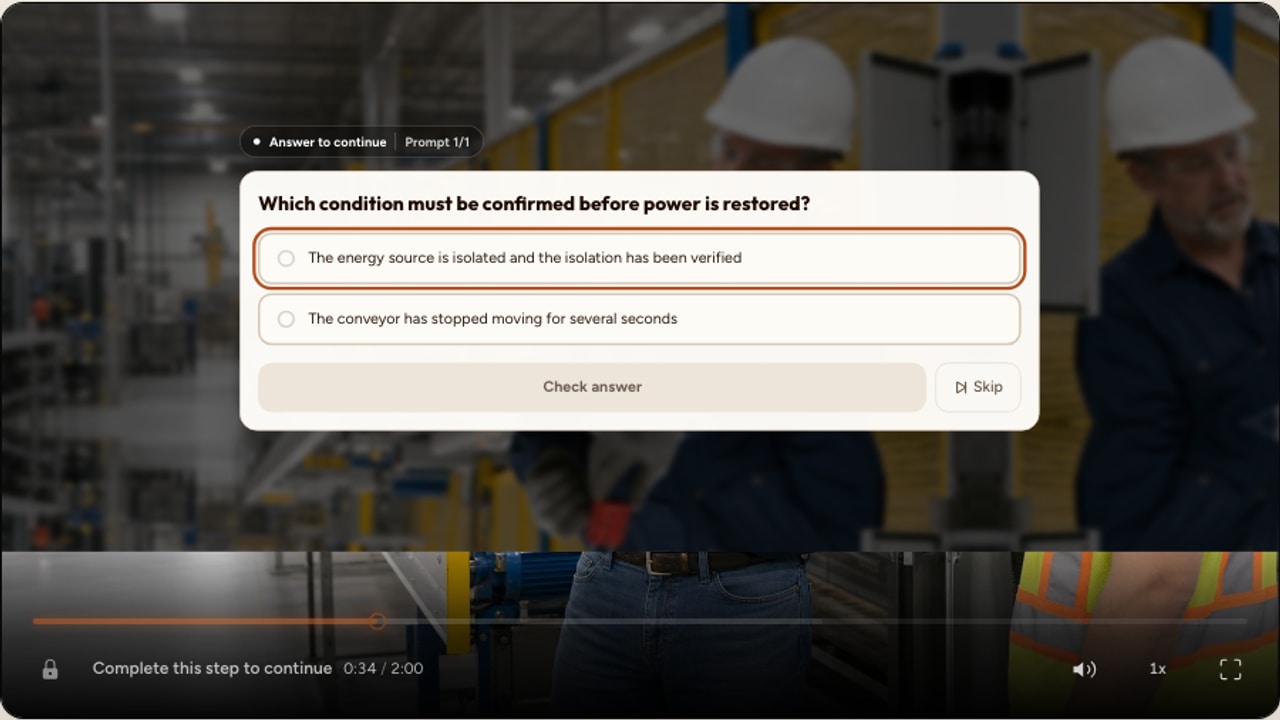
Which condition must be confirmed before the technician restores power?
Use ordinary language, remove details that do not affect the answer, and avoid negative constructions such as “Which is not...” when a positive question can test the same idea. The American College of Surgeons’ multiple-choice writing guidance similarly recommends clear stems, one best answer, parallel options, and plausible distractors.
Write plausible wrong answers
A distractor should be wrong for a meaningful reason. Use a common misconception, a step performed in the wrong order, a nearby but incorrect visual feature, or a decision that ignores one piece of evidence. Do not add absurd options just to reach a fixed number.
Keep answer choices parallel in length and grammar. Avoid making the correct answer the only detailed option. Avoid “all of the above” when the real learning outcome is choosing one defensible action. Research on item-writing flaws and weak distractors shows why option quality matters to difficulty and discrimination.
Weak distractor
Ignore the equipment and go home.
Plausible distractor
Restart once visible motion has stopped, without checking stored energy.
Choose the right response format
Multiple choice is useful when you can anticipate several distinct reasoning paths. True or false works for one precise claim, but it gives limited information about why the viewer answered. Fill-in-the-blank and numeric input are useful when recall or calculation matters. Free text is better when the wording and reasoning are themselves important.
Polls and rating scales collect audience input rather than objective correctness. Use them for predictions, confidence, and opinion. Do not turn a preference into a scored answer simply because the interaction supports points.
Choose the right interactive video interaction
Compare knowledge checks, constructed responses, audience input, context cards, and spatial activities.
Move beyond recall without becoming vague
Recall questions are valuable when the information must be retrieved quickly later. The problem is not recall. The problem is testing an incidental detail that has no connection to the outcome.
To test application, change the case while preserving the principle. Ask the viewer to diagnose a new example, compare two choices, predict a consequence, or select the next step. Keep enough context in the stem so the answer is defensible rather than subjective.
Surface recall
What color was the warning symbol in the video?
Useful application
Which visible condition shows that the restart sequence is not yet safe?
Write feedback that teaches
Feedback should close the gap between the selected reasoning and the intended reasoning. Name the evidence, explain the relationship, and tell the viewer what to notice next. “Incorrect” does none of those jobs.
A 2013 experiment published in Proceedings of the National Academy of Sciences found that interpolated memory tests during online lectures reduced mind wandering and improved learning. The practical lesson is not to fill a video with tests. It is to make each retrieval moment purposeful, then help the viewer interpret the result.
Thin feedback
Incorrect. Try again.
Teaching feedback
Visible motion has stopped, but the video shows stored energy is still present. Isolate that source before restarting.
Avoid trick questions and visual trivia
The goal is to distinguish understanding from misunderstanding. It is not to catch viewers overlooking a tiny wording difference. Remove double negatives, overlapping answers, unexplained acronyms, and clues caused by option length or grammar.
When the answer depends on the video frame, confirm the evidence remains visible behind the interaction. If the card covers the required object, use a different timestamp, a passive cue before the question, or a response type that preserves the spatial task.
Review response patterns after publishing
Treat the first published version as a test of the question as well as a test of the viewer. If nearly everyone selects the same wrong answer, inspect the explanation and timing. If nobody selects one distractor, replace it with a real misconception. If watch activity or retention drops near one question, check its length, clarity, and whether the required evidence was actually available.
Do not assume a low score always means poor learning. A mistimed question, ambiguous answer key, or inaccessible interaction can create the same pattern. Review the complete learner path before revising instruction.
A practical question-writing workflow
Name one observable outcome
Use a verb that describes what the viewer will decide, identify, explain, compare, calculate, or perform.
Write the best answer
State the evidence or reasoning that should count as success before drafting the stem.
Choose a fair timestamp
Place the interaction only after the viewer has received the information needed to respond.
Draft one focused stem
Ask one complete question in language the intended audience can understand without decoding the options.
Add meaningful alternatives
Use real misconceptions or procedural errors, keeping every option parallel and clearly distinct.
Explain the reasoning
Write feedback that names the evidence and helps the viewer correct or confirm the mental model.
Preview as a learner
Complete the question on desktop and phone, then verify feedback, scoring, resumption, and review behavior.
Add a quiz to a YouTube video
Follow the verified YouTube workflow for placing questions, configuring answers, previewing, and publishing.
Use the complete interactive video checklist
Review purpose, timing, feedback, mobile behavior, accessibility, and the published learner path together.
The final quality check
Alignment
The response demonstrates the stated learning outcome.
Clarity
The stem can be understood before the options are read.
Reasoning
Wrong choices represent believable mistakes, not jokes.
Answer
One option is unambiguously best given the video evidence.
Fairness
The viewer has seen every fact needed before the prompt appears.
Read the stem without the options. Ask a colleague to answer from the video evidence. Then ask what each wrong option means. If an option does not reveal a believable reasoning path, remove or replace it.
FAQ
What makes a good video quiz question?
A good question measures one intended outcome, arrives after the viewer has seen the necessary evidence, uses clear language, and produces a response you can interpret. Its answer choices do not give away the answer, and its feedback explains the reasoning.
How many answer choices should a multiple-choice question have?
Use only as many choices as you can make plausible and clearly distinct. Three strong options are usually better than four options when the fourth is obviously wrong. Each option should answer the same question and follow a parallel grammatical structure.
Should a video quiz test facts or application?
Use factual recall when the fact is genuinely required, but include application questions when the learning outcome involves decisions, diagnosis, comparison, or transfer. The question should match the level of thinking the viewer will need outside the video.
What should feedback say after a wrong answer?
Name the relevant evidence, explain why the selected reasoning fails, and tell the viewer what to notice next. Avoid feedback that merely repeats the correct option or uses judgmental language.
Can polls be used as quiz questions?
Polls are useful for predictions, opinions, and prior knowledge, but they should not be presented as scored knowledge checks when there is no defensible correct answer. Use a graded interaction when correctness matters.
How can I tell whether a quiz question is working?
Review answer distribution, average response time, and retention around the question. A question everyone misses may be unclear or mistimed. A wrong option nobody selects is probably not plausible. Use those patterns to revise the item and its surrounding explanation.
Turn a useful question into a learning moment
Start with a supported, embeddable public or unlisted YouTube video, or upload your own file. Place the question after its evidence, then preview the complete viewer experience.
Explore video interactions