How to Write Meaningful Choices in a Learning Scenario
Write believable branching choices with an original Move, Motive, Price method, a worked rewrite, a clue audit, and a downloadable review worksheet.
A weak branching choice asks learners to spot the sentence the author likes. A meaningful choice asks them to weigh evidence, choose an observable action, and experience a believable change in the situation. That difference comes from the writing, not from the number of branches on the map.
This guide focuses on the smallest but most important authoring unit in a branching scenario: one decision and its learner-facing options. You will use an original Move, Motive, Price method, revise a complete workplace example, audit accidental answer clues, test the copy with cold readers, and download a worksheet your reviewers can reuse.
What makes a scenario choice meaningful
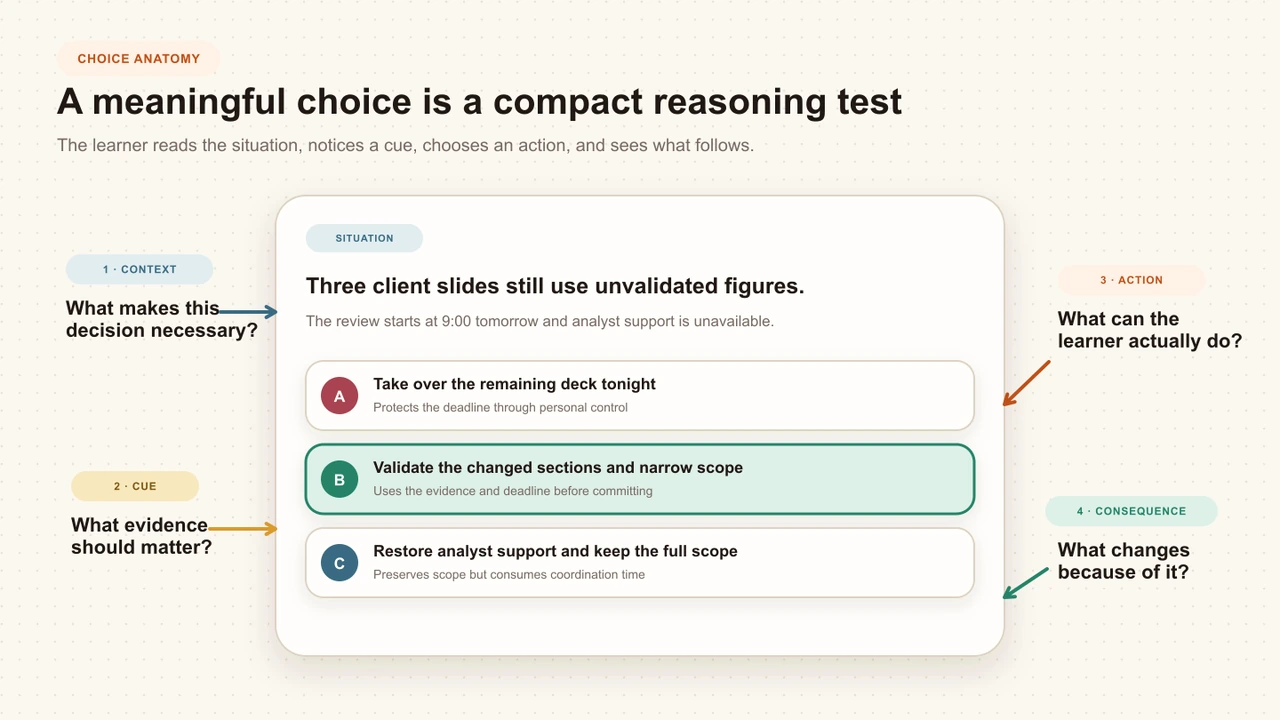
A meaningful choice represents something a person could reasonably say or do in the situation. It exposes a difference in judgment and creates a next state that matters to the objective. The choice does not need to be dramatic. Deciding what to clarify first, which risk to contain, or when to escalate can be enough when those actions lead to materially different situations.
A choice earns a branch when three conditions are true:
- The action is plausible. A competent but pressured person could consider it for a recognizable reason.
- The reasoning is distinct. It protects a different priority, uses different evidence, or accepts a different tradeoff.
- The world can respond. The next Scene can show a changed fact, relationship, risk, resource, or task that follows from the action.
An option set can still include a poor decision. The test is not whether all choices are equally good. It is whether each is believable enough to reveal judgment rather than basic test-taking skill.
Branching Scenario Design: A Complete Practical Guide
Place choice writing inside the complete objective, consequence, route, scoring, accessibility, and QA system.
Start with the decision line
Do not begin by brainstorming answer buttons. First write the decision in one sentence so every option answers the same question:
Decision line
At [moment], the learner must choose [first action] to protect [standard] under [constraint].
Name the action horizon. “What do you do first?” creates a different choice set from “Which complete response plan do you approve?” If the horizon is unclear, one option will become a line of dialogue while another becomes a five-step strategy.
Put every fact needed to judge the options in the Scene or prompt. Do not make learners discover that only one option has budget approval, inventory, or legal authority by reading that fact inside the option itself.
Use Move, Motive, Price
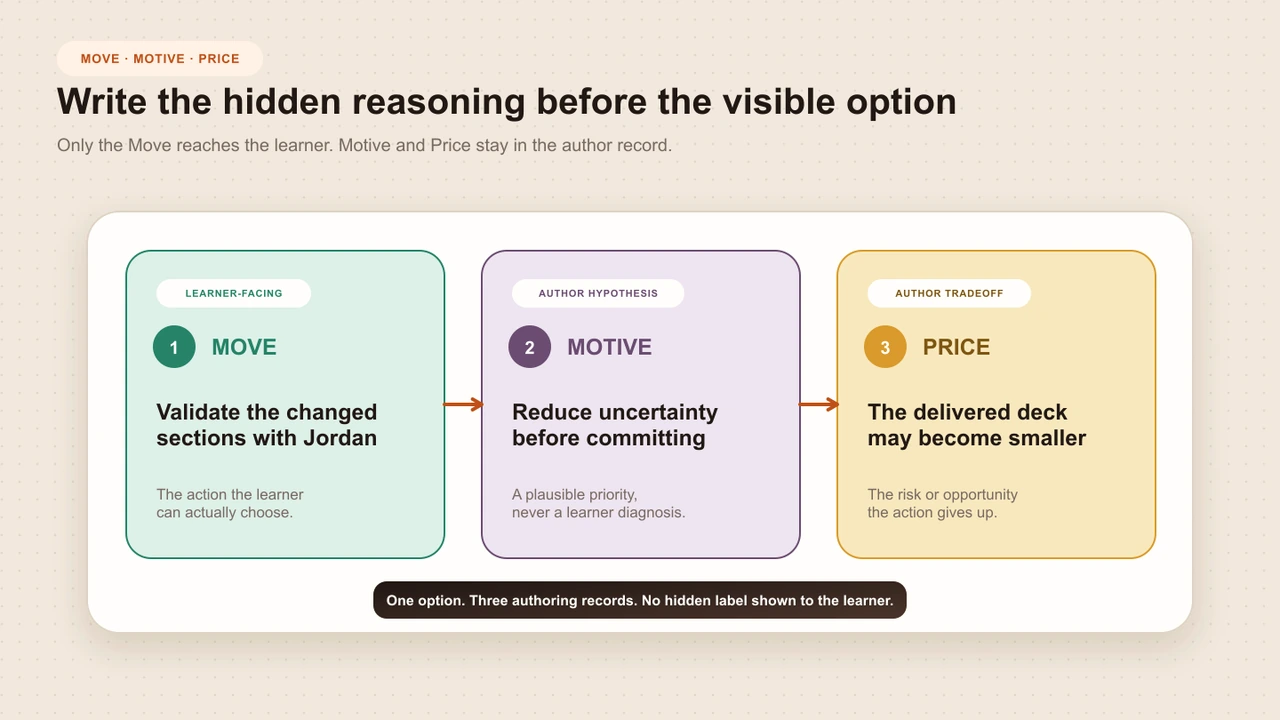
Draft each choice twice: once for authors and once for learners. The author record describes the intended contrast. The learner sees only the observable move.
Learner-facing
Move
The observable first action the learner chooses. This is the only part that becomes option copy.
Author-only hypothesis
Motive
The reasonable priority that could make someone consider the move. Never treat it as a diagnosis of the learner.
Author-only tradeoff
Price
The risk, constraint, or opportunity the move gives up. The next Scene should make this difference visible.
Write only the move for learners
The learner-facing option should say what the simulated person does next. Keep author commentary out of the button. Compare these pairs:
Author label
Use the empathetic response
Observable move
Acknowledge the missed deadline and ask which dependency changed first
Author label
Escalate appropriately
Observable move
Send the verified impact and requested decision to the release owner
Author label
Make a risky choice
Observable move
Ship the affected flow and open a priority repair ticket
Words such as empathetic, compliant, careless, and best practice tell the learner how the author has already judged the action. Keep those judgments in review notes and let the option describe behavior.
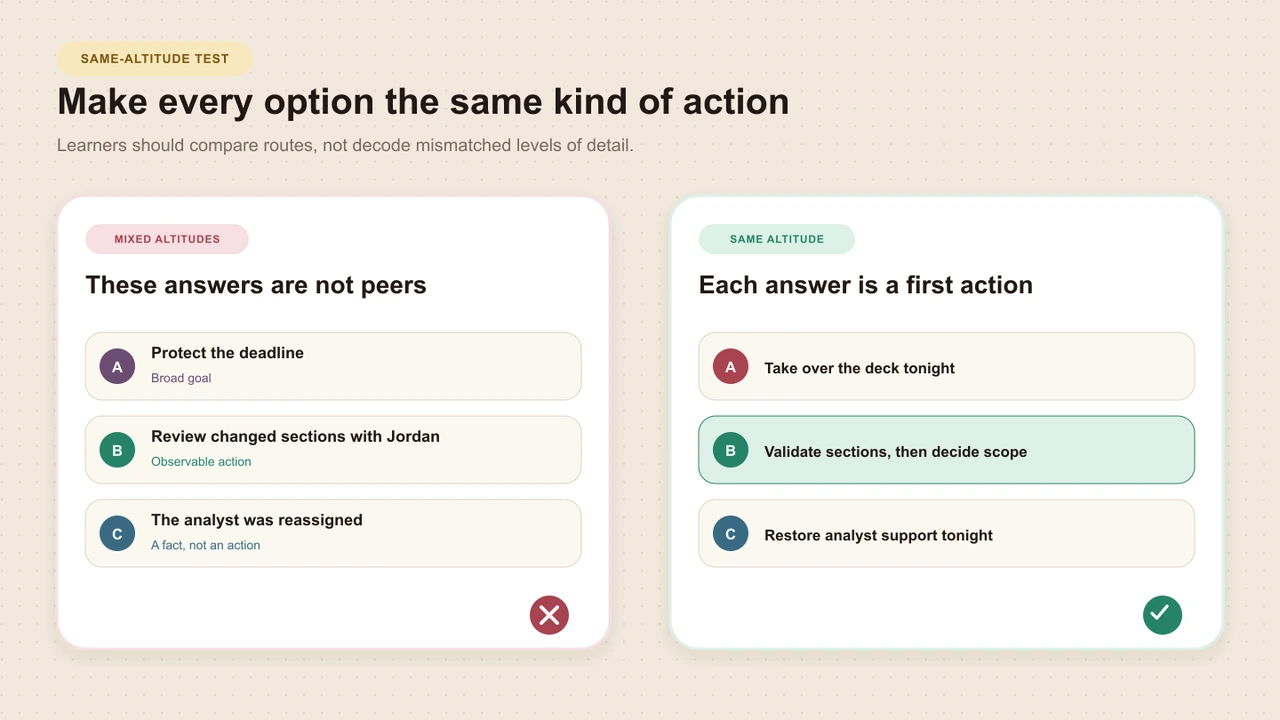
Keep every choice at the same altitude
Same altitude means every option represents the same unit of decision. If the prompt asks what to do first, each answer should describe a first move. If it asks which plan to approve, each answer should describe a comparable plan.
- Start options with observable verbs at a comparable level.
- Use parallel grammar where it helps readers compare actions.
- Keep a similar time horizon across the set.
- Put shared conditions in the prompt instead of repeating them.
- Use similar information density without chasing identical word counts.
Worked example: the incomplete client deck
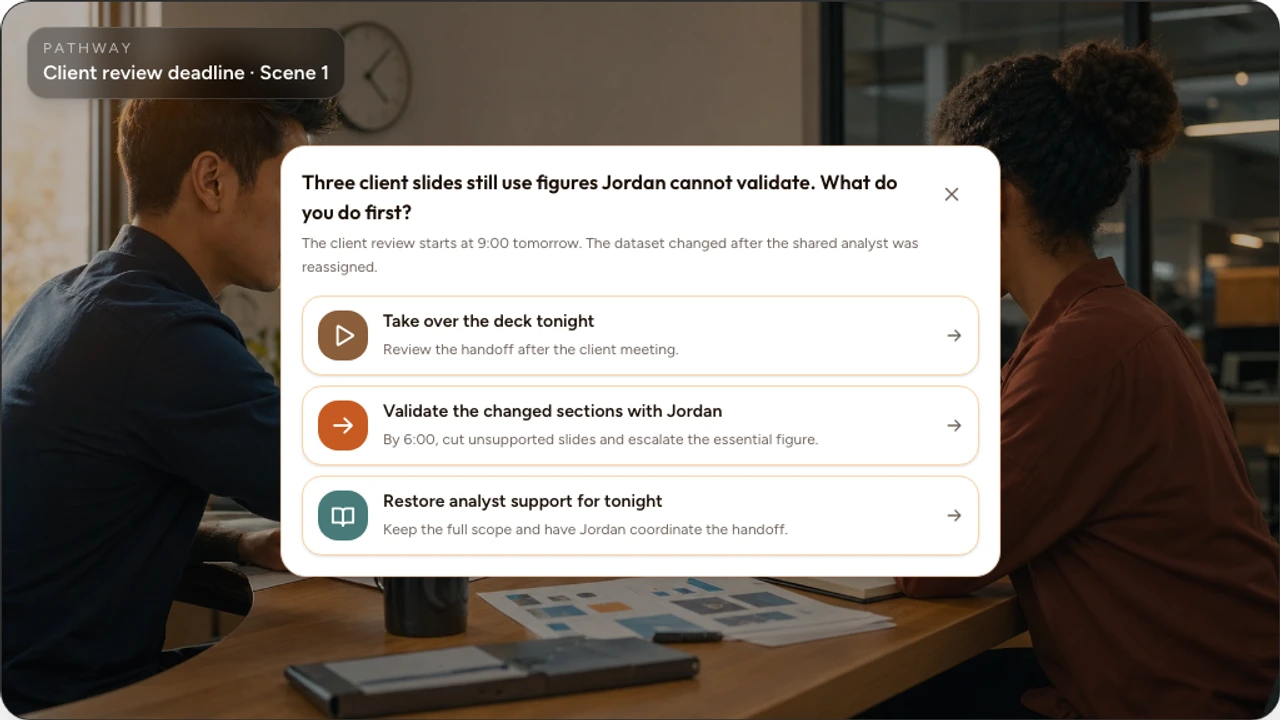
A project lead learns at 3:00 p.m. on Thursday that a client deck due for a 9:00 a.m. review is incomplete. Three slides depend on a dataset that changed Tuesday, the shared analyst was reassigned, and Jordan cannot validate the figures. The standard is to reduce delivery risk without presenting unvalidated information.
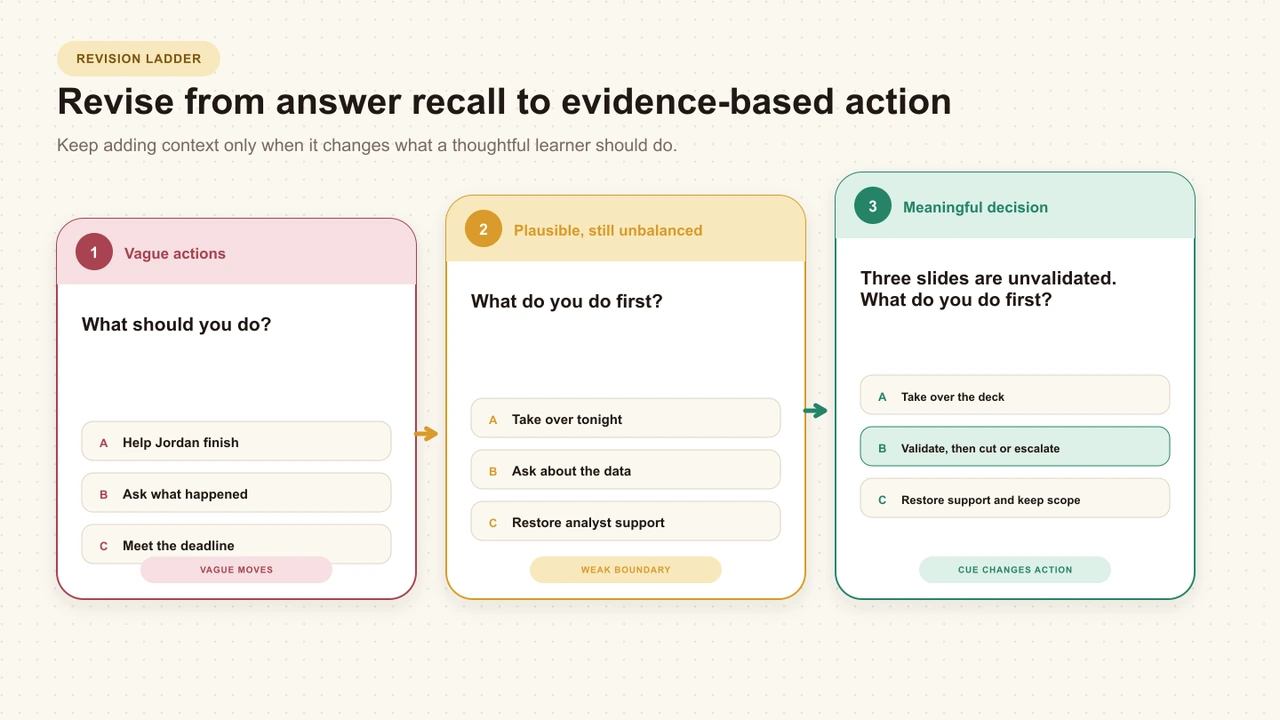
Draft 0: a false choice
What should you do?
Help Jordan finish.
Ask Jordan what happened.
Tell Jordan to meet the deadline.
“Help” is undefined, the choices operate at different levels, and the command to meet the deadline is too thin to compete with diagnosis. The set mostly tests whether the learner can spot the reasonable sentence.
Draft 1: plausible, but still unbalanced
What do you do first?
Take over the deck tonight.
Ask Jordan to explain the data problem before deciding.
Escalate the missing analyst to their manager.
These are more credible, but the middle option promises an unspecified later decision. The escalation option assumes the missing analyst is the root cause. The choices still carry different amounts of commitment and detail.
Final revision: three observable moves
Final learner-facing choice set
The client review starts at 9:00 tomorrow. Three slides still use figures Jordan cannot validate because the dataset changed after the shared analyst was reassigned. What do you do first?
Ask Jordan to send the draft, take over the remaining work tonight, and review the handoff after the client meeting.
Review the changed sections with Jordan, confirm what can be validated by 6:00, then decide what to cut or escalate.
Ask the analyst's manager to restore support for the evening, keep the full scope, and tell Jordan to coordinate the handoff.
The final options are not equally effective under the stated standard, but each protects a recognizable priority and introduces a real tradeoff. Choice B is preferred only because the standard requires defensible information before scope or resource commitments. A different policy or authority limit could change that evaluation.
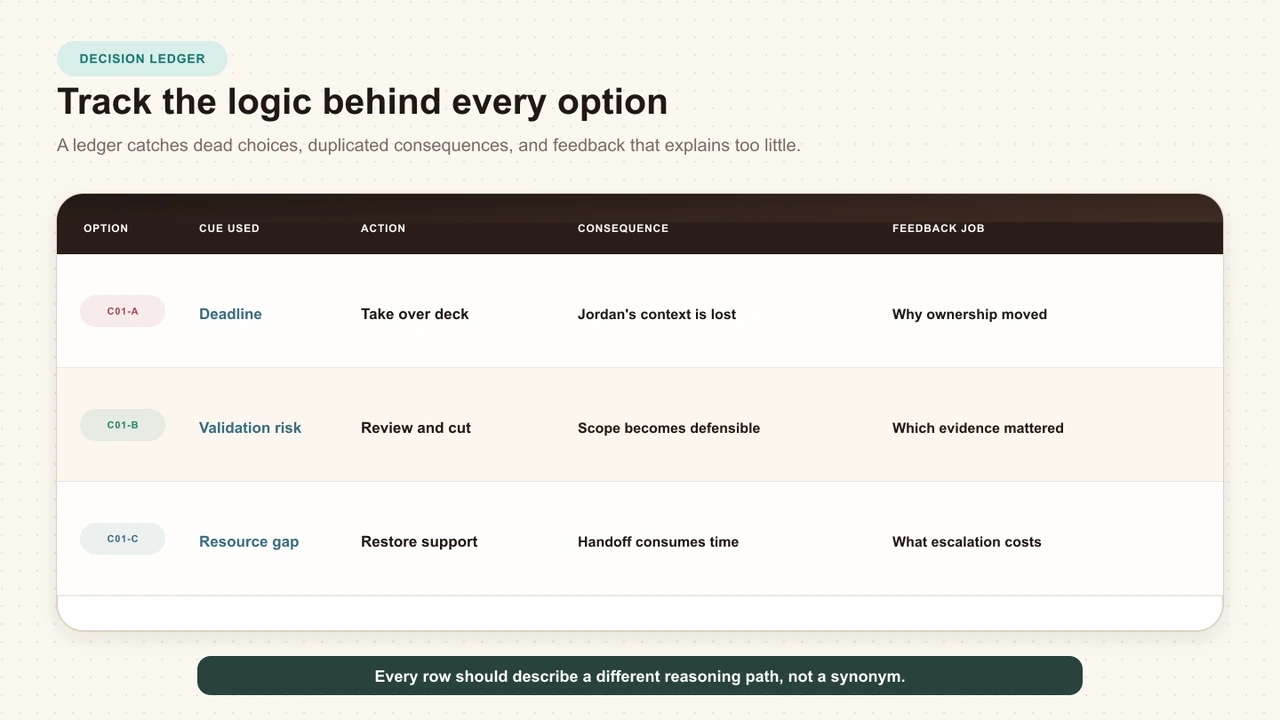
Ask Jordan to send the draft, take over the remaining work tonight, and review the handoff after the client meeting.
- Move
- Take over the remaining work.
- Motive hypothesis
- Protect the deadline through personal control.
- Price
- Jordan's context and ownership are sidelined.
- Next Scene proof
- A later data mismatch appears that the project lead cannot explain confidently.
Review the changed sections with Jordan, confirm what can be validated by 6:00, then decide what to cut or escalate.
- Move
- Inspect the uncertainty and set a decision boundary.
- Motive hypothesis
- Reduce uncertainty before committing scope or resources.
- Price
- The delivered deck may need to be smaller.
- Next Scene proof
- The review finds two removable slides and one essential figure requiring escalation.
Ask the analyst's manager to restore support for the evening, keep the full scope, and tell Jordan to coordinate the handoff.
- Move
- Restore the missing resource and retain scope.
- Motive hypothesis
- Preserve the original commitment.
- Price
- Escalation and context rebuilding use the remaining time.
- Next Scene proof
- The analyst returns late and must first reconstruct what changed.
Remove clues that reveal the preferred answer
Once the actions are sound, inspect the copy as a test-taker might. A learner should choose by reading the situation, not by noticing that one option is longer, kinder, more technical, or copied from the objective.
One option is noticeably longer, more precise, or more polished.
A moral adjective tells learners which behavior the author approves.
Only one option uses language copied from the policy or objective.
A fact needed to judge the action appears inside one option rather than the scene.
An option uses an implausible absolute such as always or never.
A joke, reckless caricature, or obvious villain makes elimination effortless.
One option is a vague catch-all such as use your best judgment.
Different options answer different questions or operate at different action levels.
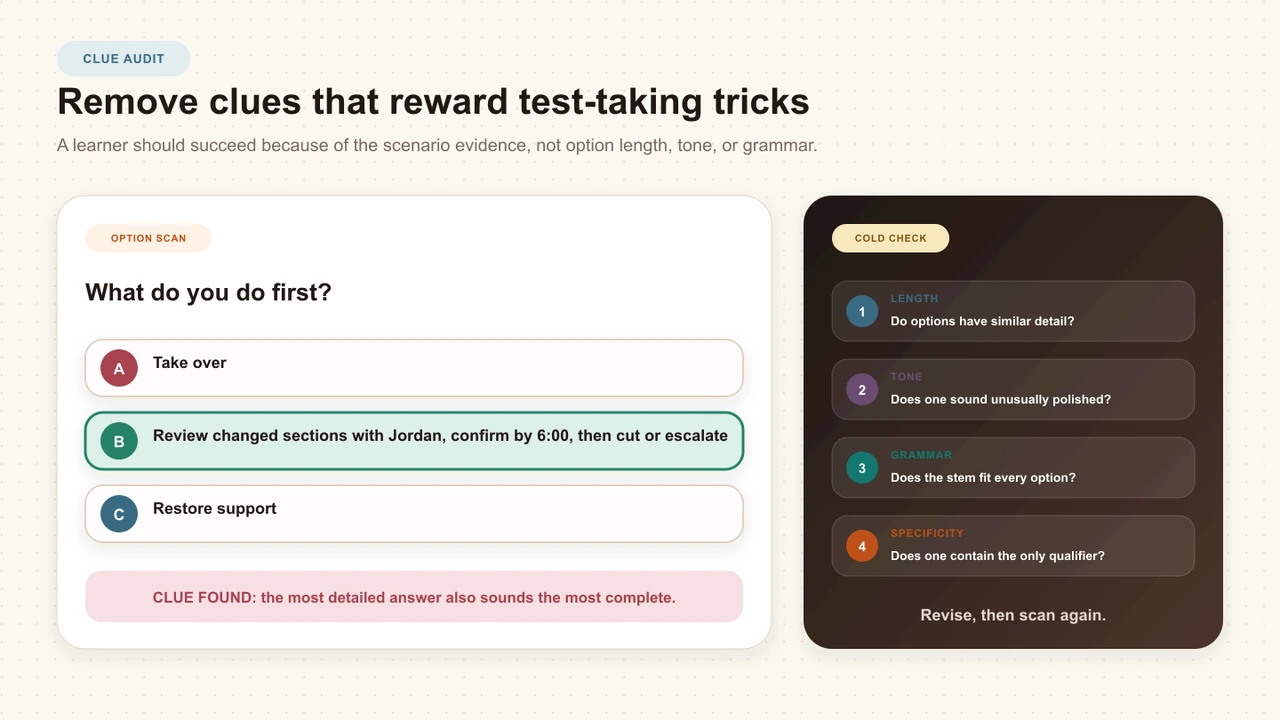
The NBME item-writing guide recommends focused questions, homogeneous and plausible options, and removal of technical flaws that cue test-wise examinees. That guide addresses one-best-answer assessment items. Applying its clue-removal principles to branching actions is a bounded editorial adaptation, not evidence that branching choices and exam items are the same.
Handle several defensible choices honestly
Some decisions have one required response. Others have several acceptable approaches with different costs. Decide which situation you are writing before assigning a preferred Route.
Required action
A verified law, safety rule, policy, or operating standard defines the necessary response.
Preferred judgment
Several moves are possible, but the available evidence makes one more defensible under the stated standard.
Several valid routes
Different actions can succeed, and the scenario should represent their tradeoffs without inventing a false winner.
Write choices people can understand
Plain language does not make the decision simplistic. It moves difficulty away from decoding sentences and back to weighing evidence. W3C guidance on cognitive accessibility recommends understandable words, short sentences, unambiguous content, and clear presentation.
- Use common verbs that describe the action directly.
- Prefer one sentence per option when the action fits in one sentence.
- Explain necessary specialist terms before the Choice Moment.
- Avoid nested conditions and double negatives.
- Keep each complete label available to screen readers.
- Do not communicate preferred or unsafe options through color alone.
- Use a clear instruction when only one option can be selected.
Test the complete interaction, not copy in a document alone. Check keyboard order, focus visibility, labels, zoom, narrow screens, and how the option set fits inside the video player.
Test choices with a cold read
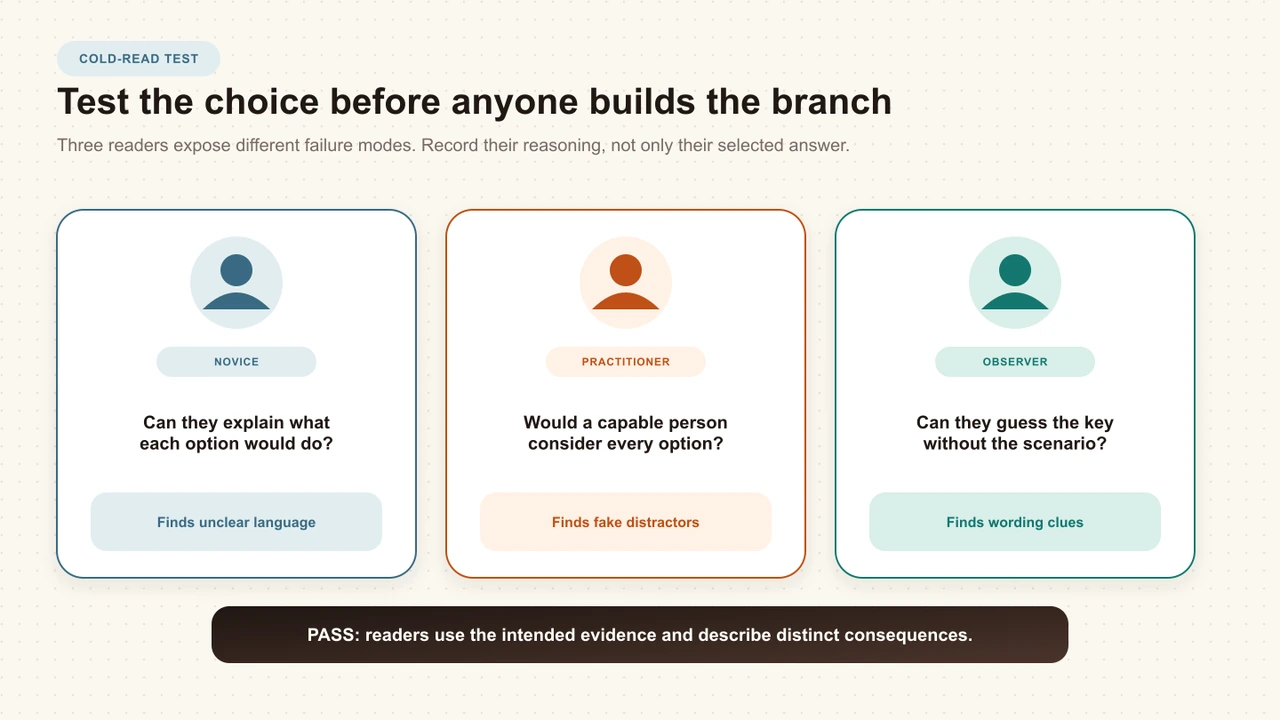
A cold reader has not seen the objective, answer key, author notes, or Route map. Give that reviewer only the learner's situation and choice set. Their job is not to approve the scenario. It is to reveal what the copy communicates before your intended explanation reaches them.
Read the scene without author notes
Confirm that the facts needed to judge the actions are actually visible to the learner.
Name the priority behind each option
Compare the reviewer's reading with the author's Motive hypothesis without treating either as a learner diagnosis.
Predict what changes next
If two options suggest the same next situation, decide whether they are genuinely different choices.
Identify the apparent author favorite
Record any clue based on tone, length, jargon, kindness, precision, or copied language.
Revise and repeat
A second cold read should use a new reviewer so memory of the first answer does not mask the new wording.
Translate the choice set into Interakly
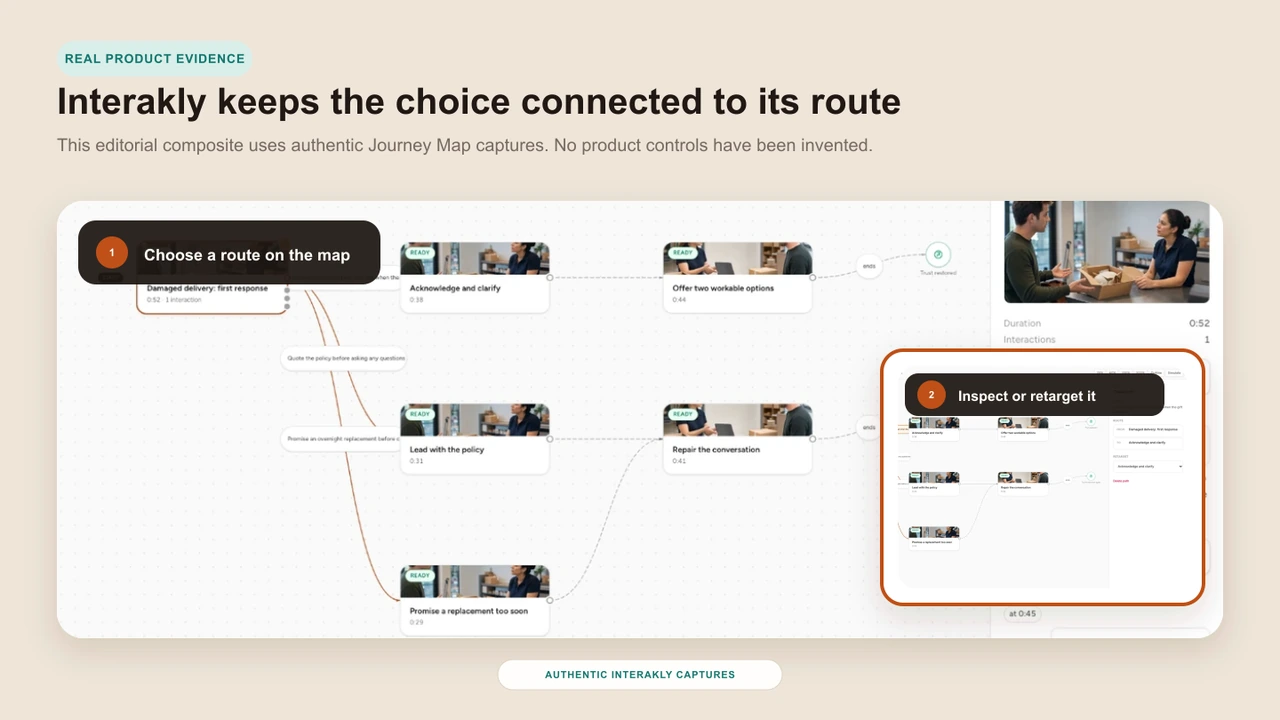
In Pathway Studio, add the learner-facing Move statements to a Choice Moment. Keep the Motive and Price notes in the planning worksheet or production documentation. Each option then receives a Route to the Scene or Outcome that proves its consequence.
Preserve exact wording across the worksheet, Choice Moment, Route label, test record, and reviewer notes. Stable text makes it easier to trace a confusing public choice back to the author decision that created it.
A YouTube Scene can show compatible contained Choice Moments, but it does not provide the complete uploaded-video segment branching workflow. Use uploaded video when options must move learners between authored video segments.
How to Create a Branching Video
Turn approved choice copy into Choice Moments, Routes, Scenes, Outcomes, and a verified learner journey.
How to Storyboard a Branching Scenario
Connect each approved option to stable Scene, Route, rejoin, coverage, and production records before authoring.
Download the worksheet
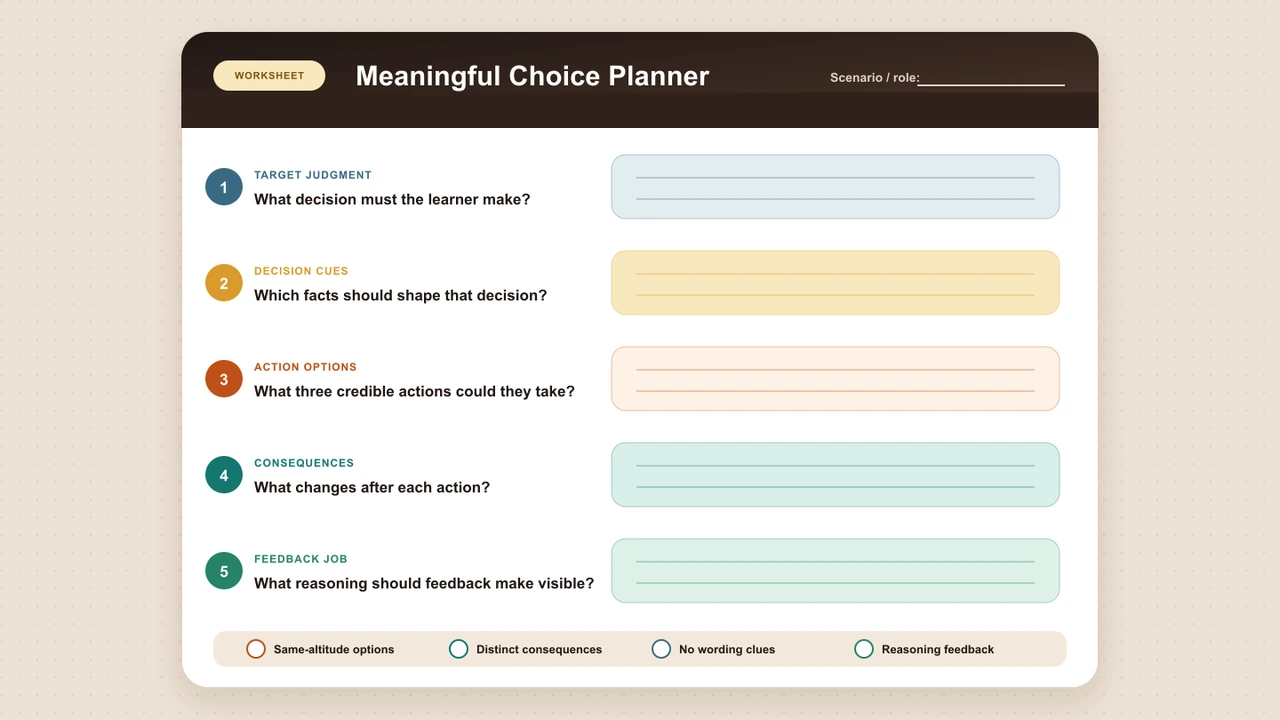
The worksheet includes the decision boundary, repeatable Move, Motive, Price records, Same Altitude review, clue audit, cold-read log, domain sign-off, and the completed client-deck example. Use the Markdown file in your documentation system or keep it beside the route storyboard in version control.
Copyable authoring file
Meaningful scenario choice worksheet
Draft, balance, review, and sign off one complete learner decision.
Final choice-writing checklist
The decision line names one moment, one action horizon, one standard, and the real constraint.
Every fact needed to judge the actions appears before the options.
Each option is an observable move a person could reasonably consider.
Author-only Motive notes express distinct priorities without diagnosing learners.
Every Price creates a tradeoff the next Scene can make visible.
All options answer the same question at the same altitude.
Grammar and information density support comparison without becoming mechanical.
The set contains no joke, villain, moral label, hidden fact, or copied answer clue.
Several defensible choices are represented honestly when the standard allows them.
A cold reader can explain the differences without relying on tone or length clues.
A qualified reviewer has checked regulated or organization-specific standards.
The final set has been tested in the real player on desktop and phone.
Common choice-writing mistakes
The author starts with answer buttons
Without a fixed decision line, the options answer different questions and operate at different time horizons.
One choice repeats the policy
The preferred answer becomes a recognition exercise instead of a judgment based on the situation.
Weak options are written as villains
A rude or absurd line tests elimination and may teach nothing about the real mistake a pressured person makes.
Motive notes become learner labels
A route selection is treated as proof of attitude, personality, or competence that the interaction cannot establish.
Every option leads to the same Scene without change
The scenario offers navigation but no meaningful consequence, new context, or evidence.
A single answer is forced onto a genuine tradeoff
Several defensible actions are collapsed into one approved sentence without a verified standard.
Plain language is mistaken for easy thinking
Writers add jargon or tangled syntax even though the decision itself already provides sufficient difficulty.
Copy is approved outside the player
A choice set that reads well in a document clips, overwhelms, or loses context in the actual interaction surface.
Sources and method limits
The sources below support realistic scenario decisions, focused questions, plausible and comparable options, understandable language, and accessible single-select presentation. They do not validate Move, Motive, Price, the Same Altitude pass, the clue audit, or the cold-read worksheet. Those are original Interakly editorial tools that should be evaluated through review, testing, learner observation, and appropriate domain oversight.
- Sennett and Vasquez, Vanderbilt University, “Branching Out with Interactive Scenarios,” 2021. The guide recommends realistic situations, decisions learners are likely to face, corresponding consequences, and objective-led scenario design. Read the guide
- National Board of Medical Examiners, NBME Item-Writing Guide, sixth edition. The guide recommends focused questions, plausible and homogeneous options, and removal of technical clues. It addresses one-best-answer assessment items, not branching scenarios. Read the guide
- W3C Web Accessibility Initiative, “Use Clear and Understandable Content.” The cognitive accessibility guidance recommends understandable words, short sentences, unambiguous content, and clear presentation. Review the guidance
- UK Government Digital Service, “Designing good questions.” The service guidance covers focused wording, necessary context, and question research. Review the guidance
- GOV.UK Design System, “Radios.” The component guidance covers explicit single-selection instructions, semantic grouping, no default answer, and stacked presentation on small screens. Review the component guidance
- Katz and Assor, “When Choice Motivates and When It Does Not,” Educational Psychology Review, 2007. This review supports a cautious position that offering options is not automatically motivating; it does not test the Interakly writing method. https://doi.org/10.1007/s10648-006-9027-y
FAQ
What makes a choice meaningful in a learning scenario?
A meaningful choice represents an action a person could reasonably take, exposes a difference in judgment, and changes the situation in a way that matters to the learning objective. The difficulty should come from weighing evidence and tradeoffs, not from deciphering vague wording or spotting a comic villain.
How many choices should a branching scenario include?
There is no universal ideal number. Use the fewest options needed to represent the important lines of reasoning in the decision. Two choices can work when the decision truly has two credible paths. Add a third only when it introduces a distinct and useful action, not a wording variation.
Should every scenario have one correct choice?
No. Use one preferred choice only when a documented standard, policy, or expert judgment supports it. If several actions are defensible, represent that honestly in the routes, feedback, and any scoring. Do not force a false answer key simply because the interface allows one.
Should all answer choices have exactly the same length?
No. Exact word counts are not the goal. Keep options at a similar level of detail and make conspicuous differences a reason to review the set. A much longer, more careful option can reveal the author's preference even when its length is not the intended clue.
How do I avoid an obviously correct scenario choice?
Start each option from a plausible priority, write comparable observable actions, keep all needed facts in the scene, and remove moral labels, jokes, absolute wording, copied policy phrases, and unique jargon. Then ask cold readers which option the author appears to prefer and what wording gave it away.
Can a selected route show why a learner made that choice?
Not by itself. A selection records one action in one designed context. The Motive field in this guide is an authoring hypothesis used to make options distinct, not a psychological diagnosis or proof of stable competence. Use route evidence cautiously and combine it with other evidence when decisions matter.
How can I make scenario choices more accessible?
Use common words, short direct sentences, parallel grammar, a clear single-select instruction, and all essential context before the options. Do not depend on color, option position, or subtle tone to communicate meaning. Test the complete interaction with keyboard navigation, screen readers, zoom, and narrow screens.
Can Interakly use these choices in a YouTube Scene?
A YouTube Scene can show compatible contained Choice Moments in Interakly, but uploaded video is required for the complete segment-based Pathway branching workflow. Use uploaded video when a selected option must move the learner between authored video segments, then verify every Route in Preview before launch.
Storyboard the complete route after the choices are approved
Give every Scene, Choice Moment, Route, rejoin, Outcome, and coverage requirement a stable place in the production plan.
Explore branching video with Interakly
See how Pathways connect authored video Scenes, learner Choice Moments, Routes, and Outcomes.
Write the decision before you build the branch
Lock one decision line, draft each Move, Motive, and Price, remove accidental answer clues, test the set with cold readers, and then connect the approved actions to believable Routes.
Explore Choice Moment