How to Storyboard a Branching Scenario: Template and Example
Plan a branching scenario with five linked storyboard views, stable IDs, a route ledger, rejoin tests, coverage checks, and a worked service example.
A branching scenario storyboard should let another person test the learner journey before anyone records a line of video. That requires more than a flowchart. The map shows where routes go, but it does not prove that a choice is fair, a consequence follows, a rejoin is truthful, or required instruction reaches every learner.
This guide gives you a reusable five-view storyboard pack, a stable ID system, a Route ledger, a rejoin-equivalence test, a route budget, and a coverage audit. These are Interakly editorial planning methods created to make branching work reviewable. They are not experimentally validated measurement scales. The research sources later in the guide support the broader principles of objective-led, authentic, scaffolded, feedback-rich scenario design.
What a branching storyboard must answer
A linear storyboard can describe what appears next. A branching storyboard must also explain why the next Scene changes and what remains true after that change. A reviewer should be able to answer seven questions without asking the author to fill in missing logic:
- Which real-world judgment is the learner practising?
- What evidence is visible before each choice?
- What does each option reveal about the learner's reasoning?
- What believable consequence follows from the decision?
- Where does every Route lead, including weak and unusual choices?
- Which information must every learner receive?
- Can the team produce, test, and maintain every reachable walk?
If the storyboard cannot answer those questions in text, polished media will not repair the scenario logic. Start with the decision and route model, test it cheaply, then invest in production.
Branching Scenario Design: A Complete Practical Guide
Define the performance, write credible choices, design consequences, and decide when routes should split or rejoin before turning the plan into a production storyboard.
Use the five-view storyboard pack
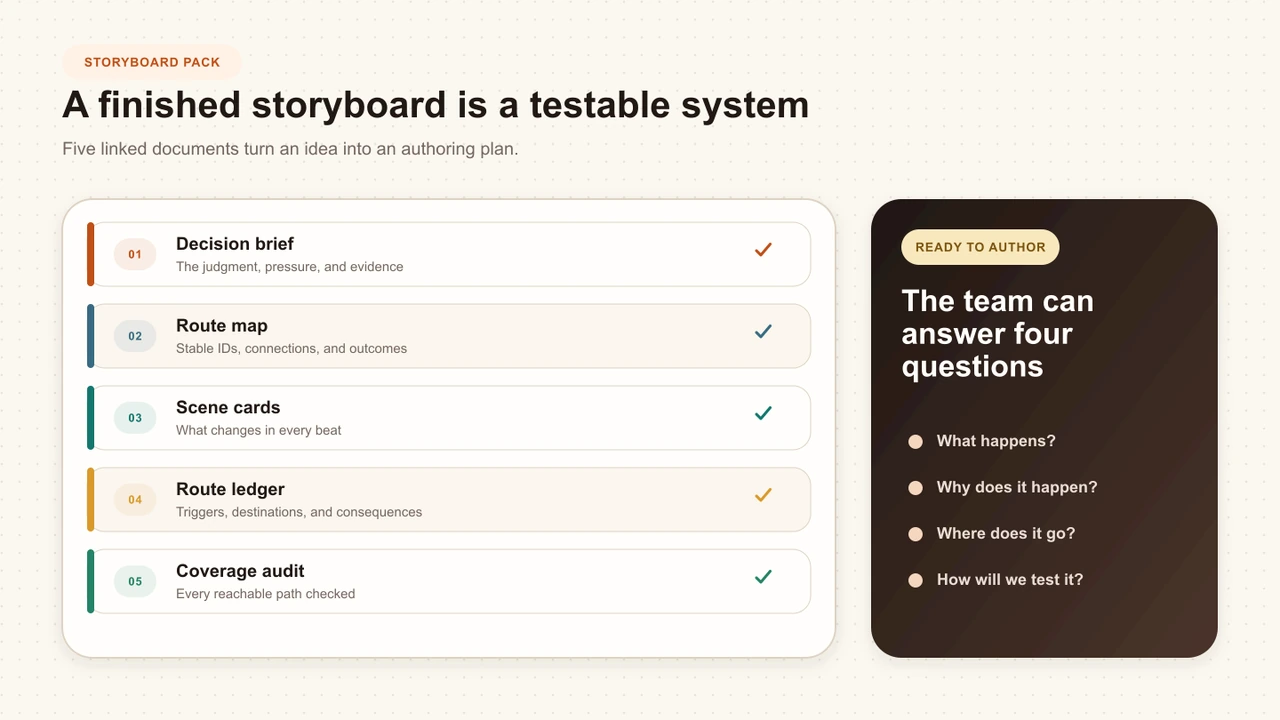
One giant document usually becomes either unreadable or incomplete. Keep five linked views instead. Each view has one job, and stable IDs connect them. A change to C01 appears in the Route map, its Scene card, the Route ledger, and any coverage row that depends on it.
1. Decision brief
What judgment should the learner demonstrate?
One performance, one decision, the pressure, and the evidence.
2. Route map
How can the situation change after each decision?
A readable graph of Scenes, choices, rejoins, and Outcomes.
3. Scene cards
What does the learner know and do at each point?
Context, visible evidence, dialogue, choice, and consequence notes.
4. Route ledger
Where does every option go, and why?
One auditable row for every Route connection.
5. Coverage audit
What must every learner encounter before completion?
Required evidence, route-specific material, and shared debrief checks.
The views are deliberately redundant at their boundaries. The Route map shows R02 exists; the ledger explains its exact trigger and destination; the Scene cards explain what learners experience on either side. That small amount of duplication helps reviewers catch disagreements before they become expensive media changes.
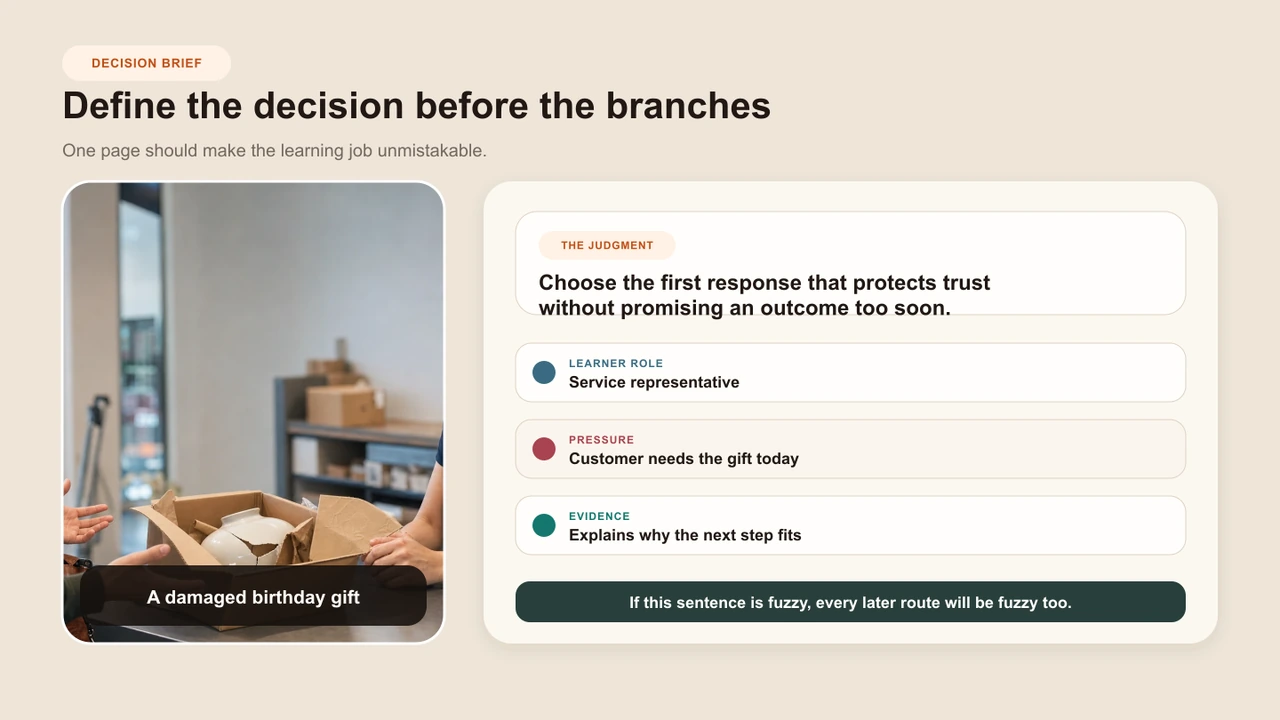
Start with a decision brief
Begin with the judgment, not the number of branches. Scenario-design guidance from the NATO Advanced Distributed Learning initiative starts by defining the competency or real-world scope being assessed. The INACSL simulation standards similarly begin with measurable objectives and expected outcomes. Those sources come from assessment and healthcare simulation contexts, so applying them to an interactive video storyboard is a reasoned design transfer.
Name the performance
Describe what the learner should handle better after the scenario, using an observable action rather than a broad topic.
Isolate one judgment
Identify the decision that separates capable performance from a plausible weak response.
Add realistic pressure
Introduce time, uncertainty, competing needs, or limited resources only when they belong to the real task.
Define acceptable evidence
State what a learner must notice, ask, choose, or explain to demonstrate the judgment fairly.
Describe the consequence
Record what changes in the situation because of the decision, before writing feedback copy.
For the worked example, the performance is: recover a damaged-laptop request without promising a remedy before learning the customer's actual constraint. The decision is whether to clarify urgency, default to policy, or deflect responsibility. The visible consequence is a change in trust, available remedies, and the information the customer shares.
Give every object a stable ID
Titles change during review. IDs should not. If “Clarify the deadline” becomes “Understand the business impact,” S02 still identifies the same Scene. Stable IDs prevent comments such as “the second box on the left” from becoming meaningless after a map is rearranged.
Shared naming system
IDs that survive rewrites
Scene
S01 Damaged laptop arrives
Choice Moment
C01 First response
Route
R01 Clarify urgency
Rejoin
J01 Shared remedy decision
Outcome
O01 Loan device plus replacement
Variable or state
V01 Trust repaired
Required coverage
K01 Warranty limits explained
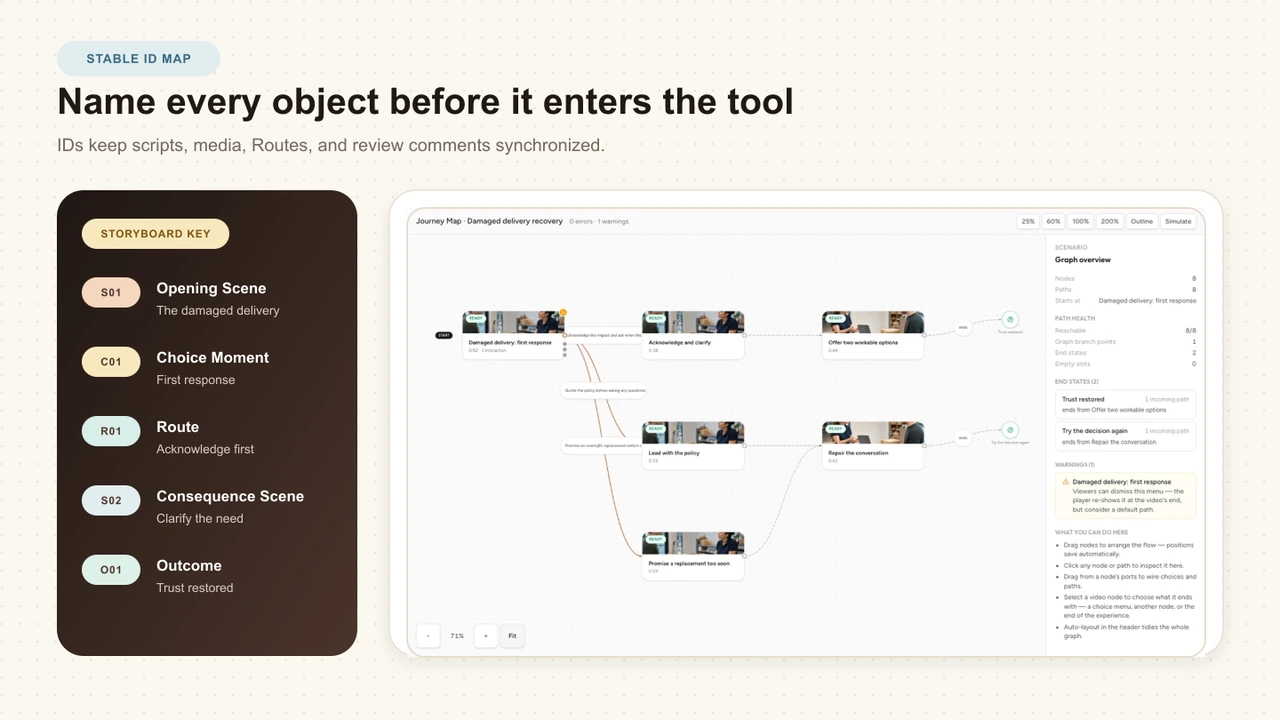
Number objects in creation order rather than visual order. A map can move, a branch can be inserted, and a Scene can be renamed without changing its references. Retire an ID instead of recycling it, so old review notes and test records remain interpretable.
Write one Scene card at a time
A Scene card describes the learner's local reality. It should state what is true on arrival, what evidence appears, what happens before the choice, and what production work is needed. Do not make a later Scene silently assume information available on only one incoming route.
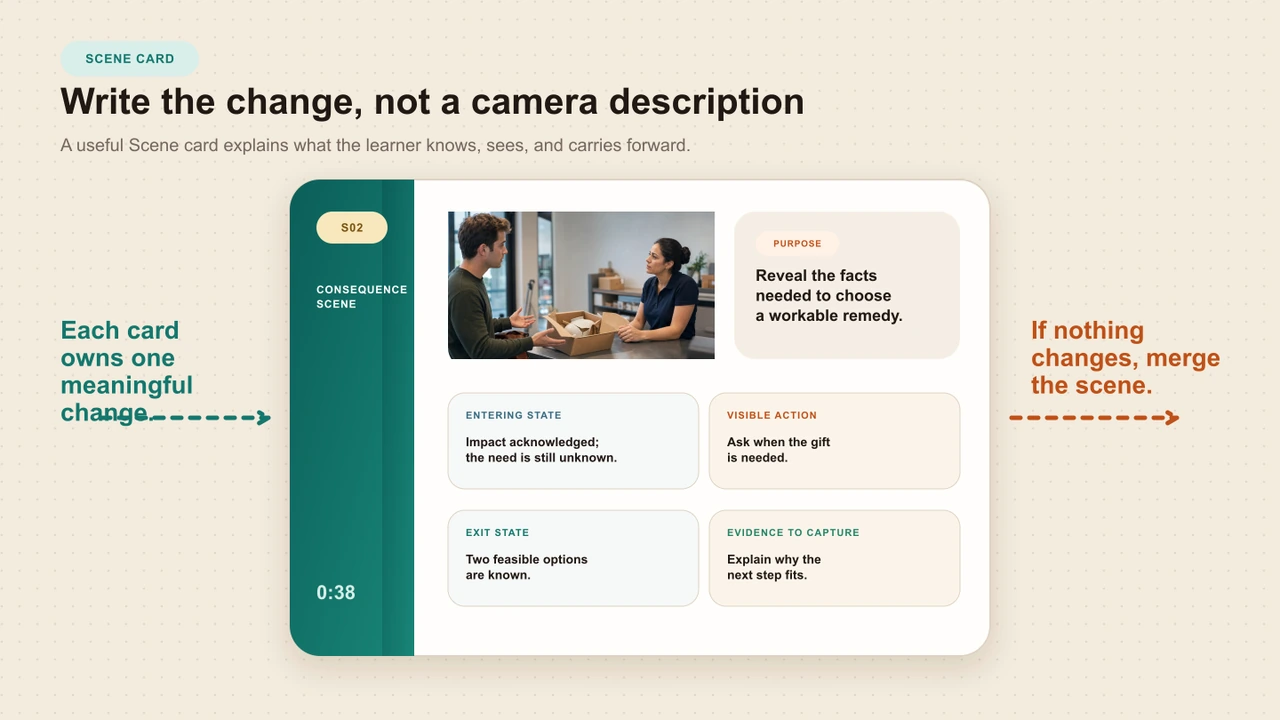
Purpose
What this Scene must teach or reveal
Arrival state
What the learner already knows, has, and caused
Visible evidence
Facts and cues available before the choice
Action
What happens in the Scene before the decision
Choice
The exact decision prompt and credible options
Consequence
What changes immediately after each option
Feedback intent
What reasoning the learner should understand
Production
Media, captions, alt text, and review needs
The arrival state is an easy field to skip. It is also the field that catches many false rejoins. A learner arriving from R01 may know the client presentation is tomorrow; a learner arriving from R02 may only know that the customer rejected a refund. Those learners are not yet in the same situation, even if both routes point to a box titled “Choose a remedy.”
Develop the exact options on each Scene card
Turn the planned decision into observable actions with distinct reasoning, honest tradeoffs, and comparable learner-facing wording.
Maintain a Route ledger
The Route map is visual. The ledger is exact. Give every option one row with the source Scene, Choice ID, option text, destination, reason for the transition, state change, and test status. If a Rule rather than a learner choice controls the transition, record the condition in the same place.
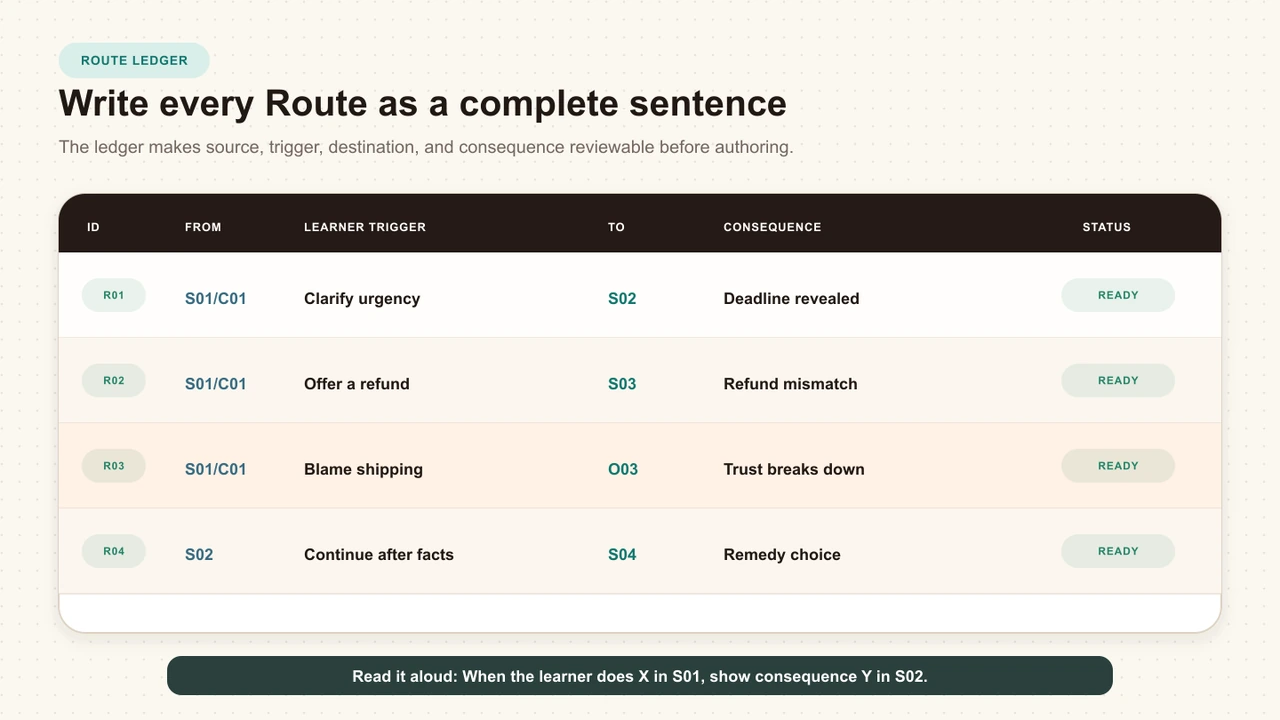
Route ledger excerpt
Every option has an accountable destination
R01
S01 / C01
Ask when the laptop is needed
S02
Reveals urgency before a remedy is promised
R02
S01 / C01
Offer a standard refund immediately
S03
Creates a mismatch because the customer needs a device
R03
S01 / C01
Blame shipping and end the call
O03
Ends in an unresolved relationship failure
A Route reason should explain the scenario logic, not repeat the label. “Goes to S02” is not a reason. “Reveals urgency before a remedy is promised” tells the writer what S02 must accomplish and tells the tester what to verify.
Test every rejoin for equivalence
Rejoining routes is valuable because it controls production and gives learners a shared next task. It is also easy to do dishonestly. Two arrows can point to one Scene while the learners arriving there have different facts, relationships, resources, or rules.
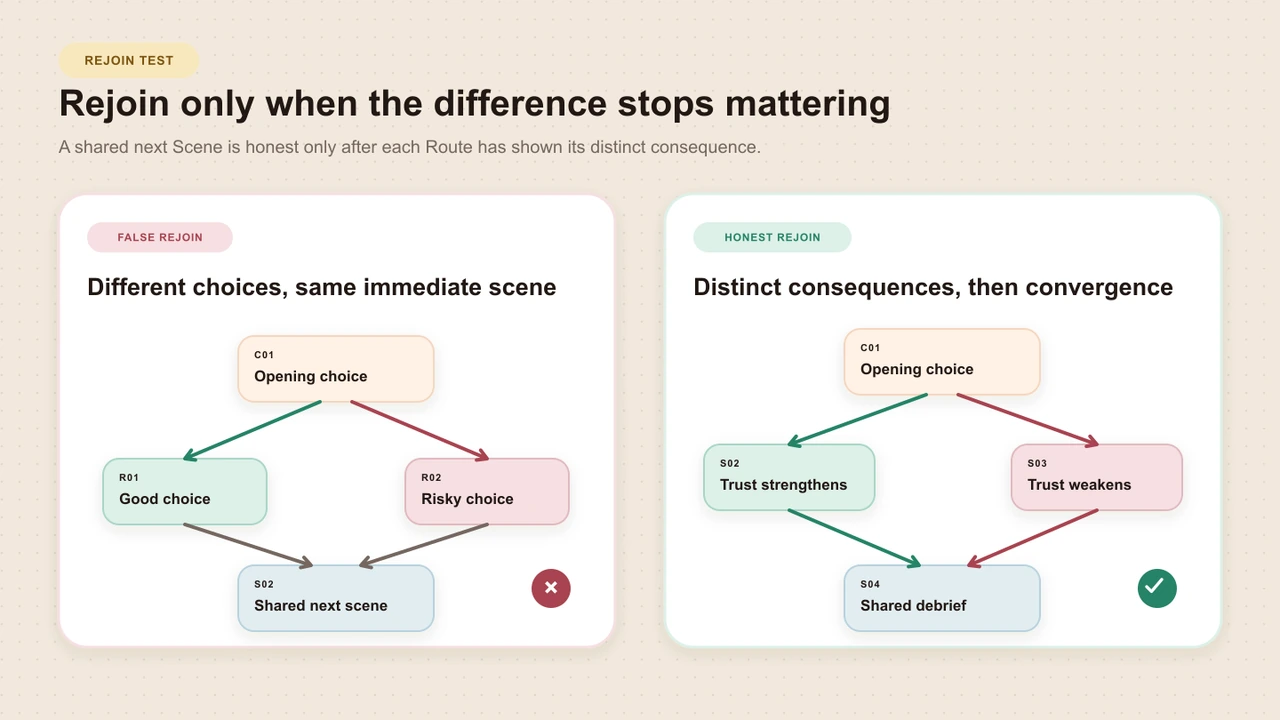
Rejoin-equivalence test
Five questions before one shared Scene
Facts
Do learners know the same material facts?
Relationship
Is trust, urgency, or social state equivalent?
Resources
Are the same remedies, tools, or time available?
Rules
Do the same policies and constraints now apply?
Assessment meaning
Would the next decision measure the same judgment fairly?
Mark each dimension “equivalent,” “not equivalent,” or “repaired before rejoin.” A short bridge Scene can supply a missing fact or reset a resource. It cannot pretend a damaged relationship never occurred. If the previous choice changes the meaning or fairness of the next assessed decision, keep the routes separate.
Set a route budget before production
“Four Scenes” is not a production estimate. This worked graph contains two Choice Moments, eight Route connections, three Outcomes, and seven complete learner walks. It also creates a separate media and review budget for clips, images, voice tracks, captions, accessibility, subject review, policy approval, and release QA. Set limits on each count before recording.
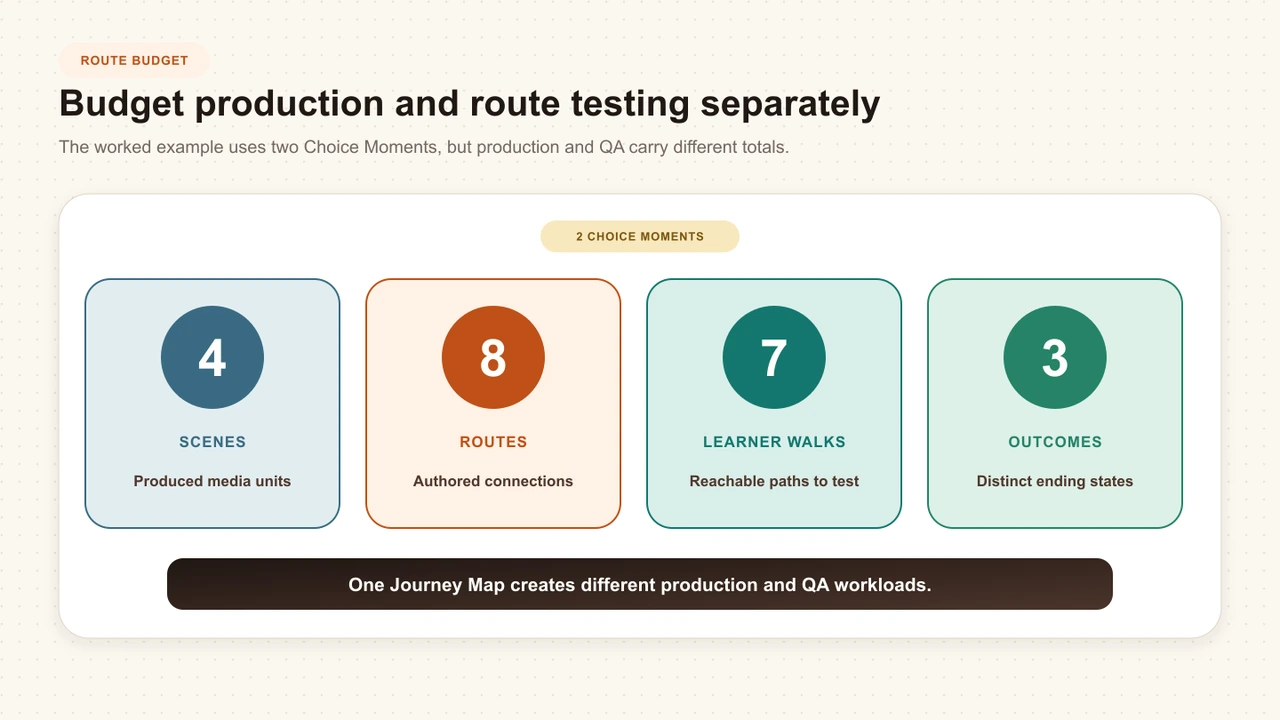
Count
What it reveals
Budget
Scenes
Distinct contexts the learner can enter
4
Choice Moments
Decision points that expose learner judgment
2
Routes
Connections from one option or rule to a destination
8
Outcomes
Explicit terminal states with distinct meaning
3
Reachable walks
Complete start-to-Outcome paths a tester must traverse
7
The numbers above illustrate a small worked scenario, not a recommended universal maximum. Your budget depends on the risk of the subject, media format, languages, accessibility needs, reviewer availability, and how often the underlying policy changes. Remove a route when it teaches nothing that another route cannot.
Walk the text prototype
Run the first route test before media production. Give a facilitator the Scene cards and ledger. Give the reviewer only the current Scene text and options. After each choice, reveal the consequence and follow the listed Route. Do not let the author explain missing context during the walk.
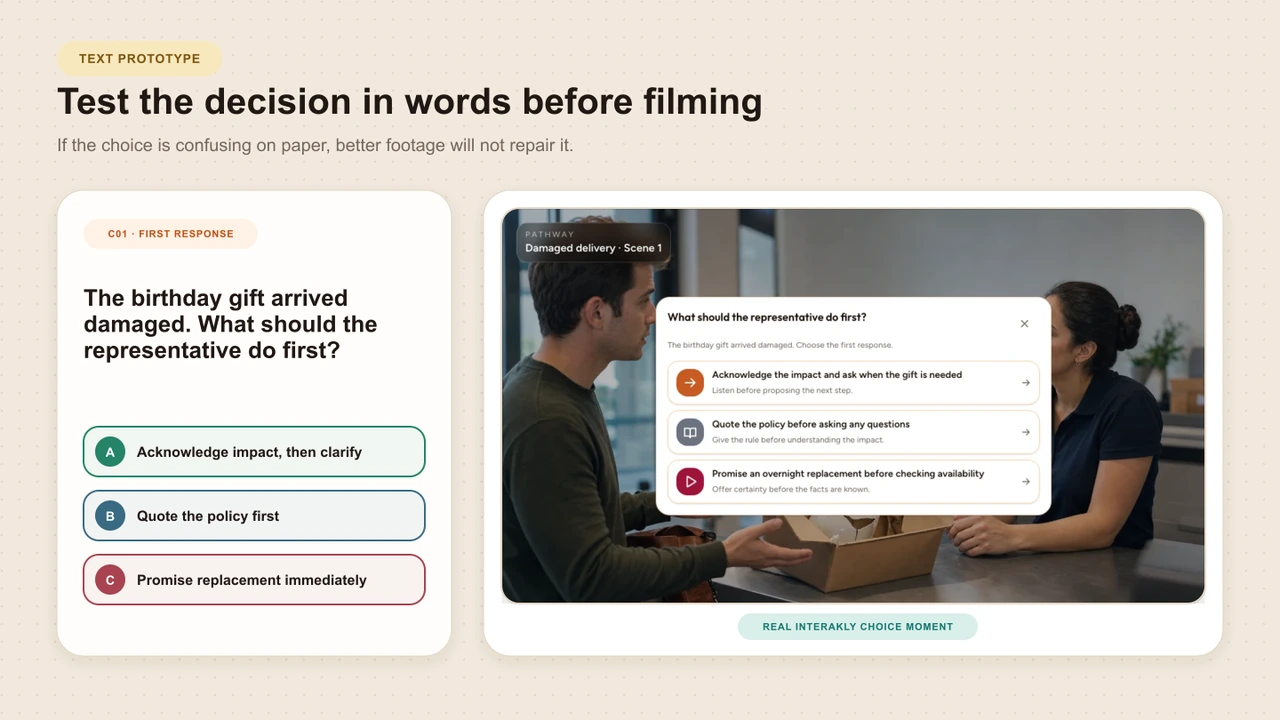
Assign one complete walk
Give each reviewer a start-to-Outcome path and identify it by Route IDs.
Read only available evidence
Do not expose notes, future Scenes, scoring intent, or the preferred route.
Choose and explain
Ask the reviewer to select an option and describe the evidence used, without coaching.
Reveal the authored consequence
Check whether it feels causally connected rather than arbitrary or merely punitive.
Record defects by ID
Log missing facts, unclear options, false rejoins, dead ends, and skipped coverage against the exact object.
Research on scenario-based e-simulation emphasizes clear objectives, authentic tasks, suitable scaffolding, and explanatory feedback. The INACSL simulation standards also require a planned debriefing process rather than treating the experience alone as sufficient. A text walk cannot prove learning effectiveness, but it can expose design defects before visual polish makes them harder to challenge.
Audit required coverage
Create a coverage row for every fact, standard, warning, demonstration, practice opportunity, or debrief point that matters to completion. Then mark which Routes expose it. The audit should distinguish three kinds of content:
Required before choice
The learner needs this evidence to make a fair decision.
Route-specific
The content exists because of one decision and should not be forced into every path.
Required after routes
Every learner needs this explanation, standard, or transfer task before completion.
Walk every reachable route against the coverage table. If K01 is required and R03 bypasses it, either move K01 before C01, add it to the shared debrief, or explicitly decide that R03 should not count as completed. Do not leave essential coverage to chance.
Worked example: a damaged laptop
A business customer receives a damaged laptop the day before a client presentation. The representative must identify the time-sensitive need before selecting a remedy. The opening choice has three credible but meaningfully different responses.
S01 / C01
A damaged laptop arrives before a client presentation
Clarify urgency, offer a standard refund, or blame shipping
S02
Urgency is revealed
The customer needs a working device tomorrow
S03
The refund does not solve the actual problem
The customer explains why a replacement matters
J01 / S04 / C02
Choose a remedy only if the arrival state is equivalent
Loan plus replacement, tomorrow replacement, or refund only
O01, O02, O03
Finish with a specific service outcome
Do not hide unresolved failure inside a generic completion screen
S01 and C01: reveal the reasoning
- R01, clarify urgency: the customer explains that a working device is needed tomorrow, creating S02.
- R02, offer the standard refund: the customer explains that money later does not solve the presentation problem, creating S03.
- R03, blame shipping: trust breaks down and the issue remains unresolved, leading to O03 unless a designed recovery route exists.
J01: verify before rejoining
S02 and S03 can both lead toward S04 only after the needed facts, available remedies, and relationship state are equivalent enough. S03 may need a short recovery beat in which the representative acknowledges the mismatch and asks the deadline. Without that repair, one shared remedy Scene would ignore what actually happened.
S04 and C02: choose the remedy
- O01: a loan device now plus a replacement after the presentation, when operations allow it.
- O02: a confirmed replacement by tomorrow, when the deadline and stock support it.
- O03: refund only or unresolved service failure, with a debrief that explains why it did not meet the stated need.
Translate the storyboard into Interakly
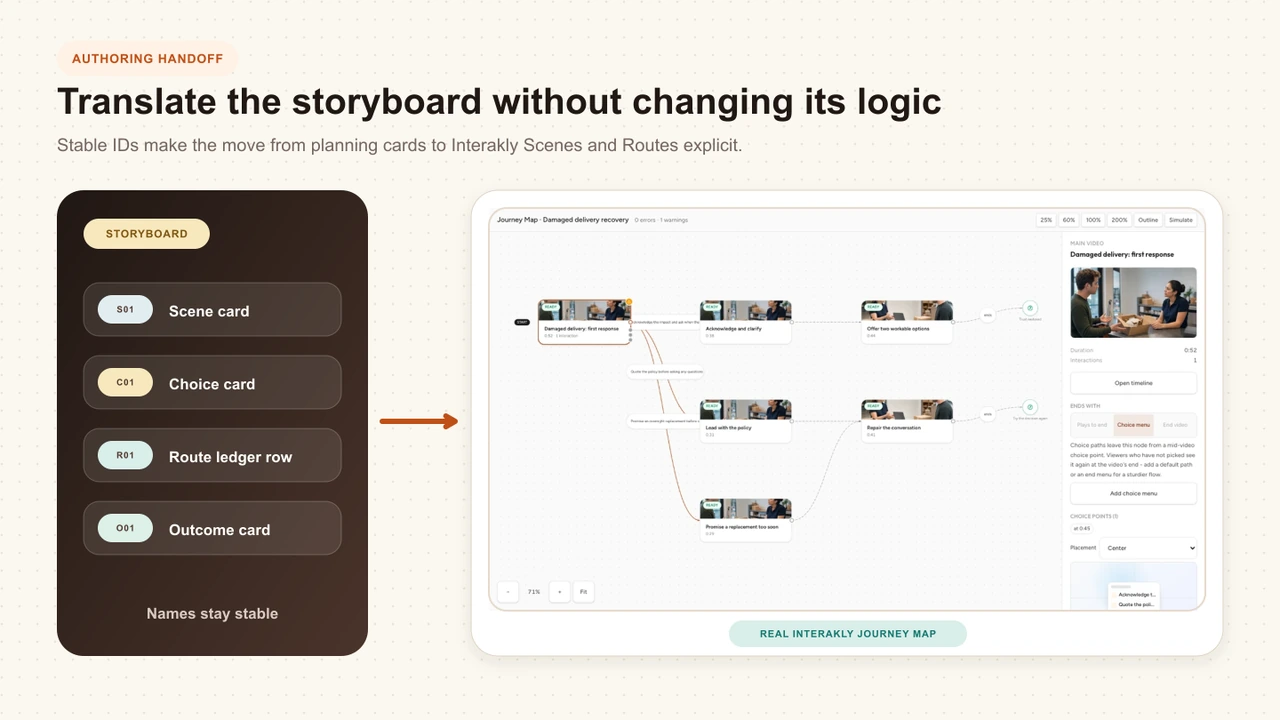
In Interakly, the storyboard's Scenes become Pathway Scenes, choice points become Choice Moments, ledger rows become Route connections, and terminal states become Outcomes. Keep the storyboard IDs in Scene titles, internal Route labels, or production notes so testers can trace a live defect back to the planning pack.
Create the uploaded-video Scenes
Attach the approved media for each authored context and verify its captions and learner-facing title.
Add each Choice Moment
Use the exact reviewed prompt and options from the Scene card, after the necessary evidence appears.
Wire every Route
Connect each option to the destination recorded in the ledger and preserve a clear internal label.
Create explicit Outcomes
Give every terminal route an authored result rather than allowing a Scene to stop without meaning.
Preview every reachable walk
Compare the learner experience with the ledger, rejoin test, and coverage audit before Launch Check.
How to Create a Branching Video
Take the approved storyboard into Interakly Pathway Studio, add uploaded-video Scenes and Choice Moments, wire Routes, test in Preview, and run Launch Check.
Branching vs Linear Learning
Confirm that the decision actually needs a changed context before committing to branching production and route QA.
Storyboard an interactive video
Use the lighter scene-and-state method when the production needs timestamped prompts, feedback, spatial activities, or a small route map rather than a complete branching-scenario pack.
Download the template
The Markdown template includes the decision brief, ID legend, Route map inventory, repeatable Scene card, Route ledger, rejoin-equivalence test, route budget, text-prototype log, coverage audit, Interakly translation checklist, and release sign-off. Copy it into your documentation system or keep it beside the production files in version control.
Copyable planning file
Branching scenario storyboard template
A practical Markdown pack for writers, reviewers, producers, and route testers.
Common storyboard mistakes
The flowchart is treated as the complete storyboard
Boxes and arrows do not capture arrival state, visible evidence, consequence logic, required coverage, or production needs.
Titles are used as identifiers
A rename breaks comments, test records, ledger rows, and file references across the project.
A rejoin is chosen only to save media
Learners arrive with different facts, trust, resources, or rules, so the shared Scene becomes false or unfair.
The team counts Scenes but not complete walks
The production looks small while route testing, captions, review, and maintenance grow unnoticed.
The preferred route receives all the detail
Weak routes become abrupt punishments instead of believable consequences with useful explanatory feedback.
Required coverage sits behind one optional branch
Some learners complete without encountering information the author assumed everyone had seen.
Media production begins before route walking
Teams become reluctant to remove broken branches because recording and editing money has already been spent.
The storyboard promises unsupported product behavior
A YouTube Choice Moment is planned as if it were the complete uploaded-video segment workflow.
Sources
The sources below support objective-led scenario design, authenticity, scaffolding, feedback, debriefing, and evaluation. The five-view pack, stable IDs, Route ledger, rejoin-equivalence test, route-budget distinction, coverage audit, and text-prototype procedure are Interakly editorial methods. They should be evaluated as practical planning tools, not presented as research-validated scales.
- Bahattab et al., “Scenario-Based e-Simulation Design for Global Health Education: Theoretical Foundation and Practical Recommendations,” Journal of Medical Internet Research, 2023. This viewpoint describes objective-led design, authentic scenarios, scaffolding, and explanatory feedback. https://doi.org/10.2196/46639
- NATO Science and Technology Organization, Competency-Based Scenario Design, 2022. The handbook covers authentic tasks, competency definition, scenario assessment, and design complexity. Read the handbook
- International Nursing Association for Clinical Simulation and Learning,Healthcare Simulation Standards of Best Practice. The standards connect simulation design to measurable objectives, facilitation, evaluation, and planned debriefing. Review the standards
- Watts et al., “Healthcare Simulation Standards of Best Practice: Simulation Design,” Clinical Simulation in Nursing, 2021. https://doi.org/10.1016/j.ecns.2021.08.009
- Bateman et al., “Virtual patient design: exploring what works and why. A grounded theory study,” Medical Education, 2013. The study examines how learner preconditions, the encoded case, the surrounding activity, and intended change interact in virtual-patient design. https://doi.org/10.1111/medu.12151
- Huwendiek, “Design and implementation of virtual patients for learning of clinical reasoning,” GMS Journal for Medical Education, 2019. https://doi.org/10.3205/zma001241
- Bahattab et al., “Development and evaluation of scenario-based e-simulation for humanitarian health training: a mixed-methods action research study,” BMJ Open, 2024. The iterative study adds evidence from one humanitarian-health education context rather than validating the Interakly planning pack. https://doi.org/10.1136/bmjopen-2023-079681
- Woodham et al., “Virtual patients designed for training against medical error: Exploring the impact of decision-making on learner motivation,” PLOS ONE, 2019. This multicenter study compared branched and linear virtual-patient designs in one medical-education setting. https://doi.org/10.1371/journal.pone.0215597
- Lacey, Francis, and Smith, “Redefining online biology education,” FEBS Open Bio, 2024. The comparison of branched and linear video is used here as a reminder to separate learner preference, structure, and learning evidence. This is an editorial inference, not a direct conclusion of the study. https://doi.org/10.1002/2211-5463.13767
FAQ
What is a branching scenario storyboard?
A branching scenario storyboard is a planning system that connects the learning decision, route structure, Scene content, destinations, and coverage checks before media production begins. A useful storyboard shows not only what appears on screen, but also why each choice exists and where every reachable route leads.
Should I storyboard a branching scenario in slides or a spreadsheet?
Use whichever tools your reviewers can maintain, but keep five linked views: a decision brief, route map, Scene cards, Route ledger, and coverage audit. Stable IDs let those views refer to the same Scenes, choices, Routes, rejoins, and Outcomes even when the files live in different tools.
How detailed should a branching storyboard be?
It should be detailed enough for a reviewer to walk every route without guessing. Record the Scene purpose, evidence visible to the learner, choice wording, consequence, destination, required coverage, feedback intent, and production needs. Dialogue can still change during scripting, but route logic should already be testable.
How do I know whether two branches can rejoin?
Compare the facts known, relationship state, available resources, applicable rules, and meaning of later assessment. Rejoin only when those five conditions are equivalent enough that the shared next Scene is truthful and fair for learners arriving from either route.
How many routes should I plan?
Set a route budget based on your ability to script, produce, caption, review, test, and maintain every reachable path. Count Scenes, Route connections, complete learner walks, and unique media assets separately. The number of boxes on a map does not reveal the full production cost.
Can I test a branching scenario before recording video?
Yes. Walk a text-only prototype by reading each Scene card, choosing an option, and following its Route ledger entry. Give each reviewer a different route and record missing context, false rejoins, unclear consequences, dead ends, and required content that a route can skip.
Can I build a complete Interakly branching video from YouTube?
A YouTube Scene can show compatible contained Choice Moments in Interakly, but uploaded video is required for the complete segment-based Pathway branching workflow. Use uploaded video when a choice must move the learner between authored video segments, then verify every route in Preview before launch.
What Is a Branching Scenario?
Review the decision, consequence, and route structure that separates a true branching scenario from ordinary navigation or quiz feedback.
Interactive Video Best Practices
Carry the storyboard into accessible timing, feedback, responsive presentation, source checks, and release QA.
Test the route logic before producing the route media
Define one judgment, connect the five storyboard views with stable IDs, walk every reachable path, repair false rejoins, and verify required coverage before you record.
Explore Choice Moment