Branching Scenario Design: A Complete Practical Guide
Design branching scenarios with meaningful choices, useful consequences, clear routes, fair scoring, accessible alternatives, and practical QA.
A branching scenario works when the learner must make a judgment, live with a believable consequence, and use the result to improve the next decision. It is not a long quiz with decorative routes. The map should make the reasoning visible.
This guide takes one customer-service recovery from brief to release. You will define the decision, shape meaningful choices, decide where routes should split or rejoin, build the Journey Map, test every path, and use route evidence without treating it as proof of real-world performance.
What a branching scenario should teach
Use branching when the objective depends on a decision whose context and consequences matter. The learner may need to prioritize competing needs, notice a risk, choose what to say, decide what information to gather, or select an action under pressure.
Use a simpler question when the job is recall. “What is the refund period?” needs a knowledge check. “The customer is outside the standard refund period but received a damaged item. What should you do first?” can support a scenario because the answer depends on judgment, sequence, and communication.
What Is a Branching Scenario?
Review the format, vocabulary, and differences between a scenario, an ordinary quiz, and a linear lesson.
Write the decision before the branches
Begin with one sentence: “When this situation occurs, the learner should be able to choose or perform this action for this reason.” That sentence limits the map. Without it, writers tend to add side stories that are interesting but do not produce better evidence.
For the worked example, the target decision is: when a customer reports a damaged gift close to an event, the learner should acknowledge the problem and identify the real constraint before offering a remedy.The scenario is not trying to test the complete returns policy, every courier exception, and the entire escalation process at once.
Topic-led brief
Teach customer service, refunds, empathy, shipping policy, escalation, and complaint handling.
Decision-led brief
Choose the first response that protects the relationship and reveals the customer’s deadline before selecting a remedy.
Build a scenario brief
A short brief keeps writers, reviewers, subject experts, and video producers aligned. Write it before dialogue. If the team cannot agree on the evidence or consequence, more script pages will not solve the design problem.
Scenario brief
Define the judgment before drawing the map
What should the learner handle better after the scenario?
Recover a damaged-order conversation without making an unsupported promise.
Which judgment separates capable performance from a weak response?
Acknowledge the problem and learn the deadline before proposing a remedy.
What makes the decision realistic rather than theoretical?
The order is a birthday gift, the event is close, and the customer is frustrated.
What will the learner say or choose that demonstrates the judgment?
A response that combines empathy, a clarifying question, and a feasible next step.
What changes because of that response?
The customer shares the real constraint, accepts a remedy, or loses confidence.
Add the operational boundaries that affect the decision. State what the learner is allowed to promise, which details are already known, what must be verified, and when escalation is required. A plausible option must not depend on hidden policy that the learner could not access.
Start with the smallest useful map
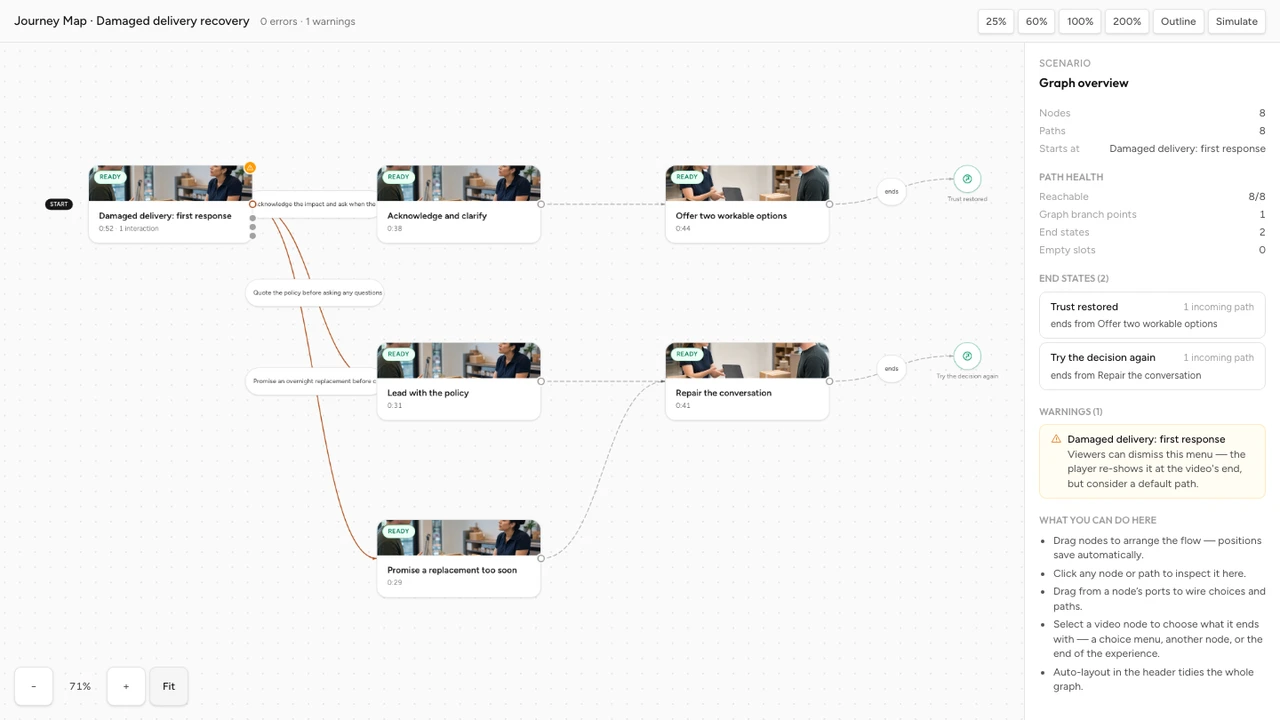
A strong first draft can fit on one screen: one opening Scene, one Choice Moment, two or three destinations, and a clear Outcome for each ending. Add a second decision only when the consequence changes what the learner must notice or do next.
Storyboard the complete branching route
Turn the decision and compact map into five linked planning views with stable IDs, Scene cards, a Route ledger, rejoin tests, and a coverage audit.
Open with the situation
Give the learner the role, the customer's request, the available evidence, and the immediate pressure without explaining the answer.
Pause at the real decision
Place the Choice Moment after the learner has enough context and before the simulated employee acts.
Show one immediate consequence
Let the next Scene reveal how the customer, system, or situation responds to the choice.
Ask for the next judgment only if needed
Use a follow-up choice when the first consequence creates a genuinely different problem to solve.
Finish with a useful debrief
Name the reasoning that helped or hurt, then connect it to the next real task or practice opportunity.
Write choices that expose reasoning
Choices are not alternate endings written for entertainment. Each option should represent a recognizable line of reasoning. One learner may rush to solve the payment problem. Another may defend the organization. A third may gather the information needed to solve the customer’s actual problem.
Plausible
A competent but rushed person might genuinely consider each option.
Diagnostic
Each option reveals a different assumption, priority, or missing step.
Speakable
The wording sounds like something a person could actually say or do.
Consequential
The next scene changes in a way that follows from the decision.
- Keep the action level consistent. Do not mix one line of dialogue, a broad strategy, and a complete five-step procedure in the same choice set.
- Remove comic villains. An obviously rude or reckless option rarely diagnoses anything beyond basic recognition.
- Keep details available. The learner should not need to guess policy, inventory, timing, or authority that the scene never provided.
- Use natural language. Read each option aloud as if an employee were saying or doing it.
- Do not hide the difference in wording. Difficulty should come from the judgment, not dense sentences or near-duplicate phrasing.
Write choices that reveal real judgment
Use a repeatable method to turn competing priorities into credible, comparable actions without signalling the preferred route.
How to Set the Right Difficulty for Video Questions
Separate useful decision difficulty from ambiguity, missing context, and avoidable reading burden.
Make consequences do the teaching
The next Scene should answer, “What changed because I chose that?” Show the customer’s reply, a new piece of information, a change in risk, a missed opportunity, or a better position for the next decision. Then add a short explanation when the consequence alone could be misread.
Use three layers of response:
- Natural consequence: the simulated world responds.
- Instructional feedback: the experience explains the reasoning and names the evidence.
- Next opportunity: the learner applies the lesson in a new decision or finishes with a focused debrief.
How to Write Useful Feedback for Video Questions
Turn correctness and consequences into explanations that help the learner notice the evidence and improve the next response.
Decide when paths should split or rejoin
Split the route when a decision changes the information, relationship, risk, available remedy, or next task. Rejoin routes when the consequence has been taught and every learner can fairly continue with the same context.
- Keep paths separate if the customer has escalated, trust has changed, a resource is no longer available, or the learner needs a different recovery action.
- Rejoin paths after a short consequence and debrief when the next skill is genuinely shared.
- Use an Outcome when the experience has reached an intentional finish rather than letting a route stop without closure.
- Use a Rule only when the condition represents a design decision you can explain and test, such as a valid score threshold.
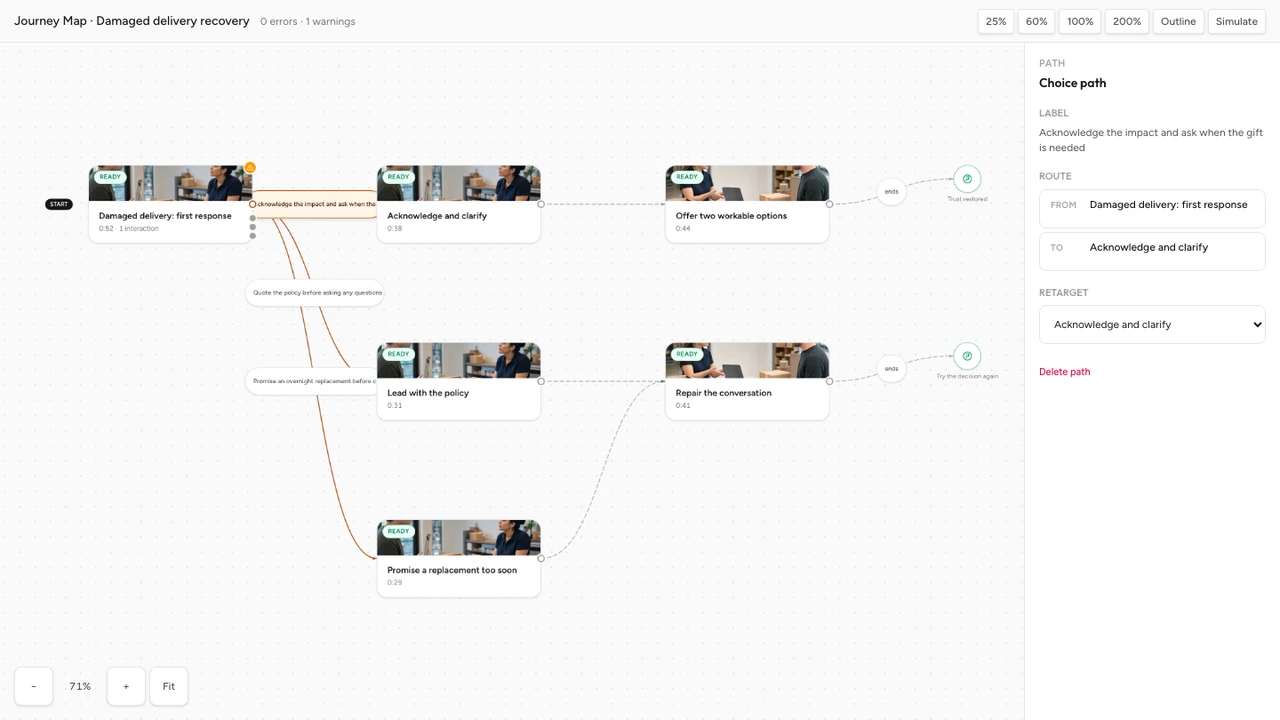
Rejoining is not cheating. It controls production cost and keeps the learner’s route understandable. The test is whether the shared Scene still makes sense after every route that enters it.
Use scores and rules carefully
A scenario can teach without a score. Route outcomes, explanations, and practice may be enough. Add scoring only when a chosen action or submitted response supports an interpretation you are prepared to defend.
If the scenario is scored, answer these questions before authoring:
- What does a point represent: recall, decision quality, process completion, or something else?
- Can learners on different reachable routes earn comparable evidence?
- Does an early mistake remove later opportunities to demonstrate the objective?
- Does the rule use a score that can actually be obtained on that path?
- Will any text or media response remain provisional until human review?
How to Choose a Quiz Pass Score
Check obtainable scores, consequence, evidence quality, manual review, and final result states before routing on a threshold.
Worked example: recover a damaged order
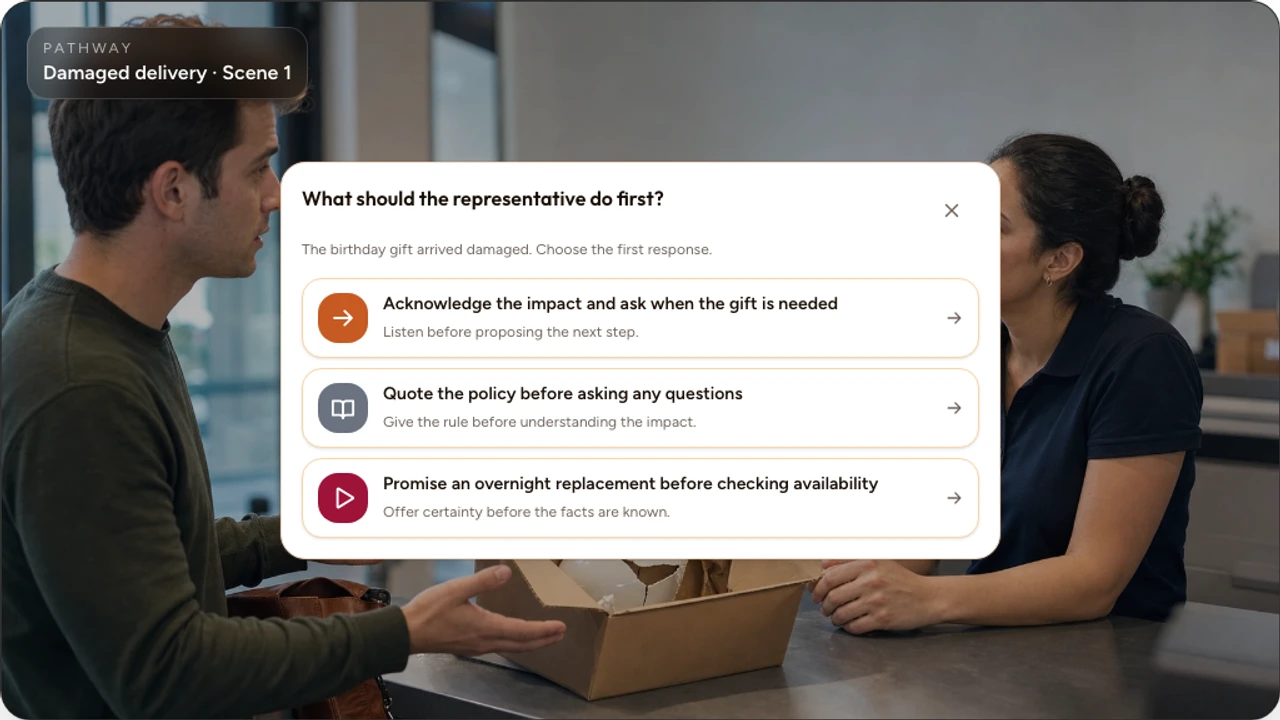
The opening video shows a customer contacting support. The package contains a damaged gift. The customer says, “This arrived broken, and I cannot believe I have to deal with this now.” The learner has the order record and replacement policy but does not yet know the event date.
Worked route blueprint
One complaint, three visible judgments
Opening scene: a customer receives a damaged birthday gift and needs a useful response before the event.
Choice
Acknowledge the damage and ask when the gift is needed
- What it reveals
- Learner protects the relationship and gathers the missing constraint.
- Immediate consequence
- The customer says the birthday is Saturday. An expedited replacement is still possible.
- Next route
- Route to a remedy decision with enough context.
Choice
Issue a refund immediately without asking another question
- What it reveals
- Learner acts quickly but assumes money is the customer's main need.
- Immediate consequence
- The customer repeats that the gift, not the payment, is the urgent problem.
- Next route
- Route to a recovery scene with less trust and less time.
Choice
Explain that the courier caused the damage
- What it reveals
- Learner prioritizes blame and policy over ownership of the conversation.
- Immediate consequence
- The customer becomes more frustrated and asks for a supervisor.
- Next route
- Route to an escalation scene and a narrower set of remedies.
The best route does not reward a magic phrase. It rewards the sequence: acknowledge the impact, gather the missing constraint, then choose a remedy the organization can deliver. The weaker routes remain plausible and produce recoverable consequences, so the learner can see why speed or defensiveness felt attractive and why each response created more work.
The second decision
After the learner learns that the birthday is Saturday, present a second Choice Moment. Options might include an expedited replacement with a confirmed address, a refund that does not solve the deadline, or an unsupported delivery promise. The consequence should reveal feasibility, not merely announce “correct” or “incorrect.”
The outcomes
- Recovered trust: the learner understood the deadline, offered a feasible remedy, and confirmed the next step.
- Partial resolution: the transaction was addressed, but the customer’s real need remained unresolved.
- Escalation: blame or an unsupported promise reduced trust and required supervisor involvement.
Build the map in Interakly
In Interakly, a Pathway organizes the experience as Scenes connected by Routes. A Choice Moment appears inside a Scene and each option is wired to a destination Scene or Outcome. The Journey Map is the visual authority for those destinations.
Create a Pathway
Open the Pathways library and start from a blank Journey Map or the two-choice decision starter.
Name the opening Scene
Use a role and situation the creator can recognize, then attach a video that provides the decision context.
Add the Choice Moment
Place it after the relevant context, write at least two clear options, and make the video wait for the route decision.
Wire every option
Connect each choice to an existing destination, a new Scene, or an intentional Outcome, then name the Route clearly.
Attach consequence Scenes
Let each destination show what changed, then add a debrief or another decision only where the objective needs it.
Preview the learner journey
Test the Choice Moment and destination in the real learner presentation, including phone and embed views that matter to the audience.
Run Launch Check
Resolve missing content, unwired choices, unreachable Scenes, invalid interactions, and other blockers before publishing.
How to Create a Branching Video
Follow the current Interakly workflow from a new Pathway through Scenes, Choice Moments, route wiring, Preview, Launch Check, and release.
Design for accessibility and mobile use
Accessibility begins in the script and route design. A keyboard-operable choice cannot repair missing context, a color-only consequence, or a path that depends on seeing an unlabeled visual detail.
- Give every choice a clear text label that stands on its own.
- Do not communicate route quality through color, position, or icons alone.
- Caption speech and meaningful sound in every Scene.
- Describe the visual evidence needed for the decision.
- Keep the keyboard focus order aligned with the visible choice order.
- Provide a non-spatial equivalent when a task depends on pointing or visual location.
- Preview long labels and consequence copy at a phone-sized player before release.
- Confirm that each transition announces a useful Scene or Outcome, not only a visual change.
Mobile review is also a writing test. A choice that needs three paragraphs to explain is probably doing more than one job. Shorten the decision, not the essential context.
Interactive Video Best Practices
Review source limits, timing, feedback, responsive presentation, accessibility, and release checks across the complete video experience.
Test every route before launch
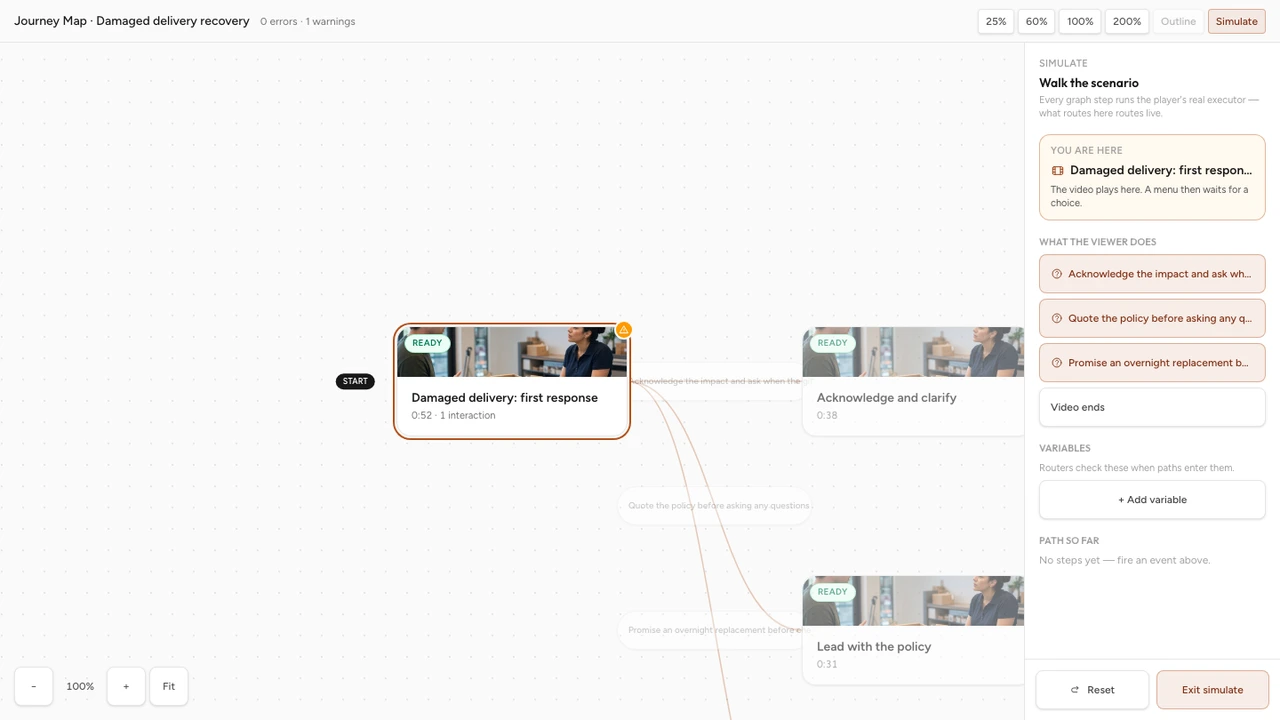
The happy path is only one test. Build a route inventory that names every Choice Moment, option, destination, rejoin, Rule, and Outcome. Assign a tester to each complete route and record the result.
Map integrity
- Every choice has a destination.
- Every Scene is reachable from the start.
- Every ending is intentional and clearly named.
Timing and context
- The Choice Moment follows enough evidence to decide fairly.
- Playback pauses while a required route choice is open.
- The next Scene begins without repeating or skipping vital context.
Evidence and fairness
- The route reflects reasoning rather than wording tricks.
- Reachable paths collect comparable evidence when a score matters.
- An accessible alternative carries the same essential task.
Learner finish
- Every route explains the consequence of the decision.
- The learner can recognize completion and the next step.
- Phone, desktop, replay, and return visits preserve a coherent state.
In Interakly, Launch Check is a server-backed release gate. It can block publishing when Scenes lack content, source video is unavailable or not ready, a Choice Moment is invalid, an option lacks a destination, or the graph contains another fatal problem. Warnings still require human review. For example, a choice at the opening frame or a Choice Moment that does not pause may be technically possible but confusing.
Read route evidence after release
Pathway Insights can show which Scenes were reached, which Routes were chosen, and where sessions stopped. Use those signals to find design questions, not to invent conclusions about motivation or competence.
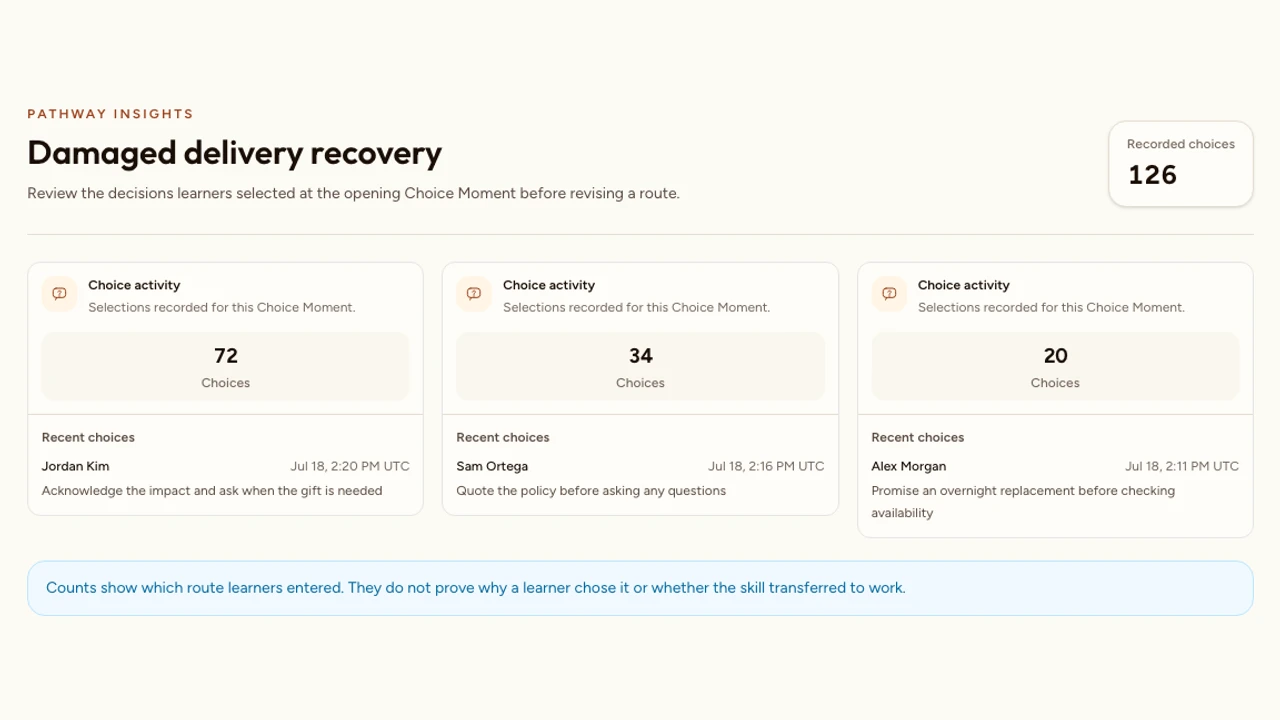
- One route dominates: check whether it reflects a real preference, an obvious wording clue, or a destination preview that makes the choice too easy.
- A Scene has low reach: verify the incoming Routes and decide whether the Scene represents a rare but important decision or an unnecessary detour.
- Drop-off follows a Choice Moment: inspect label length, context, playback state, destination delay, and mobile presentation.
- Many learners reach a weak Outcome: review the source instruction, the plausibility of the choice set, and the feedback before assuming a learner deficit.
Route evidence describes activity inside this authored experience. It does not by itself prove transfer to the workplace, explain why a person chose an option, or establish that one branch caused a later outcome.
Common branching scenario mistakes
The map begins before the objective
Writers draw interesting routes without deciding which judgment the experience should reveal.
One option is serious and the others are jokes
The choice checks whether the learner can spot the writer's preferred wording instead of diagnosing reasoning.
Feedback replaces consequence
A text card says the answer was weak, but the customer, system, or situation never responds to the decision.
Every branch stays separate forever
Production effort grows while later Scenes repeat the same information with minor wording changes.
Routes stop without an Outcome
The learner reaches the end of a Scene but cannot tell whether the scenario is complete or what the route meant.
A score hides unequal evidence
Two learners receive the same percentage after encountering decisions with different difficulty or opportunity.
Only the author tests the experience
Unwired choices, assumed context, unclear consequences, and mobile problems survive because the map already makes sense to its creator.
FAQ
What is a branching scenario?
A branching scenario is a learning experience in which a learner makes a decision, sees a consequence, and follows a route shaped by that decision. A useful scenario tests judgment in context rather than hiding ordinary quiz questions inside a story.
How many branches should a scenario have?
Use the fewest branches needed to show the important differences between decisions. Begin with one opening decision, two or three credible choices, and one meaningful follow-up where it adds evidence. Add another route only when it teaches something the existing routes cannot.
Should every choice lead to a different ending?
No. Routes can split to show different immediate consequences and later rejoin when the next task is genuinely shared. Keep paths separate when an earlier decision changes the information, risk, relationship, or action that follows.
What makes a branching choice meaningful?
A meaningful choice represents a decision someone could reasonably make, reveals a difference in reasoning, and produces a consequence tied to the learning objective. Avoid one obviously correct option beside silly or unethical distractors unless the objective truly is basic recognition.
Should a branching scenario be scored?
Score only when the decisions provide defensible evidence for a stated outcome. Practice scenarios can use feedback and route outcomes without a score. If you score, define what the points mean, make the evidence comparable across reachable paths, and test every denominator before launch.
Can a branching scenario use YouTube video in Interakly?
A Pathway Scene can use YouTube for compatible contained Choice Moments, but uploaded video is required for spatial activities and the complete segment-based branching workflow. Confirm source behavior in Preview before promising a seamless route experience.
How do I test a branching scenario?
Make a route inventory, then complete every choice, rejoin, rule, and outcome on desktop and phone. Check timing, route labels, feedback, score behavior, accessibility, replay, and the learner's understanding of what happens next. In Interakly, resolve every Launch Check blocker before publishing.
Interactive Video for Corporate Training
Place branching practice inside a broader onboarding, compliance, service, or enablement program.
How to Create Interactive Video
Compare the general video workflow with the additional planning, route wiring, and QA required for a Pathway.
How to Write Better Video Quiz Questions
Use a question-writing framework when one route needs a scored knowledge check instead of another decision branch.
Design one decision that deserves a branch
Define the performance, write two or three credible choices, show a believable consequence, wire every destination, and test the complete learner route before adding more complexity.
Explore Choice Moment