Pretesting with Video: A Practical Guide
Use prequestions before video instruction without punishing prior ignorance: choose targets, correct errors, protect untargeted learning, and evaluate cautiously.
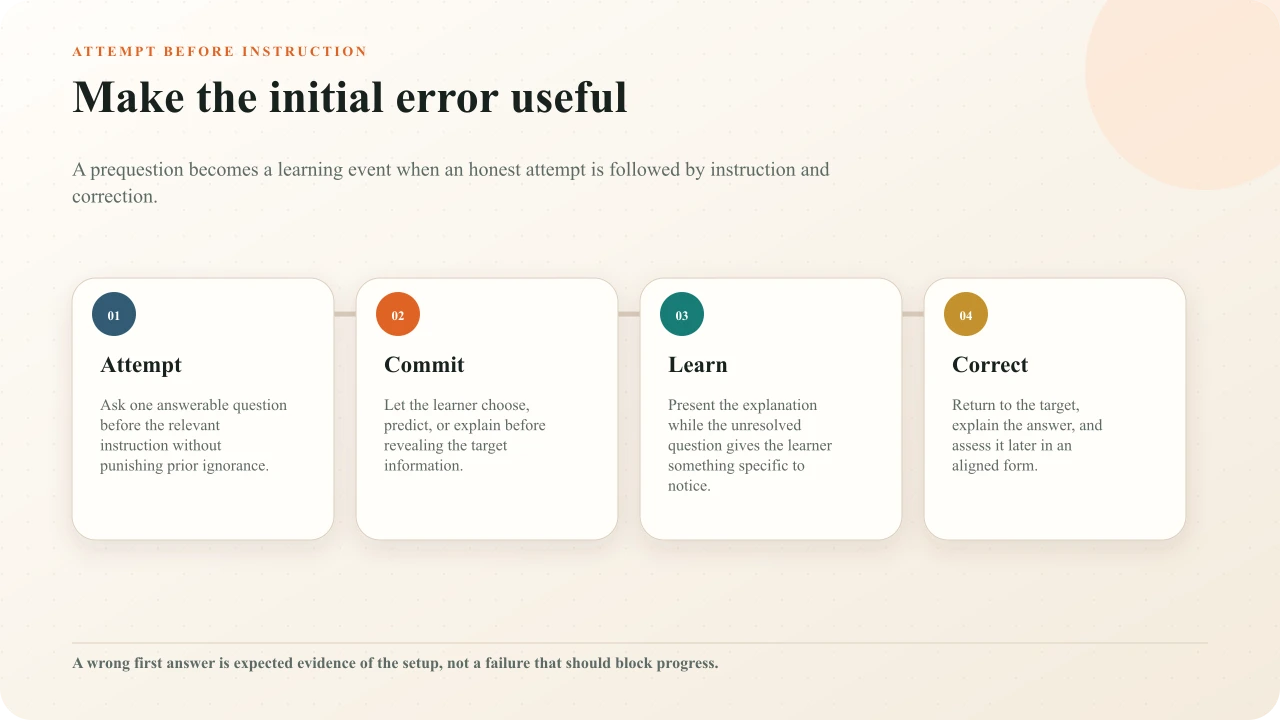
A prequestion asks learners to attempt an important idea before the relevant instruction. They may answer incorrectly, but the unresolved question can give the following explanation a purpose: the learner has a prediction to test, a distinction to notice, or a gap to correct. The first response is not the end of assessment. It is the beginning of a deliberately completed learning loop.
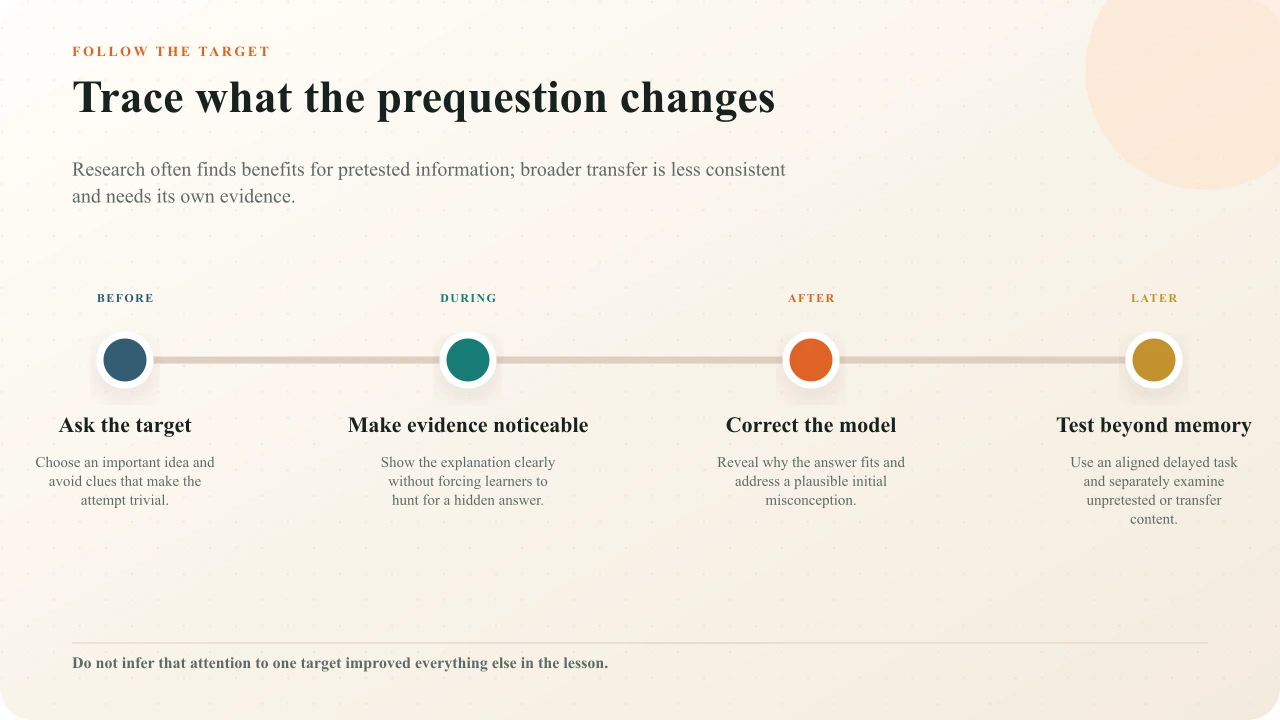
Pretesting research is promising but not permission to put a scored quiz at the start of every video. Effects vary by question, material, placement, feedback, comparison, and outcome. Benefits are often clearest for pretested information, while broader effects on unpretested material are less consistent. This guide translates the evidence into a cautious video workflow and keeps diagnostic, prediction, retrieval, and certification claims separate.
Define pretesting precisely
In a learning-oriented pretest, the target material has not yet been taught in the relevant sequence. The learner makes a genuine attempt, encounters the instruction, receives correction, and later has an opportunity to use the idea. Richland, Kornell, and Kao reported a pretesting effect across five experiments in which unsuccessful initial retrieval was followed by learning from a passage. Their result supports studying this sequence; it does not imply that every failed question, medium, or learner will benefit.
Write the target in the plan: “Learner distinguishes correlation from a causal claim in the upcoming case.” Then write what the video will teach and what later task will show. If the source never explains the answer, the prequestion is a trap. If the answer is already printed in the stem, the learner has not made a meaningful attempt. If the only later measure repeats the same wording, the evidence may reflect memory for the prompt rather than flexible understanding.
Distinguish four similar activities
Pretesting, diagnosis, prediction, and retrieval practice can all appear near the start of a lesson, but they answer different questions. A pretest attempts target content before instruction. A diagnostic sample estimates prior knowledge so support or placement can change. A prediction uses currently available conditions to forecast an outcome. Retrieval practice recovers material that has already been studied. Labeling all four “pretest” makes the purpose and interpretation unstable.
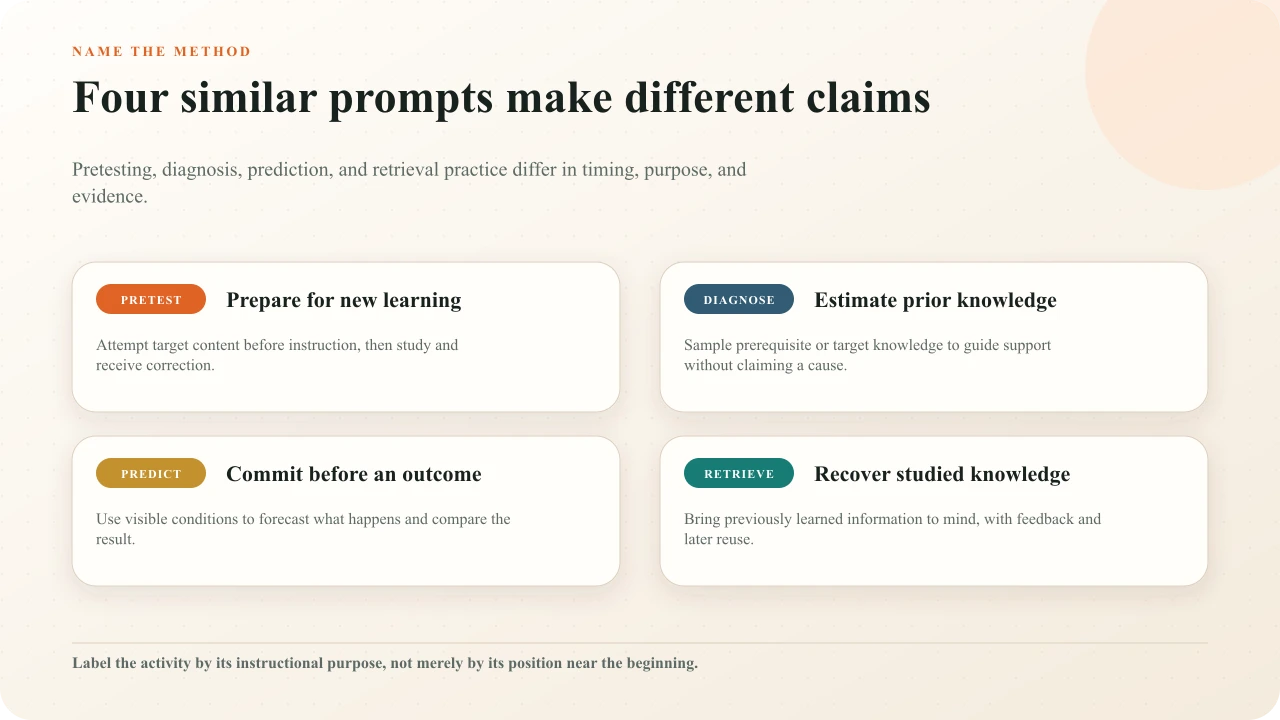
A beginning-of-course assessment that places learners into different paths is not a harmless learning prompt. It needs enough coverage and quality to support the placement decision, plus fairness, accommodations, privacy, and a recovery route. A prediction can use unfamiliar content when all necessary conditions are visible. Retrieval practice can occur before a new video when it deliberately recovers knowledge from a previous lesson. The retrieval-practice guidedevelops that later-use sequence in detail.
Ambiguous opening quiz
Ten difficult questions produce a percentage, but learners do not know whether it affects grades, placement, instruction, or merely the author's curiosity.
Purposeful prequestion
One low-stakes target is attempted before its explanation, corrected explicitly, and revisited later in a changed application.
Choose one important target
Choose knowledge that organizes the following explanation: a misconception, causal relationship, governing rule, discriminating cue, sequence dependency, or concept learners must use later. Avoid incidental names, decorative numbers, or a surprise fact included only because it makes a difficult question. A useful target gives the learner a reason to inspect the lesson's central evidence.
Keep the set small. Prequestions can direct attention toward tested material, which may be helpful for that target but may also change attention to everything else. Pan and Carpenter's review of the prequestion effect synthesizes benefits and important procedural differences. A meta-analysis by St Hilaire, Chan, and Ahn describes the overall prequestion effect and mixed evidence for unpretested information. Design the target and the rest of the lesson as separate evidence questions.
Map each question to the exact scene, explanation, or demonstration that resolves it. If three questions all point to one brief sentence, they may overemphasize that sentence. If one question requires integrating an entire model, tell the learner to listen for a relationship rather than a single keyword. The pretest should prepare meaningful attention, not turn the video into an answer hunt.
Keep the first attempt low stakes
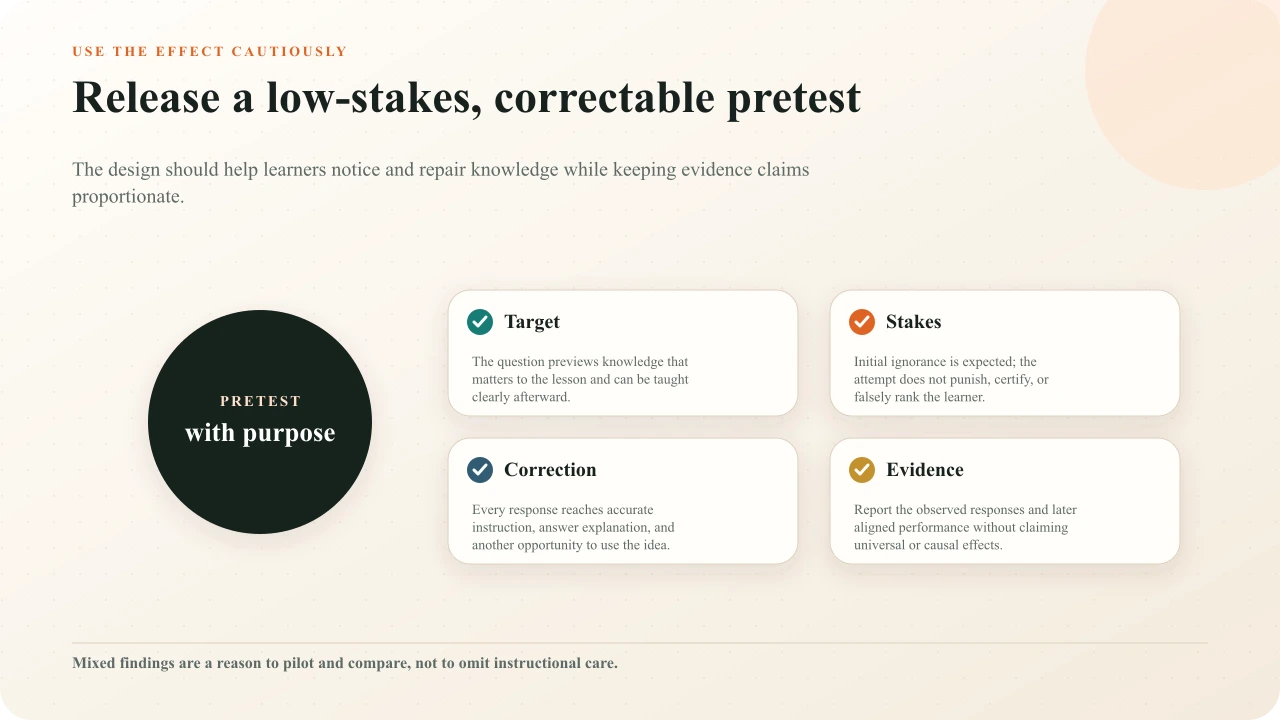
Tell learners why they are attempting unfamiliar material: “Make your best prediction. This is not graded; the next section will build and revisit the idea.” Do not show a failing percentage, lock the lesson, or compare people on knowledge they have not yet had an opportunity to learn. A response record can support reflection or design review, but its meaning is bounded by the deliberate lack of prior instruction.
If a pretest affects access, placement, certification, or grades, treat it as an assessment program rather than borrowing the learning-effect label. Define the construct, decision, coverage, scoring, retake, appeal, security, accommodations, privacy, and validation. The IES practice guide on organizing instruction and studysupports quizzing and explanatory questions as learning practices, but it does not validate a local high-stakes decision merely because a question appears before instruction.
Place the prequestion before relevant instruction
Put the question immediately before the coherent section that teaches it, not necessarily at the first second of the entire video. Establish neutral context and instructions first. For a scenario prediction, show the decision conditions but stop before revealing the consequence. For a concept question, avoid an opening title or thumbnail that leaks the answer. For a procedure, do not ask learners to guess safety-critical action when guessing itself would be misleading; use a non-operational scenario and correct it clearly.
Placement can influence what learners attend to. A study of prequestion placement and broader benefits across text and video materials found that presentation order mattered in the investigated conditions. The design implication is to align the prequestion closely with its instruction and test broader content separately. The video question-placement guide helps inspect conceptual boundaries, answer leakage, interruption cost, and the return to playback.
Make the answer noticeable without hiding it
The instruction should resolve the prequestion as part of genuine teaching. Signal the important distinction, show the decisive frame, and explain the relationship in plain language. Do not place the answer in an unrelated late section to reward persistence. Do not highlight only a keyword when the target is a causal model. The learner should be able to say why the answer fits, not merely recognize that a phrase appeared.
Use the source medium. A video can show temporal change, procedure, expression, spatial relation, comparison, or consequence. Let the prequestion prepare observation of that evidence. If the answer is purely a definition and the moving image adds nothing, concise text or a diagram may be more efficient. Theinteractive-video lesson-design guide helps match preparation, media, practice, and later transfer instead of making the player carry every part of instruction.
Correct the initial model
Return explicitly to the question. State the answer, name the decisive evidence, and contrast a plausible wrong model. “The pressure falls because the outlet opens; temperature is not the changing condition in this case” repairs more than “Incorrect.” If learners entered open text that is merely recorded, do not pretend the system evaluated meaning. Offer a model response, comparison criteria, facilitator review, or self-check as appropriate.
Initial errors should not be left active. Use immediate feedback when the instruction has already resolved the target, or briefly delay a reveal until the learner has seen the relevant evidence. Then ask the idea again later with changed wording, less cueing, or a new application. Thefeedback-writing guide includes structures for correction, misconception, retry, and open-response acknowledgment.
A pretest answer can also become a reflection anchor. Ask learners to compare the initial reason with the final model: what changed, which evidence mattered, and what cue would they use next time? Preserve dignity. The goal is not to dramatize how wrong someone was, but to make conceptual change inspectable.
Protect unpretested learning
Prequestions can focus attention, so inspect what falls outside that focus. Give the lesson a clear organizing question, visible structure, and transitions that explain how unpretested ideas relate to the target. Avoid a long bank of questions that makes every unmentioned detail seem unimportant. If the outcome includes a model with four relationships, do not pretest only the easiest relationship and then claim the whole model improved.
Measure pretested and unpretested information separately, then include a transfer or explanation task if the claim goes beyond item memory. Welhaf and colleagues reported no statistical evidence for some proposed pretesting benefits in a video-lecture experiment. Counterevidence is valuable: it prevents the method from becoming a ritual and encourages teams to compare their actual materials, learners, and outcomes.
Use more than one response format
Multiple choice makes commitment and feedback practical, but visible alternatives can cue the target and expose misconceptions. Open response supports generation but needs an honest review or model-comparison route. A poll can capture a prediction when no response is inherently correct at that moment. A spatial click can ask where evidence will appear in uploaded video, but the later explanation must still identify the governing relationship.
Match the later assessment to the intended use. If learners must independently explain, include an uncued explanation. If they must discriminate cases, use plausible alternatives with changed surface details. If they must perform a procedure, video responses can prepare observation and sequence but cannot replace appropriate performance evidence. The method should serve the final task rather than maximizing the number of recorded events.
Build the sequence in Interakly
Write the target and limit
Name what the learner will attempt, what the following source teaches, and what the response cannot establish.
Place the prequestion
Set it before the relevant instruction, after neutral directions, and before any title, narration, or frame that reveals the answer.
Choose the smallest honest response
Use a choice, prediction, open response, or spatial activity that fits the evidence without implying automated judgment that does not exist.
Teach and correct
Make the answer visible in the source, provide explicit feedback, and reconnect the learner's initial model to the explanation.
Revisit in a changed form
Use a later aligned question or application with less cueing and separately inspect learning that was not pretested.
Preview the published route
Complete the sequence on desktop and phone, including wrong, correct, replay, skip, open-response, and accessibility paths.
Use the full learner route, not the editor's timestamp alone. Confirm that playback pauses before answer leakage, the selected state is visually unambiguous, feedback stays readable, and the source resumes at the intended point. Estimate the complete time for attempt, thought, instruction, correction, and later use. A one-minute source can still create an incoherent five-minute learner task.
Evaluate the result cautiously
Start with descriptive questions. Did learners attempt? Which alternatives or themes appeared? Did they reach the corrective explanation? How did performance change on the later matched item? What happened on unpretested items? Were there device, access, replay, or abandonment problems? A classroom meta-analysis of quizzing effects in real educational settings provides useful broader context, but local implementation and comparison still determine what can be claimed.
Do not compare the pretest and posttest percentages as if the difference proves the pretest caused learning. The video instruction, repeated item, feedback, learner selection, time, and other experiences also changed. For a causal question, use an appropriate comparison, allocation method, sample, analysis, and preregistered outcome. For product improvement, treat response patterns as clues and combine them with observation, interviews, source review, and delayed aligned tasks.
Audit the complete learning loop
Ask a subject reviewer whether the question has one defensible interpretation, the following instruction truly teaches it, every feedback path is accurate, and the later task matches the intended knowledge. Ask a representative learner what they thought the opening question was for, whether they felt punished, which evidence changed their answer, and what they now believe. A design can be technically correct yet undermine trust if it resembles an unexplained gate.
Test captions, keyboard order, visible focus, selected state, touch targets, replay, seeking, and the shared or embedded route. Verify that an unanswered or skipped prequestion does not conceal the instruction unless that rule is explicitly justified. Review data collection and retention, particularly when the question touches sensitive identity, health, workplace, or performance information. Remove personal detail that the learning purpose does not need.
Interakly product boundaries
Interakly can place a configured question before a relevant video section, pause the source, record supported response events, show authored feedback, and continue the learner route. Uploaded video supports spatial activities tied to the authored frame; supported YouTube media uses compatible non-spatial interactions. The editor and published player can preview and deliver the sequence, but they do not determine whether a question is a valid pretest or whether its effect generalizes.
A response record shows what was selected, written, located, skipped, or completed under the configured conditions. It does not diagnose why the learner answered, prove durable retention, establish transfer, or isolate a pretesting effect. Open responses are not automatically semantically evaluated merely because text was accepted. Use formative assessment with video to connect evidence to an instructional decision and keep stronger claims behind stronger designs.
Place the pretest inside a complete lesson
Connect preparation, media evidence, response, feedback, later practice, and transfer beyond the player.
Sources and further reading
- Richland, Kornell, and Kao (2009), The pretesting effect.
- Pan and Carpenter (2023), Prequestion and pretesting effects: a review.
- St Hilaire, Chan, and Ahn (2024), meta-analysis of the prequestion effect.
- Welhaf and colleagues (2022), pretesting in a video lecture.
- Study of prequestion placement and broader benefits in text and video.
- Yang and colleagues (2021), classroom quizzing meta-analysis.
- Institute of Education Sciences practice guide: Organizing Instruction and Study.
- W3C guidance for planning accessible audio and video media.
FAQ
What is pretesting in a video lesson?
Pretesting asks learners to attempt target content before the relevant instruction, then gives them a clear opportunity to learn and correct it. The initial response may prepare attention or reveal prior knowledge, but it should not be treated as mastery evidence by itself.
Does a pretest have to be graded?
No. For a learning-oriented pretest, low stakes or no stakes are usually more coherent because prior ignorance is expected. If the result changes placement, access, certification, or grades, it becomes a stronger assessment decision and needs appropriate validity, reliability, fairness, privacy, and review.
Should I show the correct answer immediately?
Make accurate correction available through the following instruction and explicit feedback. The useful sequence is attempt, instruction, correction, and later aligned use. Do not leave an error unresolved or make learners search an entire video for a concealed answer.
Is pretesting the same as retrieval practice?
No. Pretesting generally asks about target material before it has been taught in the current sequence. Retrieval practice asks learners to recover previously studied knowledge. Both involve generation and feedback, but their timing, purpose, and evidence differ.
Does pretesting always improve learning?
No. Reviews and meta-analyses report benefits across many conditions, especially for pretested material, but effects vary and some video studies report limited or null findings. Generalization to unpretested content is inconsistent. Pilot the design and keep claims tied to the observed task.
How many prequestions should a video use?
Use the smallest set that highlights genuinely important targets without narrowing attention away from the rest of the lesson. One well-chosen question can be enough. Count conceptual targets and complete learner time, not elapsed minutes or a desired quiz total.
Build a prequestion that completes the learning loop
Place one purposeful attempt before instruction, teach the target clearly, correct the response, and test the published route.
Explore higher education