How to Run an Interactive Video Pilot That Informs
Plan a bounded interactive video pilot with clear owners, implementation checks, learner evidence, privacy safeguards, and scale-or-stop decisions.
A pilot is not a small launch with a vague promise to “see how it goes.” It is a bounded decision process. The team names a need, tests a representative author-to-learner workflow, protects participants, observes implementation, reads evidence, and chooses whether to scale, iterate, extend, or stop.
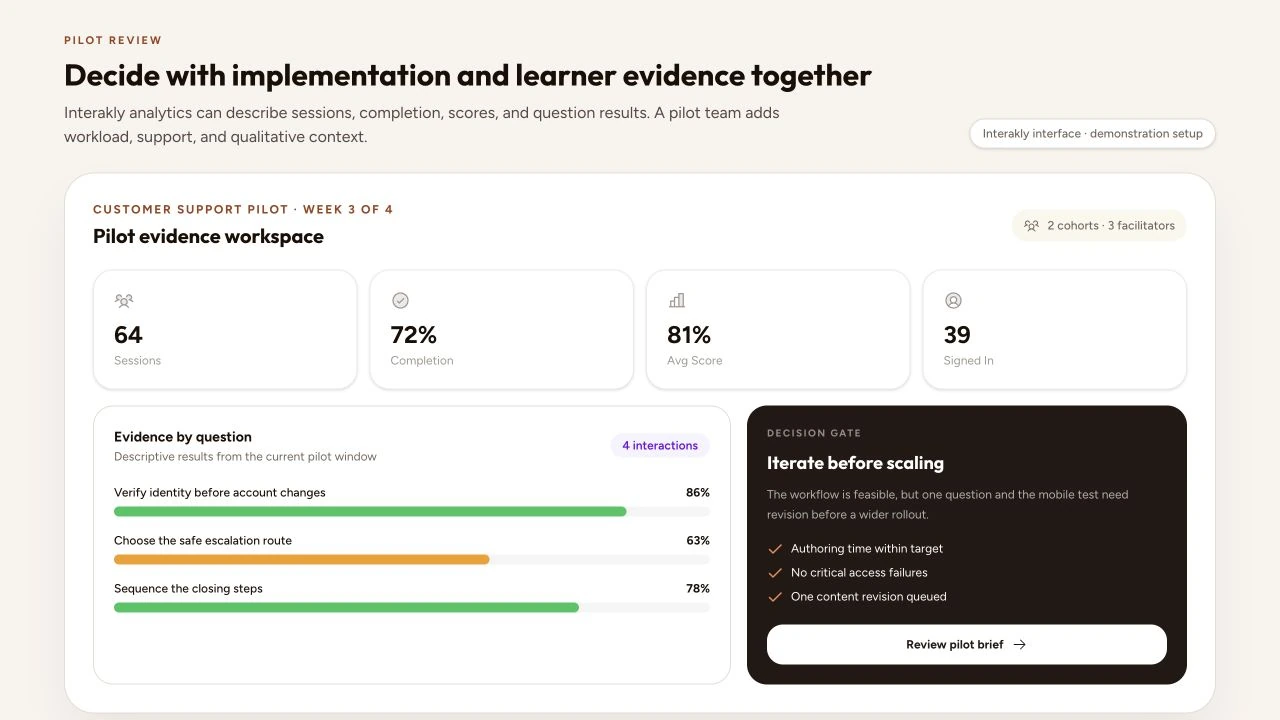
Interactive video pilots are especially easy to overread because the product generates attractive behavioral data. Sessions, completion, score, answers, and watch activity can describe the pilot. They do not by themselves prove why behavior occurred, whether learning transferred, or whether organization-wide adoption will produce the same result.
Treat a pilot as a decision process
Write the decision before choosing the measures. “Should this team expand interactive video to the full safety curriculum next quarter?” is specific enough to expose the required evidence: can authors build to the standard, can learners access and complete the experience, does the support model work, are safeguards adequate, and is the learning evidence promising enough to justify the next investment?
Digital Promise's current EdTech Procurement Framework organizes work from analyzing a need through selection, planning, implementation, evaluation, and scale. Its earlier eight-step pilot framework makes the same practical point: identify the need, plan the pilot and evidence, train and implement, collect data, analyze and decide, and share the result. Do not skip those steps because a tool can be configured quickly.
Define the need and population
Name the instructional or operational gap, the priority population, and the context that makes it consequential. Avoid broad goals such as “increase engagement.” Prefer an observable need: “new customer-support agents need repeated practice choosing a safe escalation route before live queue work.” Describe current practice and why the existing approach is insufficient.
Bound the population. Record role, location, language, device environment, prior knowledge, accessibility needs, assignment conditions, and inclusion criteria relevant to the decision. If participation is voluntary, say so; volunteers may differ from the eventual required audience. If the pilot uses one team or instructor, do not present the result as representative of every future setting.
Write a one-page pilot brief
A useful brief fits on one page and is specific enough to prevent silent scope expansion. Include the need, population, source material, learning objective, representative interaction workflow, dates, expected exposure, owners, safeguards, support route, evidence questions, minimum usable data, and decision rules. Link detailed technical or privacy documents rather than hiding the operating agreement in a long slide deck.
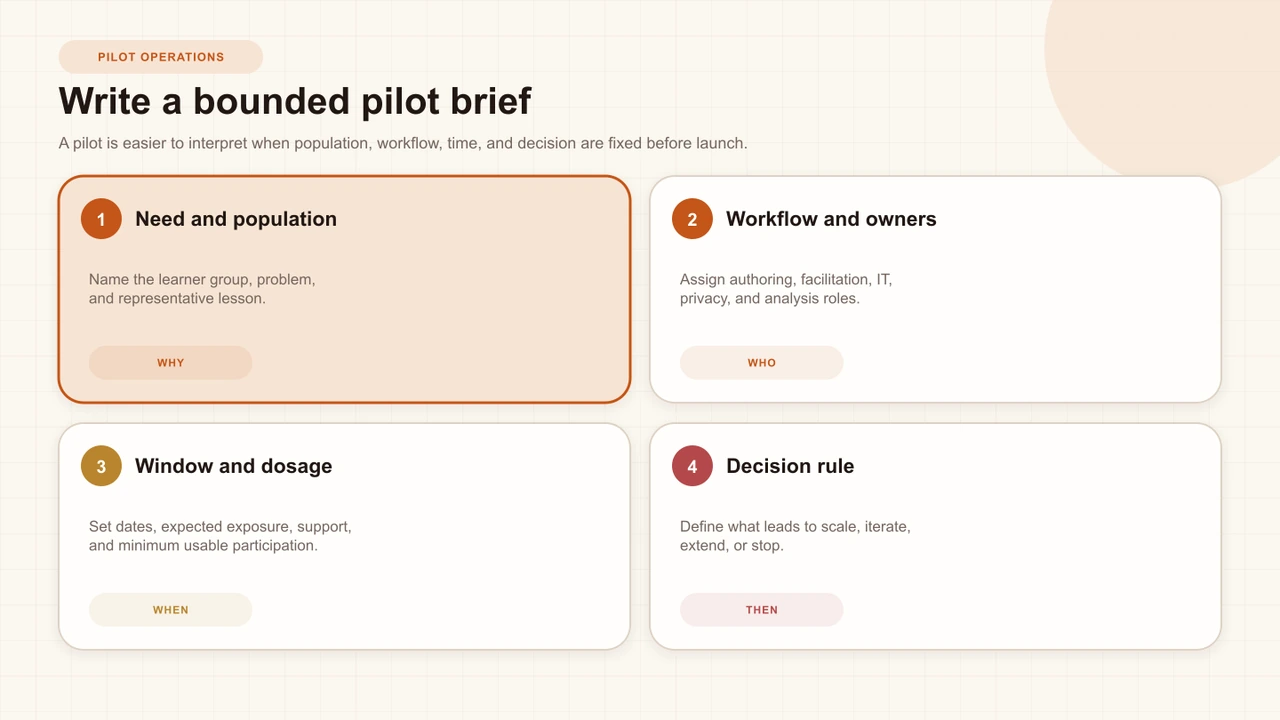
Assign named roles: sponsor, instructional owner, author, facilitator, technical administrator, privacy or safeguarding reviewer, learner-support contact, analyst, and decision owner. One person may hold several roles in a small pilot, but the responsibilities still need names. Clarify which decisions the vendor can advise on and which remain institutional.
Build a simple logic model
The IES Program Evaluation Toolkit begins with a logic model because a program cannot be evaluated coherently until the team describes how it is expected to work. For a pilot, map resources, activities, immediate outputs, short-term outcomes, and later outcomes. Keep the model honest about the links the pilot will and will not test.
For example, author training and an accessible template are resources. Building and assigning the lesson are activities. Published lessons, participant sessions, and completed practice are outputs. More accurate responses may be a short-term outcome. Safer behavior in live work is a later outcome that probably needs evidence outside the player and a design capable of addressing alternative explanations.
Unstated theory
Interactive video will improve performance because learners are more engaged.
Testable chain
With training and support, authors can publish scenario practice; learners can complete it; response and workplace evidence will be reviewed separately.
Choose a representative workflow
Select one or a few lessons that resemble the likely rollout. Include the relevant source: uploaded video if the program needs on-frame hotspots or movable spatial elements; YouTube if that is the normal media source. Use typical duration, caption quality, question complexity, access route, device mix, and publishing pattern. A deliberately easy demonstration can prove that the product opens, not that the program can operate it.
Define what stays fixed and what may change. If the pilot tests the workflow, allow instructional revisions but log them. If it compares two lesson designs, keep audience, timing, and assignment conditions as stable as practical. Preserve versions so later question or completion results are not attributed to content that no longer existed when those sessions ran.
Set privacy, access, and support
Complete the interactive-learning data privacy review before live participation. Decide whether the pilot needs anonymous sessions, a password, optional details, required sign-in, or individual invitations. Document fields, purposes, roles, learner notice, retention, exports, integrations, deletion, and the route for incidents or requests.
Rehearse access with accounts and devices that match the participant experience. Test the published link outside the editor session, the real LMS embed or launch, restricted domains, password and email states, captions, mobile layout, returning-session behavior, and support contact. A pilot should not discover its first identity or embed failure during a mandatory learner window.
Define a support threshold and route. Record response times, common issues, workarounds, unresolved failures, and which team absorbed the effort. A successful learner session that required invisible manual repair still contains important implementation evidence.
Prepare authors and learners
Give authors a bounded orientation tied to the representative task: source preparation, timeline placement, interaction states, feedback, appearance, access, preview, publishing, and analytics definitions. Ask them to build a small practice lesson independently. Record questions and errors; training demand is part of product fit, not noise to remove from the evaluation.
Give learners concise instructions on purpose, duration, required steps, accessibility and technical support, data use, and what the pilot will decide. Do not coach them through the interface so thoroughly that ordinary discoverability disappears from the test. When the program is high stakes, provide an alternative or recovery route appropriate to policy.
Measure implementation first
Before reading outcomes, ask whether the planned program happened. Did authors receive training? Were lessons published by the intended date? Did the correct population receive access? Was exposure close to the planned dosage? Did technical or policy failures prevent participation? Did facilitators use the workflow consistently? Without implementation evidence, a weak outcome is difficult to interpret.
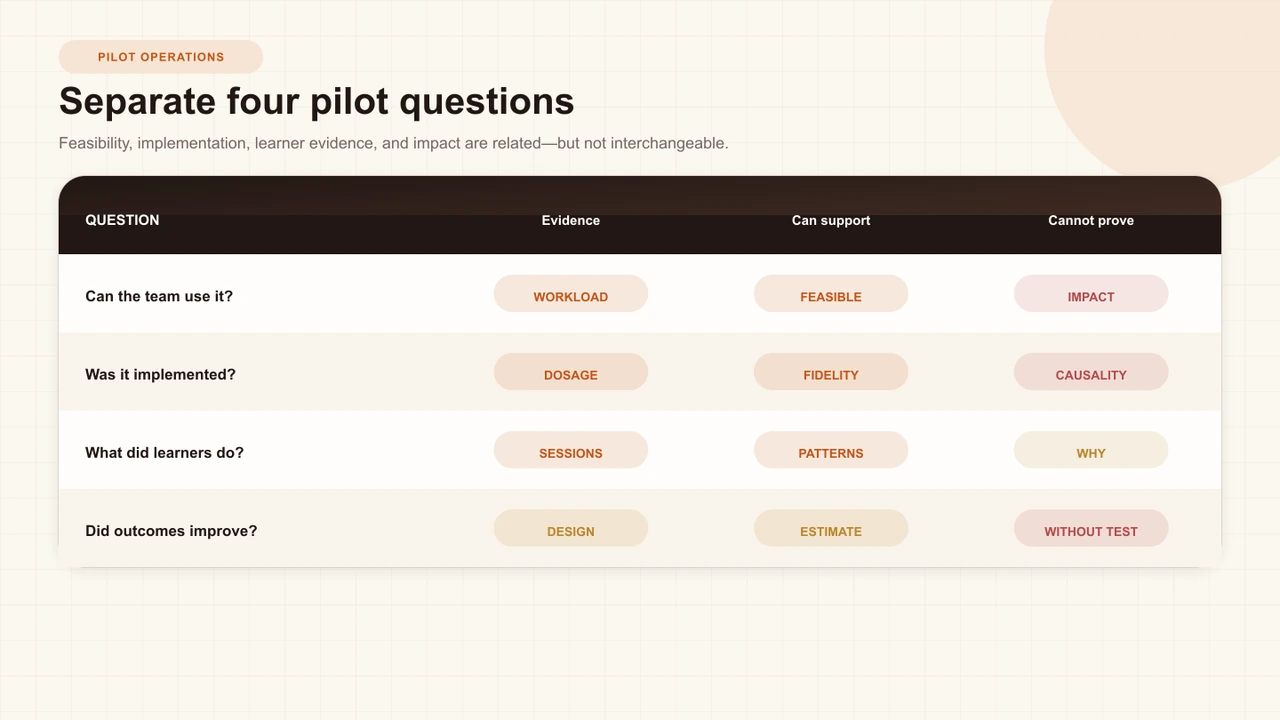
Track author time, number of revisions, support contacts, access failures, caption or media preparation, successful publishes, participant exposure, and deviations from the brief. Treat these as evidence about feasibility and fidelity. They are not inconvenient details to hide before presenting the dashboard.
Read learner evidence carefully
Start with definitions. A view may be a session rather than a unique person. A completion rate depends on its configured terminal rule. A score depends on which interactions are graded and how attempts are handled. Question distributions show recorded responses, not the cause of those choices. Watch heatmaps reflect relative event sampling, not a direct measure of attention.
Report counts beside percentages, date windows, inclusion rules, lesson versions, missing data, technical recoveries, and the distinction between signed-in and anonymous sessions. Use the detailed guides to reviewquestion evidence, completion rate, and watch-activity heatmaps.
Collect qualitative evidence
Ask authors where work slowed, which controls were unclear, what they could not create, how confident they felt publishing, and what support they used. Ask learners what they expected, where they hesitated, whether feedback helped, what device or environment affected them, and how the experience compared with the intended task. Use structured questions plus space for unanticipated issues.
Pair feedback with observation and product events. One complaint may reveal a severe issue even when it is not common; one enthusiastic comment does not estimate prevalence. Record who participated in interviews or surveys and who did not. Avoid presenting facilitator impressions as learner outcomes or anonymous quotations as representative without context.
Use explicit decision gates
Review hard safeguards first: privacy, accessibility, security, safeguarding, critical source compatibility, and any institutional requirement. Then review implementation, learner experience, evidence quality, support, and total operating effort. Compare the result with the thresholds written before launch rather than inventing a favorable rule after seeing the data.
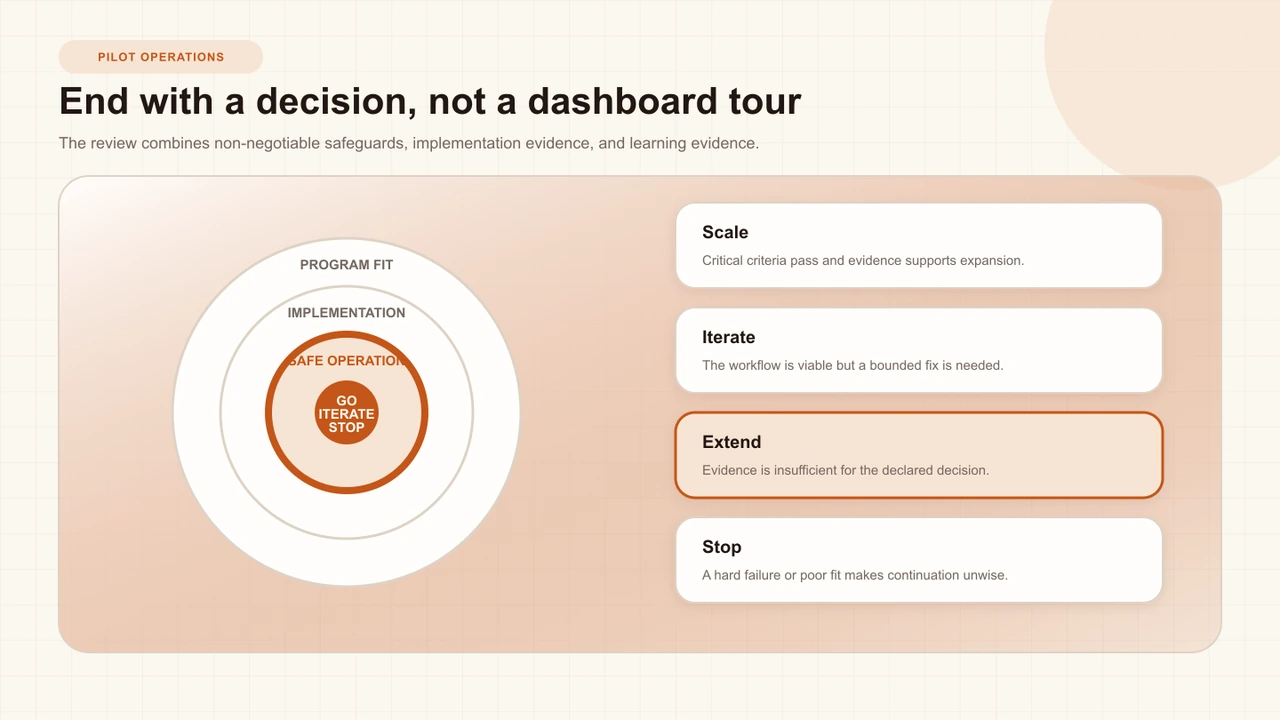
- Scale: critical criteria pass and evidence supports a defined expansion with an operating plan.
- Iterate: the workflow is viable, but a bounded content, training, configuration, or support change should be tested.
- Extend: the pilot did not produce enough appropriate evidence for the declared decision.
- Stop: a hard failure, poor fit, disproportionate burden, or weak value makes continuation unwise.
Share a short decision brief with the need, population, workflow, deviations, evidence, limitations, decision, owner, and next review date. Digital Promise includes summarizing and sharing because transparent results help participants and future decision-makers understand what was actually tested.
Interakly product boundaries
Interakly can support a pilot across authoring, learner preview, publishing, access, embeds, responses, completion, scoring, question analytics, and watch activity. Uploaded video supports spatial on-frame interactions; YouTube supports non-spatial timestamped interactions. Use the same source family in the pilot that the likely rollout will use.
Current analytics are primarily session- and response-based. They can describe behavior within the product under defined rules; they do not by themselves measure workplace transfer, long-term retention, satisfaction, cost savings, or causal impact. Interakly access settings provide choices such as password, sign-in, allowlists, invitations, and embed restrictions; the institution remains responsible for choosing and governing the appropriate route.
Use the interactive-video tool evaluation guide before a pilot when several candidates remain. Use the interactive-video best-practices guide as the common lesson-quality baseline so a weak design is not mistaken for a platform failure.
A four-week pilot sequence
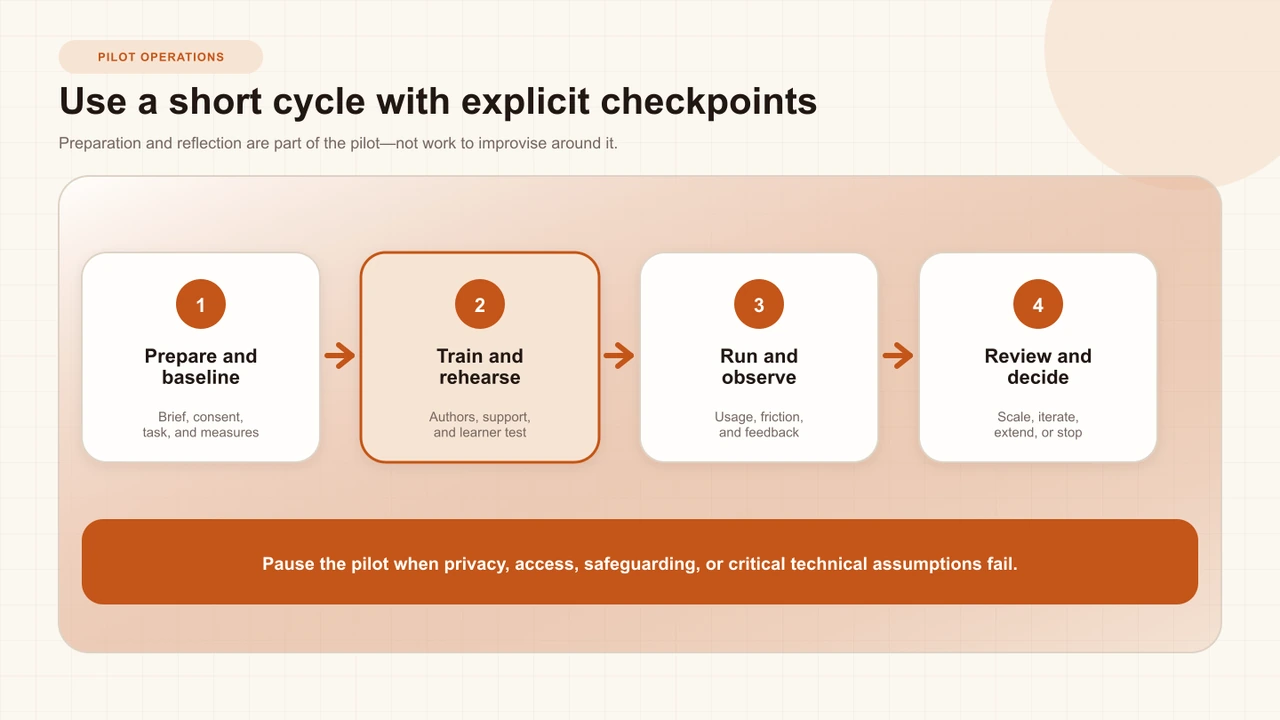
Week 0 — prepare
Approve the brief, data path, access route, representative lesson, owners, baseline, and decision rules.
Week 1 — train and rehearse
Have authors build independently; test the published learner and integration flow; repair only documented blockers.
Weeks 2–3 — run and observe
Monitor exposure, support, technical reliability, deviations, product evidence, and structured feedback.
Week 4 — reconcile and decide
Review safeguards, implementation, learner evidence, qualitative findings, uncertainty, workload, and the predeclared gate.
After the decision
Assign the next action, communicate to participants, handle retention and deletion, and schedule any follow-up evaluation.
Sources and further reading
- Digital Promise EdTech Procurement Framework — a current phased process from need analysis through evaluation and scale.
- Digital Promise eight-step Ed-Tech Pilot Framework — pilot planning, implementation, data collection, decision, and sharing.
- IES Program Evaluation Toolkit — logic models, questions, design, sampling, data quality, collection, analysis, and dissemination.
- IES Logic Model Workshop Toolkit — practical support for describing a program and connecting it to evaluation questions.
- IES technical assistance for rigorous impact evaluations — design and implementation-research resources for stronger causal questions.
- What Works Clearinghouse Handbooks — current standards for assessing education research evidence.
- Jisc Code of Practice for Learning Analytics — responsibility, transparency, validity, access, and stewardship principles.
FAQ
How long should an interactive video pilot run?
Long enough for the representative workflow and decision criteria to be observed, but short enough to remain bounded. A four-week cycle can work for a small training use case; academic schedules or low-frequency tasks may require longer.
How many learners does a pilot need?
The answer depends on the decision. A small group may reveal severe usability and workflow failures, but it cannot support every outcome comparison. Define a minimum usable participation level and report uncertainty rather than choosing an arbitrary universal number.
Does a higher completion rate prove the pilot worked?
No. Completion is session behavior under a configured rule. Read it with implementation, question evidence, score, access conditions, technical reliability, qualitative feedback, and any outcome measures appropriate to the design.
Should a pilot use real learner data?
Use only what the defined decision requires and what the approved plan permits. Rehearse with demonstration data first, then apply access, transparency, retention, and role controls before live participation.
What are valid pilot outcomes?
Scale, iterate, extend, or stop are all valid. A pilot that reveals a poor fit or a hard safeguard failure has produced useful evidence even if the product is not adopted.
Can a product vendor run the whole pilot?
A vendor can support setup and product interpretation, but the institution should retain ownership of the need, safeguards, local implementation evidence, decision rules, and final conclusions.
Start with one bounded lesson and one honest decision
Build the representative workflow in Interakly, test it as a learner, and use the pilot brief to decide what the evidence can support.
Explore corporate training