How to Audit and Refresh an Interactive Video Library
Audit an interactive video library with a practical process for prioritizing risk, testing learner paths, and deciding what to retain, update, merge, or retire.
An interactive video library can look healthy because its links still open. That is a very low bar. The source may be outdated, a caption may misstate a term, a correct answer may no longer be defensible, an embed may sit in an abandoned course, or the person who approved the lesson may have left. Interactions add dependencies that a conventional page inventory rarely captures.
A useful audit turns that uncertainty into owned decisions. It defines the collection, creates a reliable register, prioritizes by consequence and change, tests the real learner route, and ends with a documented retain, update, consolidate, or retire state. This guide focuses on executing that work, while the companion guide explains the wider interactive-content governance model.
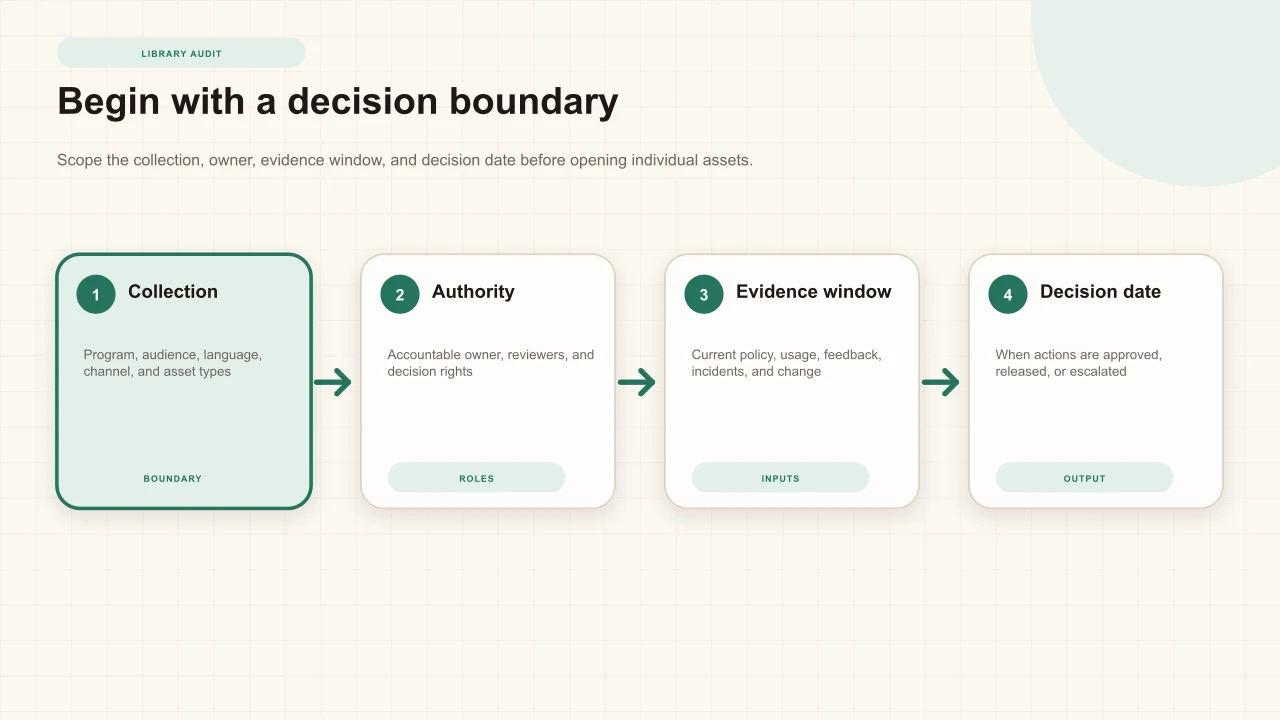
Define the audit decision
State what the audit must enable. A compliance team may need to confirm that every assigned lesson reflects the current procedure. A learning team may need to reduce duplicates before a platform migration. A product team may need to refresh customer education after a major release. These are different decisions and require different evidence, reviewers, and deadlines.
Write the decision in operational language: “By 30 September, the program owner will approve which onboarding videos remain, which receive a scoped update, which merge into one supported route, and which are removed from assignment.” Name who has authority, which conditions can block retention, and how urgent defects are handled before the audit ends.
Set a useful scope
Bound the work by program, audience, language, delivery channel, content type, owner, or risk tier. Include published assets and the places learners actually encounter them: public links, embedded pages, LMS modules, assignments, playlists, knowledge bases, and facilitator materials. A project that exists in the editor but is not published creates a different operational risk from a lesson reused across fifty courses.
Define an evidence window. Record the current authoritative sources, material changes since the last review, use and response evidence for a meaningful period, learner and support feedback, incidents, accessibility reports, and known migrations. The W3C accessibility planning guidancerecommends reviewing the environment and content, assigning responsibility, and building checks through the lifecycle rather than treating review as a one-time event.
Build a decision-ready inventory
Start with the smallest register that can support the decision. Give every asset a stable identifier, title, purpose, audience, accountable owner, subject reviewer, risk tier, source, publication route, last and next review, status, and replacement relationship. Add interaction count and types, captions and transcript state, language, access mode, embed or LMS placements, data use, and critical external dependencies.
Keep evidence fields interpretable. “42 responses” is incomplete without the question, time window, response denominator, and configuration. “No use” is incomplete without knowing whether the link was assigned. “Reviewed” is incomplete without the reviewer, source, learner route tested, findings, and decision. The US Web Design System's Digital.gov content management guidanceemphasizes regular evaluation for accuracy, relevance, quality, and decisions to refresh, repurpose, or remove.
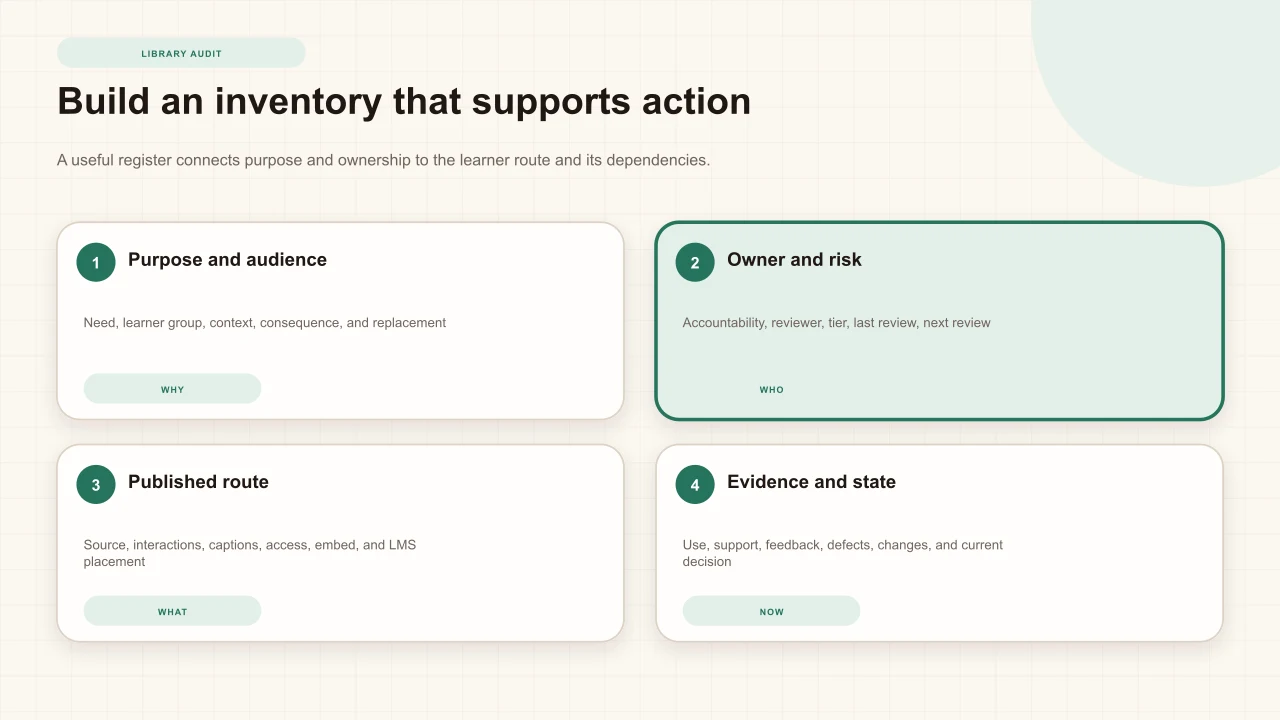
Asset list
Customer service video, created 2024, 96 views—insufficient to decide whether it is current, needed, supported, or safely delivered.
Audit record
Purpose, audience, owner, source version, risk, published routes, response window, reported issues, decision, action owner, and next review.
Prioritize by risk and uncertainty
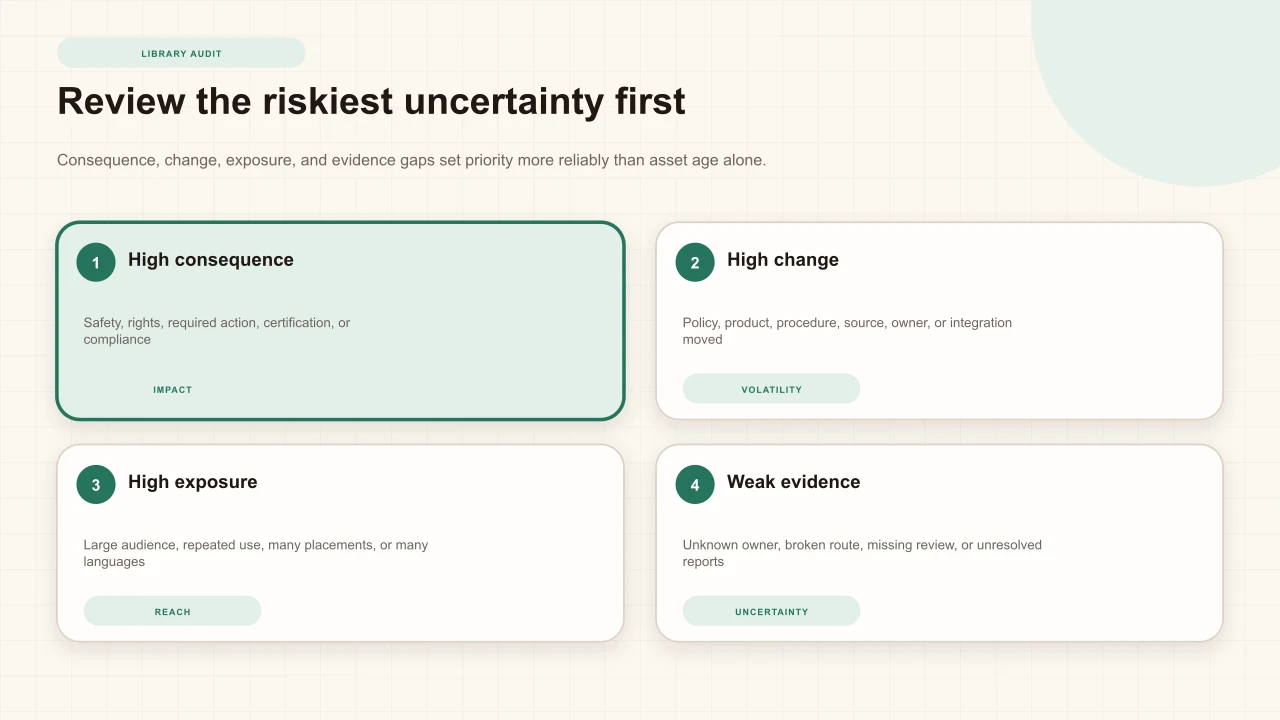
Do not sort only by age. A five-year-old stable orientation video may remain accurate, while a six-month-old safety lesson may be wrong after a procedure change. Prioritize consequence, volatility, exposure, and uncertainty. High-consequence content affects safety, rights, regulated actions, certification, or critical performance. High-volatility content depends on changing products, policy, law, personnel, interfaces, or vendors.
Exposure includes learner volume, repeat use, number of placements, languages, and reuse across programs. Uncertainty includes missing owners, unknown sources, unresolved reports, incomplete review records, inaccessible routes, and unclear replacement status. Use a simple rubric to order work, then allow qualified owners to override it with a recorded reason. A number should support judgment, not conceal it.
Review accuracy and continuing need
Ask two separate questions: is the lesson accurate, and does the need still exist? Verify facts, procedure, terminology, examples, screenshots, answer keys, links, contacts, and policy claims against current authoritative sources. Record the source version and reviewer. Then confirm that the intended audience still performs the task, that the lesson occupies a useful place in the journey, and that a newer asset has not replaced it.
The UK Government's content maintenance guidancecalls for setting review dates and creating new editions when content changes. Its transition guidancealso recommends combining analytics, user research, and service insight to identify high-impact, outdated, and duplicative content. Apply that combination here: evidence of use does not certify accuracy, and accuracy alone does not establish continuing need.
Test the published learner path
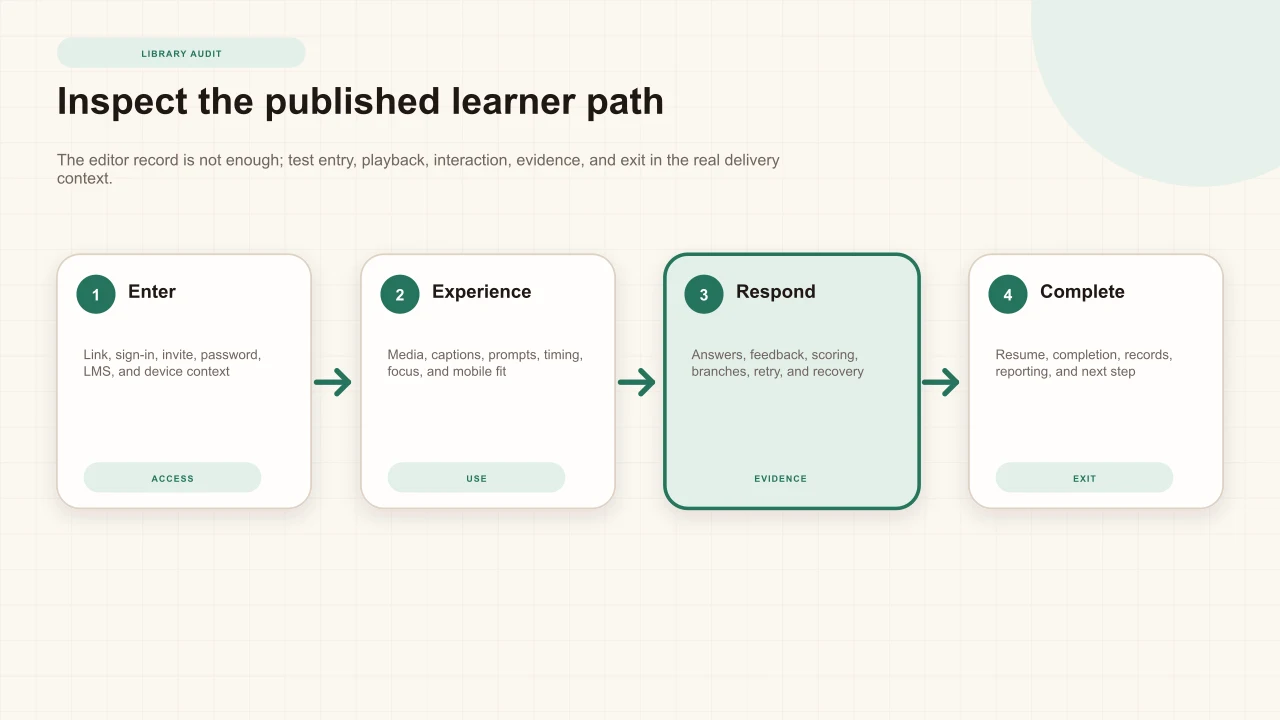
Open the route a learner receives, not only the editor preview. Test the link, assignment, embed, LMS context, sign-in or invitation, password, allowed domain, and device. Start from the expected entry point, complete the media and every interaction, follow branches, inspect feedback, retry or resume when supported, and verify the ending. Record browser, viewport, input method, identity state, and publication route for reproducibility.
Test a representative phone and desktop width, keyboard-only operation, captions, focus, scrolling, and zoom. Include a slower connection or media start when it matters. A prompt can be technically present yet cover the only visual evidence needed to answer. A branch can work in preview yet fail through an old embed. The learner-path check is where dependencies become visible.
Use the complete interactive video quality checklist
Review purpose, pacing, interaction choice, feedback, mobile behavior, accessibility, and published playback together.
Inspect interactions and evidence
For each prompt, confirm its purpose, timestamp, wording, response type, options, answer, feedback, scoring, retry rule, skip behavior, and downstream branch. The source must provide enough evidence before the prompt appears. Wrong choices should be defensible misconceptions, not jokes. Free responses need a clear operational reason. Polls and ratings should not be interpreted as objective correctness when they collect opinion or confidence.
Submit representative answers and inspect the resulting evidence. Check that the displayed result matches the configured answer, the score changes as intended, completion still occurs, and review does not create another response. If a question changed, label the analytics window so old and new versions are not silently combined into one interpretation. Use the video-question analytics guide to distinguish distributions from explanations.
Review accessibility and mobile behavior
Confirm captions are accurate, synchronized, and complete; controls and interactions are reachable and operable by keyboard; focus is visible and returns predictably; labels describe purpose; contrast is adequate; pointer targets remain usable; and content survives the maintained phone-player size without clipping or changing meaning. Test with zoom and, where relevant, assistive technology used by the intended audience.
Do not reduce the audit to an automated score. W3C's accessibility evaluation guidancedistinguishes initial review, conformance evaluation, and continuing monitoring. Automated checks find some conditions; human inspection and task completion reveal timing, language, focus, context, and interaction problems. The practical accessibility guide provides a wider review sequence.
Check access, data, and dependencies
Verify that the access setting matches the current audience and risk. Remove unnecessary identity requirements; confirm invitation and allowlist owners; test passwords and restricted embed domains; and inspect whether old links expose content beyond the intended context. Record what learner and response data is collected, why it is needed, who can access it, how long it is retained, and which policy or notice applies.
Test every external dependency: YouTube embeddability and captions, uploaded media, links, forms, attachments, domains, LMS modules, authentication, integrations, and certificates. Assign an owner and failure response for critical dependencies. The audit identifies current behavior; it does not replace privacy, security, records, accessibility, legal, or policy review by qualified roles.
Use analytics without mistaking use for value
Analytics can help target inspection. A falling completion rate may point to access, length, pacing, interaction, or context. A dominant wrong option may justify reviewing the item and surrounding explanation. A low-use asset may be undiscoverable, narrowly assigned, seasonal, or unnecessary. Product analytics describe recorded behavior under the current configuration; they do not establish accuracy, accessibility, continuing need, learner motivation, transfer, or causal impact.
Define the time window and denominator, separate anonymous from identified evidence when that distinction matters, note content changes, and compare like delivery contexts. The companion guides explain how to read completion rate and watch-activity heatmaps without turning one signal into a verdict.
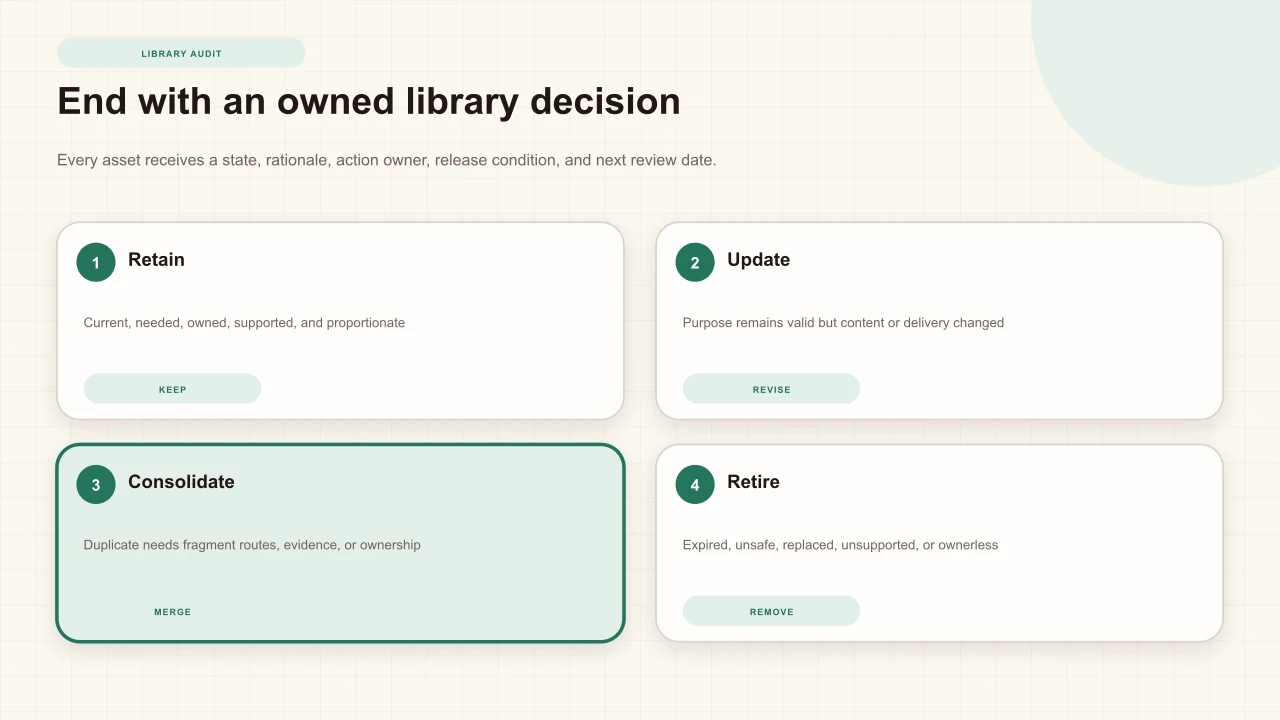
Decide: retain, update, consolidate, or retire
Retain when the need remains, content is accurate, the learner path works, ownership and support are clear, and the ongoing burden is proportionate. Update when the need remains but meaning, source, interaction, access, dependency, or delivery changed. Consolidate when separate assets serve substantially the same need and divide authority, support, learner routes, or evidence. Retire when the need ended, a supported replacement exists, the asset is unsafe or inaccurate, dependencies are no longer supportable, or no accountable owner will accept it.
Every decision needs a rationale, approver, action owner, release or removal condition, affected routes, communication plan, records treatment, and next date. “No change” is still a retain decision. “Archive” is not enough if an LMS still assigns the old embed. Digital.gov's content lifecycle guidanceexplicitly connects audits with updating, consolidating, and retiring content; the operational work is making those states real across every route.
Plan changes and validate release
Group related changes, but classify impact before editing. A wording change can alter the correct answer; a new source cut can move every timestamp; a caption replacement can affect transcript-derived questions; an access change can invalidate an LMS route. Define the review needed for meaning, accessibility, data, integrations, scoring, and records. Preserve a change note and identify which evidence belongs to the previous version.
Re-run the published learner path after release. Confirm the intended version is live, every affected placement resolves, mobile and keyboard operation remain coherent, responses are recorded as expected, and old routes are redirected or withdrawn. For a larger change, use a bounded interactive-video pilot before broad rollout. For investment decisions, connect the maintenance workload to the complete cost and value model rather than treating authoring as the only cost.
Run a sustainable audit cadence
Maintain the register
Capture owners, routes, dependencies, status, and next review as part of ordinary publishing and change work.
Triage continuous signals
Route source changes, support reports, accessibility issues, incidents, and dependency failures to the accountable owner.
Review by risk
Audit high-consequence and high-volatility collections first, then work through the planned cadence.
Decide in batches
Approve retain, update, consolidate, and retire states with actions, dates, and responsible roles.
Validate the release
Test the changed or withdrawn content through every material published learner route.
Review the process
Track overdue decisions, recurring defects, owner gaps, and effort so the next audit becomes smaller and more reliable.
W3C's sustaining accessibility guidanceemphasizes monitoring, tracking changes in standards and technology, incorporating feedback, and repeating evaluation. Use the same feedback loop for content accuracy, learner experience, dependencies, and governance. The goal is not a heroic annual cleanup. It is a library whose ownership makes major cleanup increasingly unnecessary.
Turn audit findings into a bounded decision
Present need, evidence, unknowns, operating conditions, and a clear request without inventing certainty.
Interakly product boundaries
Interakly can provide current project and publication state, access configuration, interactive video and image authoring, response records, scores, completion, question distributions, and watch-activity evidence where those features are configured and recorded. Uploaded video and YouTube are not interchangeable: uploaded media supports spatial and source-controlled workflows that a YouTube embed cannot. Audit the capability actually used by each asset.
Interakly does not determine whether content is legally compliant, factually authoritative, accessible in every context, required for records, safe to retire, or causally effective. It does not automatically discover every external placement or assign accountable owners. Those judgments and inventory controls remain organizational responsibilities. Use product evidence as input to qualified review, not as an automated retirement score.
Sources and further reading
- W3C WAI: Planning and Managing Web Accessibility
- W3C WAI: Plan
- W3C WAI: Reviewing and Evaluating
- W3C WAI: Sustain
- GOV.UK: Content maintenance
- GOV.UK: Transition guidance for agencies
- Digital.gov: Crafting quality content throughout its lifecycle
- Digital.gov: Manage content
FAQ
How often should an interactive video library be audited?
Use risk-based intervals plus immediate change triggers. High-consequence, rapidly changing, widely reused, or dependency-heavy lessons need shorter reviews. Stable low-risk content can use a longer cadence, but every asset still needs an owner, a next review date, and a route for reported defects.
What should an interactive video audit include?
Include purpose, audience, ownership, accuracy, source media, captions, interactions, answers, feedback, scoring, branches, access, embeds, LMS placements, mobile and keyboard use, data collection, learner support, analytics context, dependencies, and the complete published learner path.
Should low-use interactive videos be retired?
Not automatically. Low use can indicate weak discovery, a narrow but important audience, seasonal need, or a critical procedure used rarely. Review continuing need, consequence, alternative coverage, placement, owner, and support cost before deciding.
What is the difference between updating and consolidating content?
Update when one asset still serves a valid need but some content or delivery conditions changed. Consolidate when multiple assets serve substantially the same need and duplicate routes, evidence, support, or ownership. Consolidation requires a migration plan for links, embeds, records, and learner context.
How do you retire an interactive video safely?
Confirm the need has ended or has a supported replacement, identify every published route, preserve required records, communicate the change, update links and embeds, prevent new assignment, monitor for missed dependencies, and record the decision and responsible owner.
Can Interakly automatically decide which content to retire?
No. Interakly can provide current project, publication, response, completion, score, and question evidence. The organization must determine continuing need, accuracy, risk, ownership, legal and records duties, replacement coverage, and the final retain, update, consolidate, or retire decision.
Refresh the library by decision, not by appearance
Start with one bounded collection. Inventory its real learner routes, inspect the highest-risk uncertainty, and give every asset an owned next state.
Explore corporate training